Best 360 Degree Video Cameras for Rich, Immersive Footage
If you’re searching for 360 degree video capture, you want devices that deliver seamless panoramic coverage, stable footage, and easy post-processing. This guide highlights five top options suited for creators, remote teams, and enthusiasts who want true 360 coverage. Each pick is explained for who it’s best for, why it stands out, and any notable limits to consider.
| Product | Best For | Why It Stands Out |
|---|---|---|
| Insta360 X3 | Action enthusiasts and vloggers | 5.7K 360 with AI reframing and FlowState stabilization |
| Owl Labs Meeting Owl 3 | Hybrid meetings and remote collaboration | 360° video with 18 ft mic pickup and AI speaker focus |
| TOUCAN 360‑Degree Conference Camera | Small offices and home offices | 1080p HD 360° with AI tracking and multiple mics |
| Meeting Owl 4+ | Large rooms and Teams/Zoom setups | 4K 360° video with intelligent focus and easy deployment |
| AKASO 360 Action Camera Motorcycle Combo | Adventurers and riders | 5.7K 360 with horizon lock and AI tracking |
Insta360 X3-360 Action Camera

The Insta360 X3 combines 5.7K 360 capture with the capabilities of a traditional 4K action camera. It supports 360 Active HDR video and offers post-capture reframing in the AI-powered Insta360 app. This makes it ideal for riders, skiers, and vloggers who want flexible editing after the fact. Best for creators who want high-resolution 360 footage plus quick, AI-assisted editing workflows.
Best for: Action-focused creators who value deep post-processing options. Limitation: The 5.7K resolution may require more processing power and storage during editing.
Owl Labs Meeting Owl 3

The Meeting Owl 3 delivers 360° video in 1080p HD with 360° audio up to 18 feet. It uses Owl Intelligence to automatically focus on the active speaker and provides plug-and-play deployment. It is well-suited for small to mid-sized hybrid meetings, especially where simple setup and reliable speaker tracking matter most.
Best for: Hybrid teams needing automatic speaker focus and easy deployment. Limitation: Video resolution is 1080p, which may be lower than newer 4K systems in larger rooms.
TOUCAN 360-Degree Video Conference Camera

TOUCAN offers a 360° field and 1080p HD imagery with AI tracking and multiple mics for clear speaker pickup. Its plug-and-play setup makes it convenient for quick meetings in offices or home offices. This option is strong for teams seeking a balance between broad room coverage and straightforward operation.
Best for: Home offices or small meeting rooms needing reliable 360° capture and easy setup. Limitation: Video resolution is 1080p, which may not satisfy users requiring higher detail in larger rooms.
Meeting Owl 4+

The Meeting Owl 4+ brings 360° 4K video and a familiar Owl Intelligence System that focuses on in-room speakers for remote participants. It emphasizes ease of setup, bulk device management, and compatibility with common conferencing platforms. It’s well-suited for larger conference rooms and teams that need premium video and automatic framing.
Best for: Medium to large conference rooms with Teams/Zoom usage and a need for 4K video. Limitation: Higher data requirements and potential cost considerations compared to 1080p options.
AKASO 360 Action Camera Motorcycle Combo
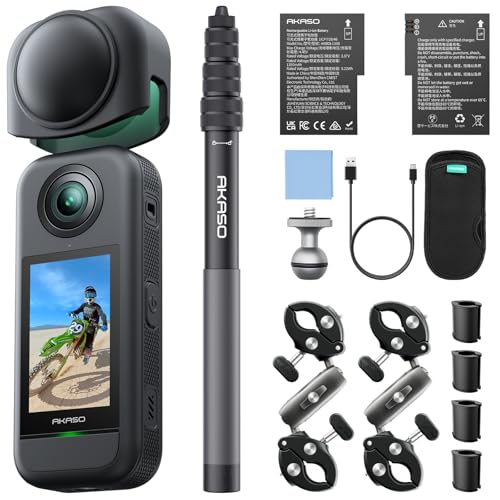
The AKASO 360 action camera offers 5.7K 360° video with ½” 48MP sensors, 360° horizon lock, and AI tracking. The package includes accessories like an invisible selfie stick and 360° horizon locking for stable aerial or ground footage. Choose this if you want a rugged, self-contained 360 setup for adventurous riding or travel videos.
Best for: Adventure enthusiasts and riders needing stable 360 footage on the move. Limitation: Some users may prefer higher-than-HD post-processing capabilities in demanding edits.
Buying Guide
- What will you primarily shoot? Action, meetings, or home/office use? This determines sensor quality, framing features, and mic arrays.
- Resolution vs. stabilization. Higher resolutions (5.7K) deliver crisper footage but demand more storage and processing power.
- Tracking and framing. AI tracking helps maintain the subject in frame, but check for success in your typical environment.
- Room size and audio needs. For conference use, mic pickup range and audio clarity are crucial; for action, stabilization matters most.
- Portability and setup. Plug-and-play devices save time but may sacrifice some advanced features of higher-end models.
- Compatibility with platforms. Ensure the device works with your preferred conferencing tools or editing apps.
FAQ
- What is 360 degree video good for? It captures a full panoramic scene, enabling interactive viewing and flexible post-editing angles.
- Do 360 cameras require special software? Many include AI editing apps that help reframe or stabilize footage after capture.
- Is 1080p sufficient for meetings? For basic conference rooms, 1080p is usually adequate, but larger rooms benefit from 4K options.
- Can I use a 360 camera with Zoom or Teams? Yes, most listed devices support common video conferencing platforms with plug-and-play setups.
- What about stabilization? Devices like the Insta360 X3 and AKASO 360 offer advanced stabilization to reduce shakiness in action footage.
- Are 360 cameras heavy on storage? Yes—higher resolutions require more storage; plan for ample SD card space or internal storage.