Best Cameras for Elderly Care: No-WiFi Options and Clear in-Home Monitoring
Answering the need for simple, private, and reliable in-home monitoring, these cameras are designed for elderly care without requiring constant internet access. They’re best for caregivers who want immediate, local control and clear two-way communication with a loved one. Ideal buyers include families managing dementia care, seniors living independently with frequent check-ins, and caregivers seeking discreet, low-hassle solutions that prioritize privacy and ease of use. The following picks emphasize no-WiFi setups, reliable local connections, and intuitive buttons for quick alerts.
| Product | Best For | Key Benefit |
|---|---|---|
| JEMXITG Elderly Monitor | Seniors needing private, offline monitoring | All-in-One with SOS, medication reminders, no WiFi |
| Smart Caregiver Video Monitor | Caregivers on the move | Rechargeable, no WiFi, secure connection |
| Zaguoroo Elderly Monitor | Room-to-room check-ins | PTZ, VOX, no WiFi |
| CallToU Elderly Monitor | Privacy-focused households | 2.4GHz FHSS, no internet, private monitor |
| Rocktone Security Camera | Indoor/outdoor versatility | Color night vision, dual-band WiFi |
JEMXITG Elderly Monitor With Camera
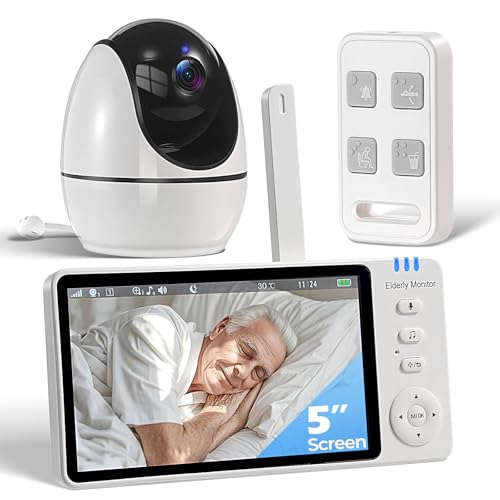
Best for: Seniors needing private, local monitoring with clear two-way talk. Why selected: It operates without WiFi, preserving privacy while offering SOS, medication reminders, temperature monitoring, infrared night vision, and VOX. The 3500mAh battery reduces daily charging needs, keeping caregivers powered through busy days.
Limitations: No WiFi means some cloud-based features or remote access are unavailable. The device relies on local operation and caregiver access through the dedicated remote.
Smart Caregiver Video Monitor
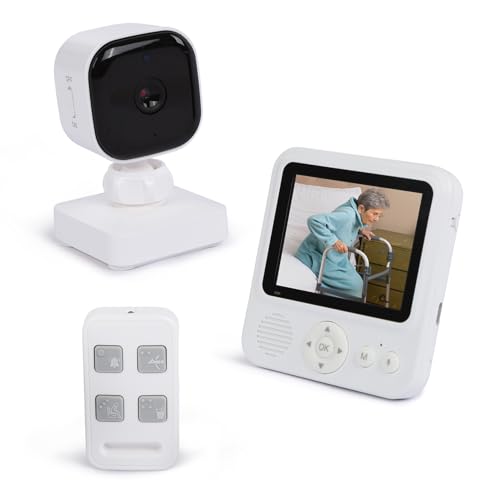
Best for: Caregivers who roam the house and need a rechargeable, no-WiFi solution. Why selected: Provides a secure, interference-free connection, infrared night vision, and a rechargeable camera with a compact USB-C powered monitor. Five call buttons support quick, distinct alerts for different needs.
Caution: The system relies on a direct, no-WiFi connection; long-range capabilities depend on home layout and interference.
Elderly Monitor With Camera And Audio

Best for: Those needing a two-way talk system with immediate VOX-activated screen. Why selected: Includes two-way audio, night vision, temperature monitoring, and no-WiFi design. The dedicated call button and ergonomic remote support visually impaired users.
Limitation: VOX may wake the screen during sleep; disable VOX if continuous display is preferred.
INFIYA 2K Indoor Camera (K7 2P)

Best for: Homes needing high-resolution indoor coverage with motion tracking. Why selected: 2K resolution with 360° PTZ and intelligent tracking helps monitor wide spaces and follow movement, plus two-way talk and a one-tap call for easy communication with seniors.
Caution: Requires 2.4GHz WiFi; not battery-powered, so continuous power is required.
VSMAHOME 2K Home Security Cameras

Best for: Households needing 2K resolution with indoor/outdoor versatility. Why selected: Full-color night vision, 1080P clarity, and dual-band WiFi reduce interference for steady monitoring. The cameras support cloud or memory card storage and can be used for elderly, baby, or pet monitoring.
Limitation: WiFi is required for cloud storage, and non-cloud options depend on local memory cards.
Buying Guide: Choosing The Right Elderly Care Camera
What should I consider before buying an elderly care camera?
- No-WiFi versus WiFi: Do you need private, local monitoring with no internet exposure, or is cloud access important for remote caregivers?
- Two-Way Communication: Is clear, reliable audio necessary for reassuring daily checks?
- Power and Mobility: Do you prefer rechargeable units that move around the home or fixed cameras with plug-in power?
- Night Vision and Lighting: Are infrared or color night vision essential for nighttime checks?
- Alerts and Accessibility: Do you need one-button SOS, medication reminders, or accessible remote interfaces?
- User Capability: Is the system easy for visually impaired seniors to operate, with tactile controls and simple remotes?
How do I compare top products side-by-side?
- Privacy: No-WiFi devices offer stronger local privacy; weigh this against remote monitoring needs.
- Range and Placement: PTZ and desk- or belt-clipped monitors affect where you can place cameras for best coverage.
- Battery Life: Rechargeable components reduce charging frequency but ensure you have charging options at hand.
- Alert Customization: Distinct alarms (SOS, Help, Toilet, Fall, Water) help caregivers prioritize responses.
What’s a quick setup tip for better performance?
- Keep devices within line-of-sight or near common living areas to ensure reliable audio and video transmission, especially for no-WiFi models.
FAQ
- Q: Do these devices require technical expertise to install? A: Most are designed for straightforward setup with minimal steps; refer to product guides for specifics.
- Q: Can seniors operate these cameras independently? A: Many include tactile buttons, large remotes, and VOX-enabled screens to simplify use.
- Q: Are alerts customizable? A: Yes, most models offer distinct alerts for SOS, falls, or daily check-ins.
- Q: Is cloud storage necessary for all features? A: No; several options function fully offline or with optional local memory storage.
- Q: Can these devices help with dementia care? A: They provide timely check-ins and emergency alerts, which can support daily routines and safety.
- Q: Do these work without internet? A: Some models run without WiFi; others may require it for certain features.