Best Cameras for Online Teaching: Clear Visuals for Remote Learning
If you’re teaching online, you need a camera that delivers sharp images, easy setup, and reliable performance across video platforms. This guide highlights five cameras that excel for remote teaching, demonstrations, and classroom-style lessons. Each pick targets different teaching needs—from document cameras for showing worksheets and experiments to versatile webcams for live lectures. The buyer is guided to the best option by scenario: primary classroom demonstrations, portable setup, or high-fidelity video with built-in audio enhancements.
Summary of chosen products
| Product | Best For | Key Benefit |
|---|---|---|
| IPEVO V4K | Document demonstrations, live demos | Ultra High Definition 8MP with fast focus |
| Gawervan Document Camera | Multi-angle visuals, classroom demos | 360° lens, 1080p with flexible mounting |
| AIKOR USB Document Camera | Portable teaching on the go | 2MP 3-in-1 with manual focus and foldable design |
| JOYUSING 8MP Camera | Reliable all-around teaching | Four modes, long battery life, broad compatibility |
| TreasLin 15MP Document Camera | Large demonstrations and multi-OS setups | 4K capability and wide coverage area |
IPEVO V4K Ultra HD Document Camera

Best for: Teachers needing high-resolution live demos and quick focus on layered materials. The 8MP sensor captures up to 3264 x 2448, with a Sony CMOS image sensor for improved color and reduced noise in dim rooms. Suitable for science demonstrations, art projects, and document showcases. It streams up to 30 fps at full HD and 15 fps at higher resolutions for smoother live sessions.
Why selected: The combination of ultra-high resolution, fast focusing, and reliable live streaming makes it ideal for structured lessons where materials change quickly. It’s a strong fit for classroom-style remote teaching and webinars.
Caution: Higher resolution streaming may require a modest computer and stable bandwidth to avoid frame drops during complex demonstrations.
Shcngqio 1080P HD Webcam with Microphone

Best for: Inexpensive, ready-to-use setups for simple online classes and meetings. 1080p clarity with a wide-angle lens helps cover desks, demonstrations, and group participation. Built-in noise-canceling microphone improves voice pickup in busy environments.
Why selected: Plug-and-play simplicity with automatic light correction supports entries into existing conferencing software. It’s a practical choice for budget-conscious teachers needing quick enrollment in Zoom or Meet sessions.
Caution: Does not offer the depth of field or macro-focused detail a dedicated document camera provides for small text or fine print.
Gawervan USB Document Camera

Best for: Teachers who need a versatile document camera with multi-angle capture. The 360° lens supports dynamic angles for worksheets, 3D objects, and demonstrations in 1080p at 30fps, making it adaptable for both in-class and remote learners.
Why selected: The 360-degree adjustability and compact USB design support quick setup, travel-friendly teaching, and simple integration with common video conferencing tools.
Caution: Manual focus is necessary in some lighting conditions; auto-focus features are not emphasized, so fine text may require adjustment.
AIKOR USB Document Camera for Teaching

Best for: Portable, lightweight teaching setups. The 2MP 3-in-1 webcam and visualizer design, with a 360-degree adjustable camera and foldable hose, supports flexible angles for demonstrations, labs, and live demos on the go.
Why selected: Its portability and simple hardware setup make it ideal for teachers who move between classrooms or teach in different locations. Manual focus helps ensure clear text under varied lighting.
Caution: Lower image resolution compared to higher-end document cameras; best used for basic demonstrations and 1080p classroom visuals.
JOYUSING Four Mode 8MP Document Camera

Best for: A flexible teaching camera with multiple modes and robust connectivity options. Four modes and an 8MP sensor enable high-detail demonstrations, while the long battery life supports mobile teaching sessions.
Why selected: The adjustable modes and broad device compatibility make it a strong all-around choice for online classrooms, remote learning, and web conferencing.
Caution: Battery life may vary with mode and brightness; ensure charging opportunities during longer sessions.
IPEVO V4K PRO Ultra HD Cameras
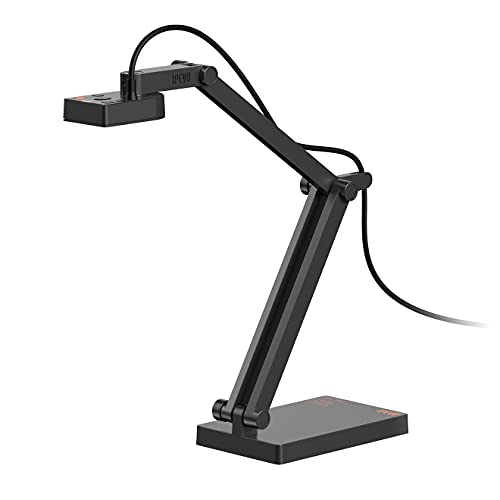
Best for: Classrooms and home studios needing AI-assisted mic with noise cancellation. This model maintains the IPEVO quality with an upgraded microphone and high-definition visuals for online teaching, live streaming, and WFH tasks.
Why selected: The combination of Sony 8MP sensing, HD video at 30 fps, and AI-enhanced mic provides clearer visuals and audio, improving engagement in remote lessons.
Caution: Higher data throughput may require a stable internet connection and compatible software to maximize AI mic features.
TreasLin 15MP Document Camera
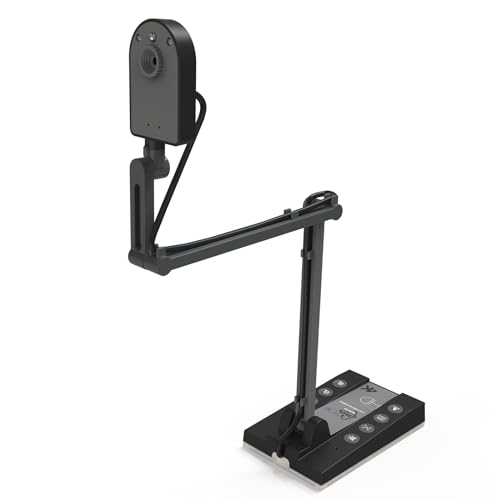
Best for: Large documents, art projects, and science demonstrations requiring a wide capture area. The 15MP sensor supports up to 4K at 15Hz or 1080p at 30Hz, with a large working area to cover A3-size material.
Why selected: Its wide coverage and multi-OS compatibility make it ideal for teachers who need to share big worksheets, posters, or lab setups during online sessions.
Caution: 4K at 15Hz may be less fluid for fast-moving demonstrations; consider lower resolutions for smoother motion capture.
Buying Guide: Key Considerations for Online Teaching Cameras
- Resolution and image quality: Choose higher megapixels for document work and close-ups; 8MP or higher helps with fine print and diagrams.
- Frame rate: 30 fps at HD provides smoother video; higher resolutions can reduce frame rate. Balance resolution with streaming stability.
- Auto vs manual focus: Manual focus is useful in variable lighting or close-up demonstrations; auto focus saves time in busy classes.
- Lighting and color accuracy: Look for sensors with good color reproduction and features like automatic light correction for dim rooms.
- Portability and setup: Foldable or compact designs help teachers who move between rooms or travel for classes.
- Connectivity: USB is common; some models offer HDMI or wireless modes. Ensure compatibility with teaching software (Zoom, Meet, Teams, etc.).
- Built-in microphone: For webcams with mics, consider noise cancellation to reduce ambient noise during lessons.
- Document sharing versus streaming: If you regularly share worksheets or 3D objects, a document camera with adjustable angles is preferable.
Frequently Asked Questions
- What type of camera is best for online teaching?
Document cameras excel for demonstrations and showing printed materials, while webcams are convenient for general lectures. A mix of both can cover most teaching scenarios.
- Do I need AI microphones for online classes?
AI microphones can reduce background noise and improve voice clarity, especially in busy rooms or shared spaces.
- Is 4K necessary for online teaching?
4K is beneficial for very detailed demonstrations but requires more bandwidth and processing power. Many teachers are satisfied with 1080p or 8MP document cameras.
- What should I look for in a budget teaching camera?
Prioritize reliable autofocus or manual focus, good lighting correction, and straightforward plugging into common conferencing platforms.
- Can these cameras work with Chromebooks?
Yes, several models listed offer Chromebook compatibility, but verify driver support and software compatibility for your exact Chromebook model.
- Do I need a separate microphone?
Some cameras include built-in mics, but a dedicated microphone can improve audio quality, especially in larger rooms or noisy environments.