Best Camera Stands for Photographing Documents in 2026
Are you looking for a reliable camera stand to capture documents clearly for archiving, teaching, or online selling? This guide highlights top stands designed to hold phones or small cameras above documents, with adjustable angles, sturdy bases, and helpful features. Best for educators, students, writers, and small-business owners who need overhead shots of pages, receipts, or art without shadows. The selected models balance ease of use, adaptability, and price to help you choose confidently.
| Product | Key Benefit | Best For |
|---|---|---|
| Copernicus Dewey Document Camera Stand | Universal device clamp, adjustable height | Classroom and distance learning |
| Cosmo Mini 700 Copy Stand (NIANWUDU) | Floating magnetic board, precise alignment | Large documents, art, and plates |
| Stand Company Cosmo Mini 700 Copy Stand | Stable, desk-friendly with big base | Product photography and documents |
| Kaiser RS 10 Copy Stand | Modular, wide component options | Professional adaptivity |
| Kaiser RS1 Copy Stand | Grid precision and sturdy column | Detailed document imaging |
Copernicus Dewey Document Camera Stand
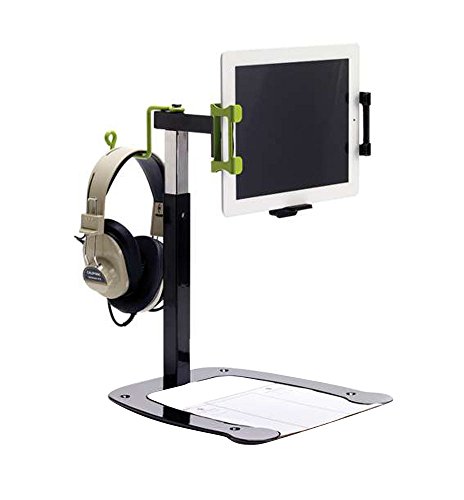
The Copernicus Dewey stands out for universal device compatibility and flexible viewing angles. Its spring-loaded clamp fits most iPads (except 12.9″ Pro) and various smartphones, with or without cases. The mounting head rotates 90 degrees and offers swivel and tilt for quick mode changes between document capture and standard camera use. Height is adjustable from about 12¾ inches to 23 inches, allowing clearance for different document sizes or small 3D objects. Best for classrooms and distance-learning setups where a single stand must handle multiple devices.
Who it’s for: educators and students needing a single, adaptable overhead setup. Why selected: its broad device compatibility and easy angle adjustments reduce setup time between activities. Limitation: the clamp excludes the largest iPad Pro models, so verify your device size before purchase.
Cosmo Mini 700 Copy Stand (NIANWUDU)
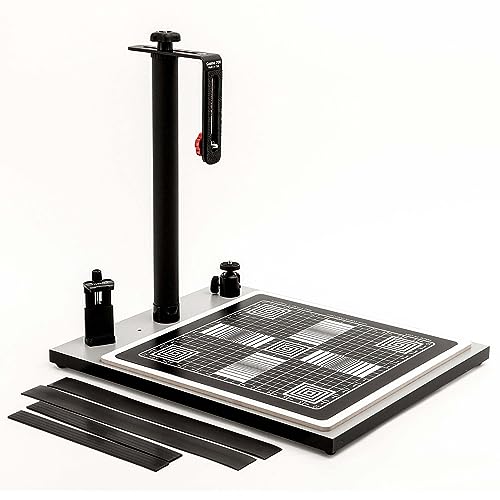
The Cosmo Mini 700 Copy Stand emphasizes precise overhead photography for large documents, photos, and even 3D objects. It accommodates most smartphones and supports DSLR cameras under 3 lbs. A notable feature is the large 15″ × 15″ Floating Magnetic Board (FMB) with ½-inch precision grid lines for accurate focusing and positioning. The baseboard measures 16″ × 19″ and includes center and side mounting holes for cameras and phones, respectively. Best for artists, food photographers, and online sellers who need a stable, space-efficient setup.
Who it’s for: users seeking a dedicated overhead stand with a precision grid and magnetic board. Why selected: the floating board and flexible mounting support enhance alignment accuracy. Limitation: this is not a professional-grade copy stand, so heavy professional workflows may require sturdier options.
Stand Company Cosmo Mini 700 Copy Stand

The Stand Company version mirrors the Cosmo Mini concept with a focus on overhead imaging for smartphones or compact cameras. It emphasizes a stable platform and adjustable height via an L-Bracket, giving users reliable control over framing. The desktop footprint of 16″ × 19″ × 17″ makes it a good fit for cluttered desks or small studios. Best for product photography, document imaging, and overhead video recording.
Who it’s for: small studios and desk-based shooters needing a robust, space-conscious stand. Why selected: its fixed desktop footprint and adjustable L-Bracket enhance control for precise shots. Limitation: the setup uses a compatible board and mounting method; verify your camera or phone compatibility with the included hardware.
Kaiser RS 10 Copy Stand with RTP Camera Arm

The Kaiser RS 10 Copy Stand is designed for professional users who require extensive configurability. It is fully modular, supporting a wide range of components and accessories. Base boards come in various sizes, with tall columns and adjustable camera arms to tailor setup for different workflows. Best for photographers and studios needing scalable, adaptable overhead capture. Limitation: modular systems can require more assembly time and planning to achieve the perfect configuration.
Kaiser RS1 Copy Stand with RA1 Camera Arm

The Kaiser RS1 Copy Stand emphasizes a non-reflective base board with precise grid patterns, forming a practical option for document imaging. It features an exceptionally stable column made from matte black anodized aluminum, with interchangeable 1/4″ and 3/8″ bushings and a camera adjustment tool. Best for users who value precise alignment and a rugged build. Limitation: may require additional accessories to reach full versatility in larger or more complex shoots.
Buying Guide
What to look for when choosing a camera stand for documents:
- Device compatibility: Ensure clamps or mounts fit your phone, tablet, or compact camera. Consider whether you need to accommodate cases or larger devices.
- Adjustability: Check maximum height, tilt, and swivel ranges. A wide range helps capture taller documents and varied lighting angles.
- Stability: Look for weighted bases, wide footprints, or magnetized boards to minimize shake on overhead shots.
- Workload and size: Match the stand’s capacity (weight limit) to your gear. Larger boards help with bigger documents or plates.
- Accessibility and setup time: Consider how easy it is to attach devices and switch between modes (document mode vs. standard photography).
- Accessory ecosystem: Some stands offer modular arms, ring lights, or magnetic boards—evaluate if those add value for your typical tasks.
FAQ
- What is the main advantage of an overhead document stand? – It enables top-down capture with consistent framing, improving readability and archival quality.
- Which stand is best for large documents? – Stands with bigger base boards and extendable arms, like the Cosmo Mini 700 family, provide more working space and alignment options.
- Do I need a ring light with a document stand? – A ring light helps reduce shadows and glare on glossy pages, especially in dim rooms.
- Are modular Kaiser stands worth it for beginners? – They offer great future-proofing if you anticipate expanding gear or changing workflows, but may require more setup effort.
- Can I use a smartphone with these stands for scanning documents? – Yes, several models support most smartphones and can function as quick scanning setups when paired with a camera or scanning app.
- What is a floating magnetic board, and why is it useful? – A floating magnetic board helps keep originals flat and precisely positioned, aiding consistent captures for repeated shots.