Best USB C or Lightning Camera Adapters to Connect Your iPhone
Looking to transfer photos and videos from cameras, SD cards, or endoscopes directly to an iPhone? This guide selects five top picks that work with iPhone models and iPad, offering reliable plug-and-play memory and camera connections. These options are ideal for photographers, hobbyists, DIY enthusiasts, and professionals who want fast, route-friendly data transfer without extra apps. Below you’ll find clear, comparison-friendly details to help you choose the right adapter for your workflow.
Summary table of selected products
| Product | Best For | Key Benefit | Limitations |
|---|---|---|---|
| Denlane SD Card Reader | Photographers needing dual iPhone/USB-C support | Dual interface with simple plug-and-play transfer | Interfaces cannot be used simultaneously |
| Elecshion [Dual-Lens] Endoscope | Technical inspections | Dual lenses and IP67 waterproofing | Requires careful cable handling for best angles |
| MTIQHS SD Card Reader USB C | iPhone 17/16/15 users | USB-C fast, broad compatibility | USB-C only, no Lightning support |
| Wahbite Lightning Camera Adapter | Apple device users needing charging pass-through | Charging while transferring; USB3.0 | Lightning-only, older iOS versions may vary |
| SZHAIYIJIN SD Card Reader | Dual-Slot SD/TF users | SD and Micro SD support in one reader | Requires iPhone/iPad compatibility with USB adapter |
Denlane SD Card Reader For iPhone And USB-C

Best for: Photographers and creators who need a versatile memory card reader with both Lightning and USB-C interfaces. This Denlane 5-in-1 adapter supports SD/TF memory cards and can connect to iPhones, iPads, Macs, and USB-C devices. It is ideal for quickly transferring camera memory to an iPhone for on-the-go sharing.
What to know: It offers dual connectors, but the two interfaces cannot be used at the same time. It’s Apple MFi certified and requires no apps, network access, or extra power. Use this when you want a straightforward, plug-and-play experience for mobile photo sharing.
Best use case: When you shoot with a camera and need fast, direct transfers to iPhone for editing or posting to social media, then move the data to other devices later.
Limitation: Do not expect simultaneous USB-C and Lightning operations; unplug one before using the other.
Elecshion Endoscope Camera With Light

Best for: DIY inspectors, plumbers, and technicians who need clear close-up views in tight spaces. The dual-lens setup enhances visibility, and the 1920×1440 HD resolution provides detailed imagery for problem solving in confined areas.
What to know: It features a semi-rigid 16.5-foot cable and IP67 waterproof probe, enabling underwater or damp area work. The dual-lens design allows switching angles quickly for comprehensive inspections.
Best use case: When you require inspection versatility in plumbing, HVAC, or automotive work and need reliable image clarity in dark spaces.
Caution: The length and semi-rigid nature require careful maneuvering to keep the target in view; ensure you maintain control to avoid snags.
MTIQHS iPhone SD Card Reader USB C

Best for: iPhone 17/16/15 users who need fast USB-C transfers to a Type-C computer or tablet. This USB-C reader supports high-speed data transfer and is built for quick, reliable media transfer to devices with USB-C.
What to know: It uses USB-C with a built-in chipset to ensure safe transfers and speeds up to about 60MB/s. It’s a compact, plug-and-play solution requiring no extra apps.
Best use case: When you want to move large photo or video files rapidly from a camera card to your iPhone or MacBook with minimal fuss.
Limitation: It is USB-C only, so users reliant on Lightning-only devices should choose a different option.
Wahbite Lightning to USB Camera Adapter
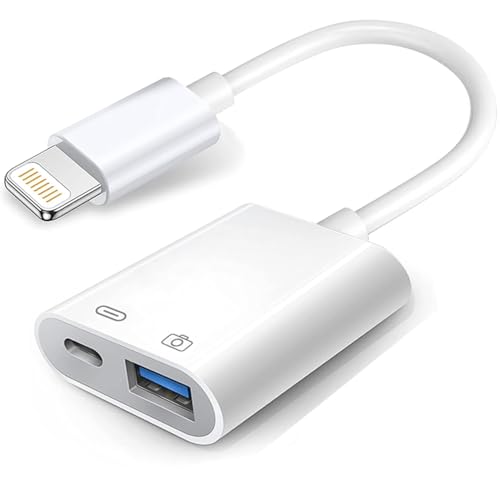
Best for: iPhone and iPad users who want a reliable Lightning-based connection with charging pass-through and USB 3.0 speed. This adapter is suitable for sharing photos or transferring files from cameras to devices while charging.
What to know: It supports USB 3.0 with speeds up to 5Gbps, plus USB 2.0 compatibility. It is widely compatible with many iOS devices and iPad models, and it provides plug-and-play operation without apps.
Best use case: When you need to keep your iPhone charged while you connect a camera, USB drive, keyboard, or other USB peripherals for quick data transfer or media viewing.
Limitation: Some older devices or iOS versions may respond differently; ensure your device supports USB OTG through this adapter before use.
SZHAIYIJIN SD Card Reader for iPhone

Best for: Photographers needing dual-card support on the go without apps. This reader is designed to import photos and videos directly from SD/TF cards to an iPhone or iPad.
What to know: It supports SD and TF cards and uses a Lightning interface. The package emphasizes a quick import process via the Photos app, with no app required.
Best use case: When you want a simple, no-fuss way to pull images from a camera’s memory card into your iPhone for editing or sharing.
Limitation: It does not support Wi-Fi SD memory cards, so plan to use standard SD/TF cards instead.
Untvie Lightning To USB 3.0 Camera Adapter

Best for: iPhone and iPad users needing a robust, MFi-certified USB camera adapter with charging and high-speed data transfer. This option is designed for broader device compatibility and reliable operation.
What to know: It is MFi certified and plug-and-play, with USB 3.0 compatibility and charging support. It’s positioned for users who want a longer-lasting solution for transferring JPEG/RAW photos and SD/HD video.
Best use case: When you rely on multiple devices in a creative setup and need a dependable, durable adapter that can connect keyboards, drives, and SD card readers in addition to cameras.
Limitation: It targets a wider device range; ensure the exact device compatibility for your iPhone model and iPad version before purchase.
Buying Guide
How to choose the right camera adapter for iPhone:
- Interface compatibility: If you use an iPhone with USB-C, favor USB-C readers; for older iPhone models, Lightning adapters are essential.
- Card support: Decide between SD/TF cards and dual-slot readers if you often swap between SD and microSD memory cards.
- Charging pass-through: If you need to charge while transferring data, select adapters with a charging port or USB-C/Lightning pass-through.
- Transfer speed: USB 3.0 readers generally offer faster transfers; USB-C readers may be faster on newer devices but check the supported speeds.
- App-free operation: All listed products emphasize plug-and-play, which keeps your workflow simple without extra apps.
- Durability and build: For fieldwork, choose models with robust connectors and reinforced joints to endure frequent plugging and unplugging.
FAQ
- Can I use these adapters with both iPhone and iPad?
Yes, most listed adapters are designed to work with iPhone and iPad models that support USB or Lightning connections. - Do any adapters require an app to function?
All listed options advertise plug-and-play with no required app; some devices may prompt a permission dialog on first use. - Is charging pass-through always necessary?
Not always; choose a model with pass-through if you regularly transfer while charging to avoid running the device down. - What should I do if transfer is slow?
Check the card type, file size, and device compatibility. Using a high-quality microSD card and ensuring the adapter is USB 3.0 compatible can improve speeds. - Are these adapters waterproof or rugged?
Some endoscope readers have IP ratings for rugged use; most card readers are not designed for water exposure and should be used in dry environments. - Will these work with Android devices?
Several adapters offer cross-platform compatibility, but verify the exact interface (Lightning vs USB-C) and device requirements for Android devices.