Best Facial-Recognition Webcams for Easy Logins and Clear Video
When selecting a camera with facial recognition, look for reliable Windows Hello integration, clear 1080p+ video, privacy features, and simple setup for quick password-free sign-in. This guide highlights five top options, each suited to different needs—from personal home offices to small meeting rooms. If you want fast Windows Hello access, high resolution, and solid privacy protections, one of these models can fit your setup.
| Product | Resolution | Windows Hello | Privacy | Best For |
|---|---|---|---|---|
| NexiGo HelloCam | 1080p | Yes | Automated privacy cover | Home office users prioritizing quick unlock |
| TOALLIN 2K QHD | 2K QHD (2592×1944) | Yes | Privacy shutter | Small teams needing sharper video |
| SynthMeet Windows Hello | 2K | Yes | Built-in mic and privacy | Professional video calls and meetings |
| TOALLIN 4K UHD | 4K | Yes | Privacy shutter | Live streaming and high-detail capture |
| CODi Allocco | 1080p | Yes | Low-light correction | Conferencing in varied lighting |
NexiGo HelloCam, 1080P Webcam with Windows Hello
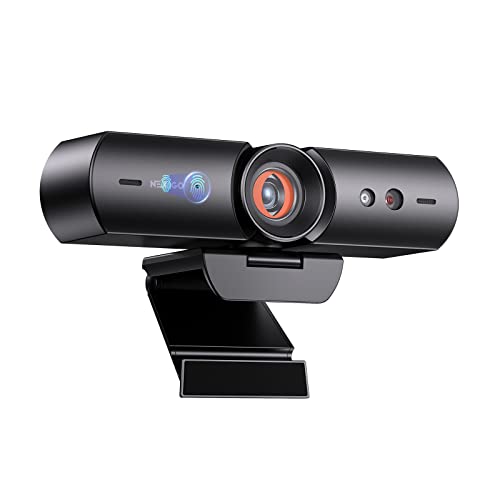
The NexiGo HelloCam integrates Windows Hello facial recognition for fast, password-free sign-in. It includes an automated privacy cover that opens during video calls and closes afterward, helping to protect privacy when not in use. The camera uses a full HD 1080p sensor and a fixed-focus 3.5mm lens optimized for distances roughly from 12 to 47 inches, making it suitable for desks, laptops, and small setups. Best for individuals who want quick access and a simple, private setup.
Best for: Solo professionals and remote workers who value instant Windows Hello login and a straightforward plug-and-play design. Limitations: The lens has fixed focus, which may be less adaptable for far-away or unusually angled setups.
TOALLIN 2K QHD Webcam with Windows Hello

This camera offers 2K QHD resolution and a dedicated infrared window for fast facial recognition with Windows Hello. It supports multiple facial profiles for login and uses a wide 84-degree FOV to capture meeting participants clearly. Best for small teams or users who want crisper video than 1080p and secure Windows Hello sign-in. Caution: Windows Hello setup may require driver adjustments for some systems.
SynthMeet Windows Hello Webcam

SynthMeet combines Windows Hello facial recognition with a 2K webcam sensor and a built-in noise-reducing microphone. The design emphasizes a balance of clear video and voice capture, ideal for professional video calls and team meetings. Best for: Professionals who need clear audio alongside facial login. Limitation: The feature set lists Windows Hello and noise reduction but does not specify newer framing controls or macro adjustments.
TOALLIN 4K UHD Webcam

This model brings 4K UHD video with Windows Hello facial recognition, a dedicated infrared camera for login, and fast autofocus. It’s designed for high-detail live streaming and meetings where image fidelity matters. Best for: Content creators and teams needing ultra-high-resolution video. Caution: 4K streaming can demand more bandwidth and processing power; ensure your system supports 4K output smoothly.
CODi Allocco HD 1080P with Windows Hello

CODi Allocco offers Windows Hello facial recognition with full HD 1080p recording at 30fps and automatic low-light correction to maintain clarity in varied environments. A built-in microphone complements video calls, and the privacy-friendly design helps protect your view when not in use. Best for: Meetings in dim or mixed lighting. Limitation: Some users may notice softer detail in very low light compared to 2K or 4K models.
Buying Guide
What should you consider when choosing a facial-recognition webcam?
- Windows Hello compatibility: Ensure your operating system and build support facial recognition with a dedicated IR camera.
- Resolution and frame rate: Higher resolutions (2K/4K) provide crisper detail, while 1080p is usually sufficient for everyday calls; 30fps is standard for smooth motion.
- Privacy features: Look for a physical privacy shutter or automatic cover to protect your privacy when not in use.
- Field of view: Wider FOV helps include multiple participants or capture your entire desk setup; narrow FOV offers more focused framing.
- Microphone quality: A built-in noise-reducing mic helps reduce background noise during calls.
- Low-light performance: If your environment is dim, choose models with automatic low-light correction or better sensors.
- Setup complexity: Some models require driver updates or Windows Hello configuration; prefer plug-and-play options if you want a quicker setup.
- System requirements: 4K models need more bandwidth and GPU/CPU resources; verify your computer’s capability before purchasing.
FAQ
- What is Windows Hello facial recognition on webcams?
It is a feature that uses IR sensors to securely authenticate your identity to log in to Windows without a password. - Do all Windows laptops support Windows Hello with external cameras?
Most modern Windows systems support Windows Hello with compatible external cameras, but driver support may vary by model and OS version. - Is 4K webcam worth it for video calls?
4K offers higher detail, which is beneficial for large displays or professional content, but it requires more bandwidth and processing power. - Can privacy shutters affect camera performance?
Privacy shutters do not affect performance; they simply block light from reaching the sensor when closed. - Do these cameras work with other video conferencing apps?
Yes, they function with common apps, but Windows Hello integration is typically most seamless on Windows platforms. - What should I consider if I have a low-light office?
Look for cameras with built-in low-light correction or infrared facial recognition for reliable login and clear video.