Best Cheap Camera With Mic Input for Clear Video Meetings
Whether you’re streaming, video conferencing, or creating online content, a budget webcam with a built‑in mic can dramatically simplify setup. This guide highlights five affordable options that balance image quality, built‑in audio, and ease of use for everyday buyers. Each pick is suited for remote workers, students, educators, and streamers who want reliable performance without a steep price tag.
Summary table of chosen products:
| Product | Key Benefit | Best For |
|---|---|---|
| TRAUSI 1080P Webcam | Automatic light correction and noise-canceling mic | Remote workers in mixed lighting |
| EMEET C960 1080P Webcam | Dual mics and fixed focus for steady calls | Small teams and students |
| Logitech C270 Webcam | 720p quality with light correction and noise-reducing mic | Budget-conscious users on basic platforms |
| AIRHUG 3 in 1 1080P Webcam | Built‑in mic and speaker for small meetings | Online classes and compact conference rooms |
| COMICA CVM-V30 LITE | On-camera shotgun mic for improved audio | Users who want better external audio with any camera |
TRAUSI 1080P HD Webcam

The TRAUSI 1080P HD Webcam blends reliable image quality with a built‑in microphone, making it a practical all‑in‑one solution for home offices and students. It features automatic light correction to adapt to varying lighting conditions, so you appear clear during video calls, even in dim rooms or outdoors. The built‑in noise‑reducing microphone helps your voice come through more distinctly in shared or noisy spaces. With a wide 1080p frame rate at 30 fps and a wide‑angle lens, it’s suitable for video calls, livestreams, and online teaching. This model is best for buyers who want straightforward setup and dependable everyday performance.
Best for: Remote workers who often juggle mixed lighting and busy environments. It’s also a good pick for beginners who want a single plug‑and‑play device for Zoom, Skype, or Teams.
Limitations: Fixed focus may be less forgiving for very close shots; consider proper placement for sharp framing.
EMEET C960 1080P Webcam

The EMEET C960 offers full HD 1080p video with a pair of built‑in omnidirectional microphones for natural voice pickup. It uses a 5‑layer anti‑glare lens and fixed focus that stays within a practical range (11.8–118.1 inches), producing a steady image without the need for constant adjustments. A privacy cover adds peace of mind when the camera isn’t in use. This webcam is well suited for individuals who want clear video with reliable audio for meetings, online classes, and streaming, while avoiding frequent mic setup.
Best for: Small teams and students who need reliable audio capture without external mics, especially in semi‑shared living spaces. Choose this if you want a compact, plug‑and‑play solution with a straightforward default setup.
Caution: Fixed focus means close‑up framing can lose sharpness; ensure proper distance from the subject for best results.
Logitech C270 Webcam

The Logitech C270 provides dependable 720p video with auto light correction and a built‑in noise‑reducing microphone. It’s widely compatible with major video platforms and devices, including PCs, Macs, and tablets, and it supports a broad range of conferencing software. The compact design and budget price make it a practical choice for students and casual users who want a straightforward webcam for frequent video calls and light streaming.
Best for: Budget‑minded buyers who need a simple, reliable webcam for Zoom, Teams, or Skype on standard desktops or laptops. It’s also a solid option when size, ease of use, and compatibility are priorities.
Limitation: 720p resolution is lower than newer 1080p options, which may affect perceived detail on larger screens or high‑resolution displays.
AIRHUG 3 in 1 1080P Webcam

The AIRHUG 3 in 1 webcam provides 1080p video with an integrated microphone and a built‑in speaker, designed for small group meetings and online classes. It emphasizes clear audio capture up to 6 feet away and features auto white balance for more natural skin tones. The device targets users who want an all‑in‑one webcam to simplify setups in conference rooms or home offices where multiple participants are present.
Best for: Teachers, students, and professionals conducting small group video calls who need a built‑in speaker and microphone without extra devices. Choose this if you want a compact setup that handles both video and audio in one unit.
Limitation: The combination of camera, mic, and speaker in one unit can limit audio customization; consider separate mics if you need advanced audio control.
Acuvar Mini Shotgun Microphone
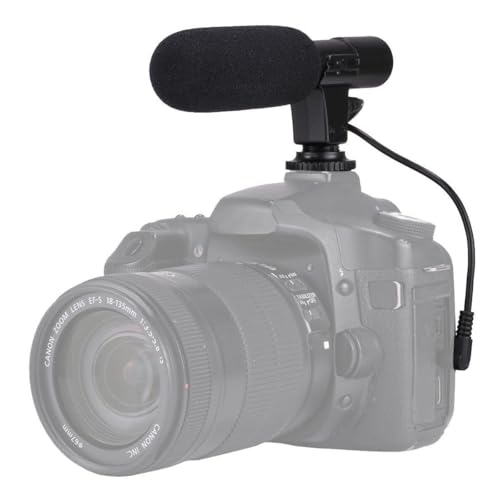
While not a camera, the Acuvar Mini Shotgun Microphone is a practical upgrade for anyone who already has a budget webcam and wants crisper audio. This compact, lightweight microphone plugs into a camera, camcorder, DSLR, or compatible smartphone via 3.5mm and positions sound closer to the source for clearer recordings. It’s a good complement when you choose a budget camera and need improved directional audio for vlogs or live streams.
Best for: Creators who want better on‑camera audio without a large investment in gear. Use it with any camera or phone that accepts a 3.5mm mic input to improve vocal clarity.
Limitation: External mics require separate setup, mounting hardware, and potential additional cables, which adds to the overall setup complexity.
Buying Guide: Key Questions and Comparisons
- What resolution do you need? If you frequently use high‑definition video calls, look for 1080p webcams. For casual use, 720p models can be sufficient and often cheaper.
- Is built‑in audio enough? If you work in noisy spaces, prioritize models with noise‑reducing mics or consider adding an external microphone for better clarity.
- What lighting conditions will you face? Cameras with automatic light correction help in dim rooms and bright windows alike, reducing the need for extra lighting.
- Do you need a privacy feature? Many affordable webcams include a physical privacy cover, which adds peace of mind when not recording.
- How important is form factor and setup? Plug‑and‑play USB cameras offer quick setup and broad compatibility; smaller desktops or laptops benefit from compact designs.
- Will you use the microphone for voice recording or just for calls? Integrated mics are convenient for calls, but an external mic can deliver superior sound for streaming and content creation.
FAQ
- Q: Do cheap webcams with mics work for professional video calls? A: Yes, they can handle standard video calls on popular platforms, especially with good lighting and a stable connection.
- Q: Is 1080p essential for a budget webcam? A: Not always; many users are satisfied with 720p, but 1080p provides crisper detail for larger screens or recordings.
- Q: Should I buy a separate microphone? A: If you need broadcast‑quality audio or work in noisy environments, a dedicated microphone often delivers better sound than a built‑in mic.
- Q: Do webcams protect privacy automatically? A: Many models include a physical privacy cover; ensure yours has one if you value this feature.
- Q: Can I use these cameras with multiple devices? A: Most plug‑and‑play webcams are compatible with Windows, macOS, and common video apps; check USB compatibility if you use tablets or newer laptops.