Best Cheap Cameras With WiFi for Home Security
Find affordable WiFi cameras that fit a tight budget without sacrificing essential features. This guide compares five budget-friendly options to help you pick the right one for your needs, whether you want a baby monitor, pet cam, or indoor security camera. Each pick is described with ideal users in mind and practical trade-offs to consider before buying.
Summary of chosen products:
- Tapo 1080P Indoor Wired Security Camera — Best for budget-friendly baby/pet monitoring with local storage.
- Wyze Cam OG Indoor/Outdoor — Best for versatile indoor/outdoor use with color night vision.
- 2K Dual-Band Indoor Camera by OZHGQ — Best for dual-band WiFi stability and higher resolution in a compact package.
- Cinnado Indoor-2K 360° Camera — Best for full-room coverage and multi-user access in a single buy.
- GlowPop 1080p Wireless Security Camera — Best for quick setup and two-way talk in a compact design.
Tapo 1080P Indoor Wired Security Camera

Best for: small homes or apartments needing a simple, wired setup with local storage. This model offers motion detection, instant push notifications, and 2-way audio with a built-in siren. Night vision reaches up to 30 feet, aiding visibility in dim rooms. It supports 2.4GHz Wi-Fi and is ideal for nursery or pet monitoring without ongoing cloud costs.
Why selected: It provides a straightforward, budget-friendly option for local storage or optional cloud storage without monthly fees. The combination of motion alerts, night vision, and 2-way audio makes it a practical all-around indoor camera for beginners.
Caution: Uses 2.4GHz Wi-Fi only; ensure your router supports this band in your space. Local storage may require compatible hardware or optional cloud if you want off-device backups.
Wyze Cam OG Indoor/Outdoor 1080p

Best for: users who want flexible placement with color night vision and indoor/outdoor use. The Wyze OG delivers 1080p streaming, color night vision, and a weather-resistant design suitable for porches or entryways when used outdoors. It supports instant motion and sound alerts and works well with popular smart assistants.
Why selected: The camera offers solid performance at a low price with robust app features, including customizable motion zones and easy integration with smart home ecosystems.
Caution: Outdoor use requires weather protection and, if used outdoors, may need a compatible power setup. 5G is not supported, so ensure your network compatibility before purchase.
2K Cameras for Home Security (OZHGQ) Dual-Band
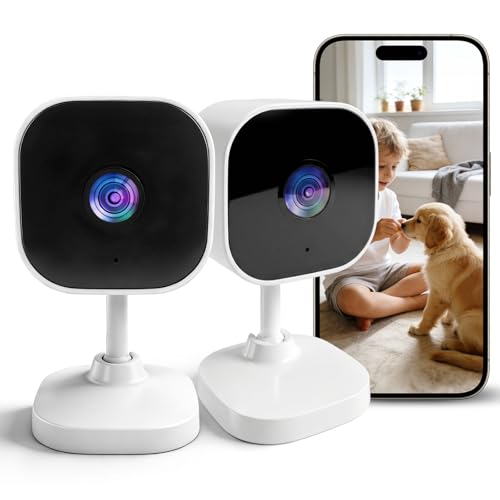
Best for: homes needing higher resolution and stable wireless performance across 2.4GHz and 5GHz bands. This indoor camera is suitable for monitoring living rooms, nurseries, or entryways where clearer details help identify faces and objects.
Why selected: The 3MP 2K resolution and dual-band WiFi offer crisper video with reduced buffering in larger spaces, making it a strong value among budget 2K options.
Caution: Requires a compatible network setup to utilize both 2.4G and 5G bands; check router compatibility and placement to avoid dead zones.
Cinnado Indoor-2K 360° Camera

Best for: households seeking complete room coverage with 360° viewing and two-way audio. The 2K resolution and remote pan/tilt enable monitoring of multiple zones from a single camera.
Why selected: The 360° capability minimizes blind spots, while the built-in mic and speaker facilitate quick communication with family or pets. It also supports 2K clarity for clearer motion details.
Caution: This is a wired indoor camera; it requires a constant power source and stable network for uninterrupted recording and notifications.
GlowPop 1080p Wireless Security Camera
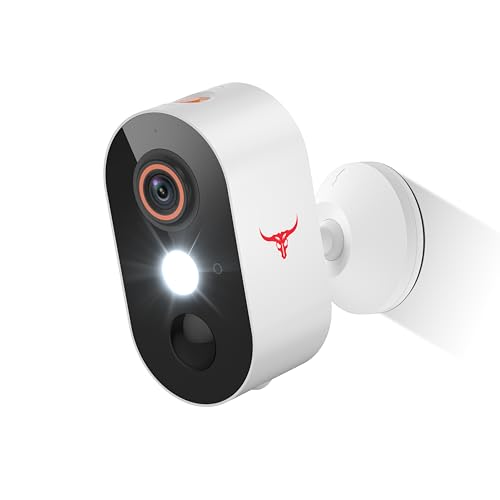
Best for: simple, quick setups with two-way talk and cloud storage. An ideal starter camera for apartment living or dorm rooms where fast installation matters and remote communication is useful.
Why selected: It emphasizes straightforward operation and reliable two-way talk, which helps in daily interactions with visitors or pets. Cloud storage adds convenience for new users who prefer off-device backups.
Caution: The device relies on cloud storage; consider privacy preferences and data usage when choosing cloud options.
Buying Guide
What should you consider when choosing a cheap WiFi camera?
- Video resolution: Look for 1080p as a baseline; 2K offers crisper detail in larger spaces but may require stronger bandwidth.
- WiFi compatibility: Dual-band (2.4G/5G) helps reduce buffering in busy networks; ensure your router supports the bands your camera uses.
- Storage options: Local storage with microSD or a subscription-free model is cost-effective; cloud storage adds convenience but may incur ongoing fees.
- Power and placement: Wired cameras avoid battery life concerns but require an outlet and cable management; wireless models offer easier placement but may depend on battery life.
- Motion and audio features: Motion detection, person detection, and two-way audio add practical value for monitoring people, pets, and deliveries.
- Night vision: IR or color night vision improves coverage in low light; consider distance and lighting conditions in monitoring areas.
- App and ecosystem: Ensure the camera works with your chosen smart home apps and voice assistants for seamless control.
How to choose by scenario
- Nursery or pet monitoring on a budget: Prioritize motion alerts, two-way audio, and local storage without ongoing fees (like Tapo model).
- Indoor/outdoor use on a budget: A weather-rated camera with good night vision and easy installation (such as Wyze OG) is practical.
- Home with large rooms or multi-zone monitoring: A higher-resolution, dual-band camera (like OZHGQ) can provide clearer details with stable streaming.
Frequently asked questions
- Do cheap WiFi cameras require a subscription? Not always. Some offer local storage or one-time payments for ongoing features.
- Is 1080p enough for home security? For most rooms, yes, but 2K provides crisper details in larger spaces or for identifying faces.
- Can I use these cameras outdoors? Some are designed for indoor use only; check IP rating and weather resistance for outdoor placement.
- Do these cameras work with smart home assistants? Many support Alexa or Google Assistant; verify compatibility in product specs.
- How important is dual-band WiFi? Dual-band reduces interference and buffering in busy homes, improving video stability.
- What about privacy? Review storage options, data rights, and enable features like local storage or on-device encryption to protect footage.