Best Digital Scanners to Convert 35mm Film to Digital in 2026
Answering the question: these film-to-digital scanners convert 35mm and other film formats into high-quality digital files. They are best for enthusiasts who want simple, one-device digitization, for families preserving old slides, and for hobbyists who monitor memory projects on a TV or computer. Below are five top options with clear use cases, pros, and limitations to help you pick.
Summary of selected products
| Product | Best For | Resolution | Screen / Viewing | Memory | Link |
|---|---|---|---|---|---|
| Magnasonic All-in-One 24MP FS71 | General digitizing with built-in display | 24 MP | 5″ LCD | Built-in memory, SD card slot | Amazon |
| BEONE GLOBAL ClearScan MINI | Compact, easy setup for quick scans | up to 16 MP | 2.31″ LCD | SD card up to 32 GB | Amazon |
| KODAK SCANZA | Reliable all-in-one for 35mm to Super 8 | 14/22 MP (scans) | 3.5″ LCD | Internal adapters included | Amazon |
| Plustek OpticFilm 8300i Ai | High-end archival digitization | Up to 30 MP effective with software | No LCD | Software bundle included | Amazon |
| Wolverine Titan 8-in-1 | Versatile for multiple formats on one device | High resolution capture | 4.3″ screen | HDMI out, local storage via USB | Amazon |
Magnasonic All-in-One 24MP FS71

The Magnasonic FS71 converts 35mm, 126, 110, and Super 8 film plus 135/126/110 slides into high-resolution JPEGs. It features a built-in 5″ LCD for direct viewing and HDMI output to a TV or monitor (HDMI cable not included). It supports SD cards up to 128GB, allowing convenient saving without a computer. Best for buyers who want an all-in-one unit with direct playback and modest storage expansion.
Best for: casual collectors and families who want a simple, standalone scanner with on-device preview. Why selected: combined film-to-digital conversion with a large display and flexible viewing options. Limitation: HDMI cable is not included, and SD card must be added separately.
BEONEGLOBAL ClearScan MINI Film Scanner

The ClearScan MINI provides 16MP scans from 35mm, 126, and 135 film plus slides. It uses a compact design with a 2.31″ LCD screen and saves directly to an SD card up to 32GB. It is fast and ergonomic, with front-facing controls for easy operation. Best for: users who want a portable, straightforward device with quick one-step scanning and smart color reproduction. Caution: SD card capacity is limited to 32GB for direct saving in many setups.
DigitPro Film And Slide Scanner

The DigitPro scanner converts 35mm, 126, 110 negatives and slides to digital JPEGs with a 5″ LCD display. It supports built-in memory and external SD cards up to 64GB. One-touch scanning makes digitizing quick, and the large display aids on-device editing and preview. Best for: users seeking an all-in-one, user-friendly option with a flexible memory path. Limitation: external SD card requirement for larger libraries may be needed for extensive collections.
KODAK SCANZA Digital Film & Slide Scanner

Kodak Scanza scans 35mm, 126, 110, Super 8, and 8mm negatives and slides to JPEG. It includes a 3.5″ LCD for preview and multiple adapters for fast loading. Its big viewing screen makes it easy to monitor results and adjust settings on-device. Best for: those who want a robust, well-supported option with flexible adapters. Note: does not support other formats beyond the listed film types.
Plustek OpticFilm 8300i Ai

Plustek 8300i Ai is a professional-grade scanner that ships with SilverFast Ai Studio 9 and QuickScan Plus software. It targets serious archival work, offering advanced color calibration targets and accelerated scanning through improved hardware. Best for: archivists and advanced hobbyists who need high-fidelity scans and strong software support. Limitation: no built-in LCD; uses software workflows and separate display for previews.
Wolverine Titan 8-in-1
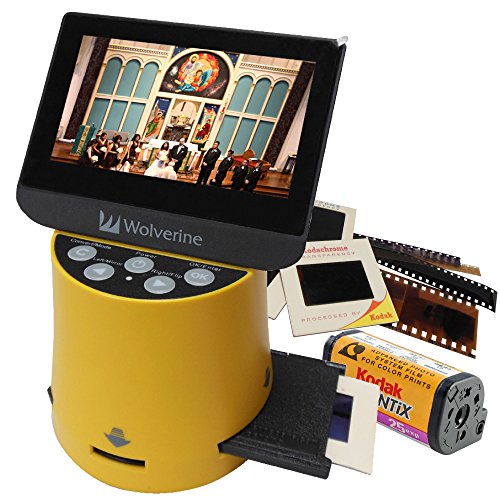
The Wolverine Titan 8-in-1 converts 35mm, 127, 126, 110, APS, and other formats to digital with a 4.3″ color screen and HDMI output. It emphasizes versatility and quick conversions with a single device for multiple film types. Best for: households with a mix of film formats wanting one device. Limitation: HDMI output requires an external viewing setup and the screen is small for long sessions.
Buying Guide
What to consider when choosing a film-to-digital scanner
- Film formats supported: Ensure the model covers your collection (35mm, 126, 110, Super 8, 8mm, slides).
- Output resolution: Higher MP captures yield crisper images; consider your archiving goals and display plans.
- Viewing and editing: built-in LCDs simplify on-device previews; HDMI or USB connections enable larger viewing or computer workflows.
- Memory options: built-in memory plus SD card support helps manage large libraries; check card capacity limits.
- Ease of use: one-touch scanning and intuitive controls save time for non-technical users.
- Software compatibility: some models bundle professional software for color correction and calibration; verify compatibility with your computer.
- Portability and setup: compact models suit travel or small spaces; bulkier units may offer better optics and batch processing.
FAQ
- What is the simplest way to digitize old negatives? Use an all-in-one scanner with a built-in display for quick previews and direct saving to SD cards.
- Can I view my scans on a TV? Yes, many models offer HDMI output for viewing on a TV or monitor.
- Do these scanners require a computer? Some models function independently with SD cards; others rely on software on a PC or Mac.
- Are 16MP scanners reliable for photo albums? For casual sharing and printing up to standard sizes, 16MP is usually sufficient; for archival-grade work, higher resolutions and color calibration matter more.
- Do I need special adapters for different film formats? Most multi-format scanners include adapters; verify the specific formats your collection uses before purchasing.