Best Ways to Convert Slides to Digital Files
Answer: If you want to convert old slides and negatives into digital photos, a dedicated slide scanner is usually the fastest and simplest option. This guide highlights five reliable slide-and-film scanners that are well-suited for different needs, from home archivists to portable scanners for travel. Top picks cover built-in LCD previews, easy-loading systems, and compatibility with 35mm, 126, and 110 formats. Ideal buyers include nostalgic families digitizing family reels, hobbyists organizing old photo collections, and travelers who need compact, battery-powered solutions.
Summary of selected products
| Product | Best For | Key Benefit |
|---|---|---|
| KODAK Slide N SCAN | All-in-one home digitizing | 5” LCD Preview and easy loading |
| DIGITNOW 135 Film Negative Scanner | Simple, stand-alone scanning | No computer required |
| DigitConvert Mobile Film Scanner | Ultra-portable scanning | Battery powered, foldable |
| DigitPro Film and Slide Scanner | Versatile formats | 5” LCD, multiple adapters |
| Suceem 22MP Film & Slide Scanner | Built-in storage convenience | 16GB internal storage |
KODAK Slide N SCAN Film & Slide Scanner
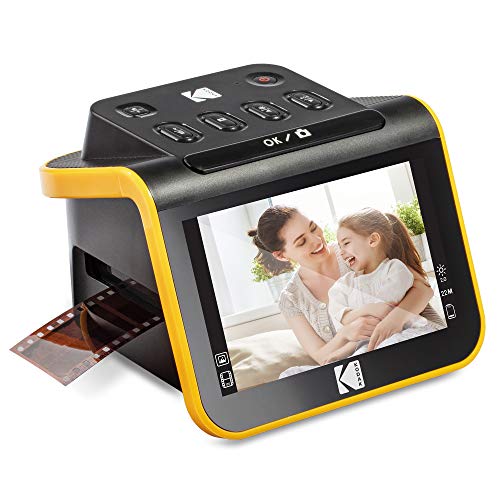
Best for: Home archivists who want an all-in-one device with a built-in display. The 5” LCD offers immediate preview and editing options, while the scanner accepts 135, 110, and 126 formats plus 50mm slides. It saves directly to an SD card (not included), and includes a 50mm slide holder and adapters for multiple formats. Limitations include reliance on SD card for saving files and a larger form factor compared to ultra-compact handheld options.
DIGITNOW 135 Film Negative Scanner

Best for: Casual digitizers who want a straightforward, standalone solution without a computer. This scanner includes an adjustable rapid slide feeder and supports 1800DPI high resolution with USB 2.0; it stores to SD card (up to 32GB) or computer. A strength is its simplicity, but it may lack advanced color management features found in higher-end models.
DigitConvert Mobile Film Scanner

Best for: Travelers and students who need a portable, battery-powered option. The scanner digitizes 35mm slides and negatives without requiring a computer or power outlet, making it ideal for on-the-go digitization. It supports typical 35mm color and black-and-white films. Limitation: may rely on a companion app for full functionality, and image quality may be lower than desktop standalone scanners.
DigitPro Film and Slide Scanner

Best for: Users seeking a versatile, all-in-one scanner for 35mm, 126, 110 negatives, 50mm slides, and even Super 8 film. It features a 5” LCD display for real-time preview and playback, and can save to internal memory or SD card up to 64GB. It emphasizes one-touch scanning and straightforward color/brightness adjustments. Caution: data indicates a need to supply an SD card separately, and the device relies on simple software rather than extensive editing suites.
Suceem 22MP Film and Slide Scanner

Best for: People who want built-in storage and a high resolution screen for quick viewing. The 22MP sensor on a 5″ LCD screen lets you view and edit without a computer in many cases, and 16GB of built-in storage supports immediate saving. It handles 35mm, 126, 110 formats and slides, with emphasis on convenient editing and sharing. Limitation: may require additional storage for larger collections beyond the built-in 16GB or eventual SD expansion.
Buying Guide
- What format do you plan to digitize most often? If you have a mix of 35mm slides and various negatives (135, 110, 126), choose a model with wide compatibility and multiple adapters (as seen in DigitPro and KODAK options).
- Do you prefer built-in storage or prefer to save directly to SD cards or external drives? Some models include internal memory or built-in storage (Suceem) while others rely on SD cards (KODAK, DigitPro).
- Is a large LCD preview important for you? A 5” display helps with instant viewing and simple editing before saving files (KODAK, DigitPro, Suceem).
- Portable scanning needs: If you travel or scan away from power outlets, a battery-powered or clip-on mobile option (DigitConvert) is advantageous, though it may have fewer editing features.
- Software and editing: Some scanners offer basic on-device editing (color and brightness). If you need advanced edits, plan to edit on a computer or mobile app after transfer (DIGITNOW and others may require external software).
- Storage capacity: Consider SD card support (up to 32GB commonly) or larger external options. For built-in memory, verify how many photos it can store and whether you need expansion.
FAQ
- Do these scanners require a computer to save scans? Some models are standalone and save to SD cards or internal storage, while others may require a computer for file transfer.
- Can I digitize Super 8 film with these scanners? Some models claim support for Super 8; verify format compatibility before purchase.
- What resolution do these scanners offer? Resolutions vary; many units scan up to 1800DPI or higher, but actual output quality depends on the sensor and lighting.
- Are adapters needed for different film formats? Yes, most units include adapters for 35mm, 126, and 110. Check the kit contents to ensure you have the right inserts.
- Is built-in storage enough for large archives? Built-in memory (e.g., 16GB) is convenient for small batches; for larger libraries, SD expansion is valuable.
- Which model is best for families with diverse memories? A versatile scanner that supports multiple formats and has an LCD preview is ideal, such as DigitPro or KODAK.