Best USB Video Capture Cards for Digitizing Analog Video to Digital
If you’re looking to preserve old memories by digitizing VHS, Hi8, DV tapes, or other analog video sources, a USB video capture card is the easiest solution. This guide highlights five reliable options that work with Windows and Mac, outlining who each product is best for and why it stands out. Ideal buyers include hobbyists archiving family tapes, quick-start creators updating home videos, and students or editors needing a straightforward capture tool without extra software complications.
| Product | Best For | Key Benefit |
|---|---|---|
| Oassuose VHS to Digital Converter | Home users with RCA or S-Video sources | Supports 1080P/30fps capture via USB-A or USB-C |
| VIXLW Capture Card (AV to USB) | Mac and Windows users seeking driver-free setup | HD 720P USB output with simple plug-and-play |
| avedio links 3.3 Feet VHS to Digital Converter | Users needing longer cable flexibility | 3.3ft USB cable and 1920×1080 recording |
| Herfair Firewire to USB Adapter Cable | Users migrating DV files from older cameras | Firewire 400 to USB 2.0 for viewing, not capturing |
| VIXLW VHS To Digital Converter | Windows or Mac editors requiring MP4 capture | Automatic NTSC/PAL detection and USB 2.0 capture |
Oassuose VHS to Digital Converter

The Oassuose device captures video and audio from legacy sources with RCA or S-Video interfaces and outputs high-definition 1080P/30fps via USB-A or USB-C. It is designed for analog tapes from VHS, VCR, Hi8, DV, camcorders, and more. Best for families looking to digitize heirloom tapes without complex setup. A notable limitation is that it requires the acquisition software and a driver-free experience may vary by system; ensure compatibility with your software before purchase.
VIXLW Capture Card (AV To USB)

This USB video capture card focuses on ease of use, converting analog RCA composite input to HD 720P USB output with audio capture. It emphasizes driver-free setup and plug-and-play operation, which is ideal for users who want a simple, reliable digitization workflow. Best for casual archivists who value a straightforward experience; limit is that 720P may not satisfy users seeking higher resolution edits or advanced color depth.
avedio links 3.3 Feet VHS to Digital Converter
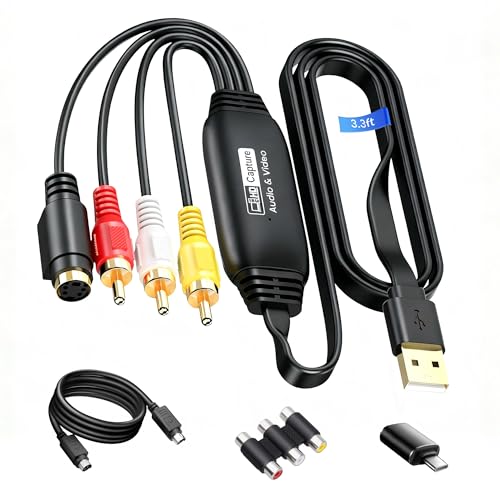
Designed with a longer 3.3-foot USB cable, this model supports 1920×1080 at 30Hz and handles RCA and S-Video inputs. It’s best for users who need flexibility in camera or TV placement during capture. It’s compatible with NTSC/PAL formats, making it a solid choice for mixed-tleet video sources. A potential drawback is that higher resolutions depend on source quality and PC performance.
VIXLW VHS To Digital Converter

This device emphasizes broad compatibility, capturing from VHS, VCR, Hi8, DV tapes to a PC with USB 2.0 output at 720P. It highlights automatic NTSC/PAL detection and supports MP4 or other digital formats. Best for editors who need straightforward capture without complex setup and who are comfortable with basic editing workflows. Limitation: capture is at 720P, which may be less suitable for high-definition archiving or future-proofing.
TCNEWCL USB Audio Video Converter

The TCNEWCL adapter captures from almost any analog video source to Windows PCs via USB 2.0, supporting RCA and S-Video connectors. It handles NTSC, SECAM, PAL, and PAL/60 and offers brightness, contrast, hue, and saturation controls for basic image adjustment. Best for users who want flexible format support and simple, driver-free setup. Limitation: advanced editing or heavy color grading may require external software.
VIXLW USB Video Capture Card

Offering AV to USB capture with 720P output and simple plug-and-play, this option is oriented toward casual archivists who want a quick digitization setup on both Windows and Mac. It advertises no need for a separate sound card, relying on built-in capture processing. Best for quick archiving; choose this if you want a straightforward, low-friction workflow and are comfortable with potential resolution limits.
Buying Guide
What to look for when selecting a USB video capture card:
- Video resolution: If you intend to preserve high-quality memories, prioritize 1080P capture. Some models max at 720P.
- Inputs and compatibility: Ensure RCA composite or S-Video inputs match your source. Check NTSC/PAL support for mixed formats.
- Connection type: USB-C can offer broader compatibility and power delivery; USB-A is widely supported. Confirm your computer ports.
- Plug-and-play vs. drivers: Driver-free devices are easier for quick setup but may depend on OS compatibility and software requirements.
- Included software: Some require specific capture software; others are driver-free but may pair best with OBS or QuickTime for editing.
- Cable length: Longer cables offer placement flexibility but can introduce interference. Pick a length that fits your setup.
FAQ
- What is the simplest USB video capture solution for beginners?
A: A driver-free model with plug-and-play setup, ideal for users upgrading family tapes without technical hurdles. - Can I digitize VHS tapes in 1080P?
A: Some models support 1080P at 30fps; verify the maximum resolution before buying. - Do I need extra software to capture with these devices?
A: Many work without external software, but some require a companion app or recommended programs like OBS or QuickTime. - Which connection type should I choose, USB-A or USB-C?
A: USB-C offers broader compatibility on newer systems and power delivery; USB-A remains widely supported on older devices. - Is 720P enough for long-term archiving?
A: It can be adequate for casual viewing, but 1080P is preferable for higher quality preservation and future-proofing. - Are these devices suitable for Mac or Windows?
A: Most listed models advertise compatibility with both platforms, but always confirm your OS version and driver requirements beforehand.