Best External Cameras for MacBook for Streaming, Video Calls, and Privacy
Enhance your MacBook’s video quality and privacy with the best external cameras available. Whether you need high-definition streaming, clear video conferencing, or reliable privacy protection, these top-rated webcams and accessories provide excellent options. Below is a quick comparison table highlighting the key features of the selected products to help you choose the right camera for your needs.
| Product | Resolution | Features | Privacy Cover | Microphone |
|---|---|---|---|---|
| GUSGU G910 2K Quad HD Webcam | 2560×1440 (2.5K) | Ring Light with 3 brightness levels, Advanced 5MP sensor | Yes | Yes |
| Dobuhont 2K Ultra HD Webcam | 2560×1440 (2K) | Adjustable stand, USB C adapter, Noise reduction mic | Yes | Yes |
| TOUCAN 1080P Webcam | 1920×1080 (Full HD) | Auto light correction, 115° wide view | Yes | Yes |
| CloudValley Webcam Cover Slide (2-Pack) | — | Ultra-thin metal cover for privacy protection | Physical cover only | No |
| Cuwada 1080P Webcam with Microphone | 1920×1080 (Full HD) | Undistorted lens, Dual noise-canceling mic | Yes | Yes |
GUSGU G910 2K Quad HD Webcam for MacBook

The GUSGU G910 2K Quad HD Webcam delivers crisp and clear video with a resolution of 2560×1440 pixels using an advanced 5 megapixels sensor and high-performance encoding chip. It’s ideal for MacBook users looking for vibrant streaming quality. The webcam features a ring light with adjustable white and warm color settings, each with three brightness levels to enhance your video appearance in various lighting conditions.
Privacy is prioritized through a built-in privacy cover, allowing you to conveniently block the camera lens when not in use. The inclusion of a microphone enables clear audio capture during video calls or streaming, making this webcam a comprehensive choice for professional and casual use.
Dobuhont 2K Ultra HD Webcam with Privacy Cover

The Dobuhont 2K Ultra HD Webcam focuses on delivering sharp and vivid images at a 2560×1440 resolution with 30fps, perfect for video conferencing, streaming, and online learning on MacBooks. It has a built-in noise-reduction microphone to ensure your voice comes through clear by filtering out background sounds.
This webcam comes with an adjustable stand that allows tilt and 360° rotation to capture your desired angle perfectly. The extendable base supports multiple mounting options, including clamping, tripod, or placing on a flat surface. Additionally, the sliding privacy cover guarantees peace of mind by protecting your privacy when the camera is off.
TOUCAN 1080P Webcam with Microphone and Auto Light

Designed for professional video calls, the TOUCAN 1080P Webcam provides clear and smooth video with Full HD 1080P resolution at 60fps. It features auto light correction that adapts to your environment to maintain consistent brightness and clarity during meetings or streaming on your MacBook.
A built-in high-quality microphone captures clear audio, while the 115° wide-angle lens ensures an ample field of view. The webcam also includes a privacy cover to keep your camera lens protected when not in use. The plug-and-play design makes setup effortless for all users.
CloudValley Webcam Cover Slide 2-Pack for Privacy

The CloudValley Webcam Cover Slide is an ultra-thin, metal webcam cover designed to protect your privacy on MacBooks and other devices. With a subtle matte black minimalist design, it complements your MacBook’s aesthetic while physically blocking the camera lens when closed.
At only 0.023 inches thick, it fits well without interfering with laptop closures or screen protectors, compatible with various MacBook Pro and Air models, iPads, iPhones, and many laptops. This accessory is perfect for users who want a simple, reliable physical privacy solution without purchasing a new webcam.
Cuwada 1080P Webcam with Dual Noise Canceling Microphone
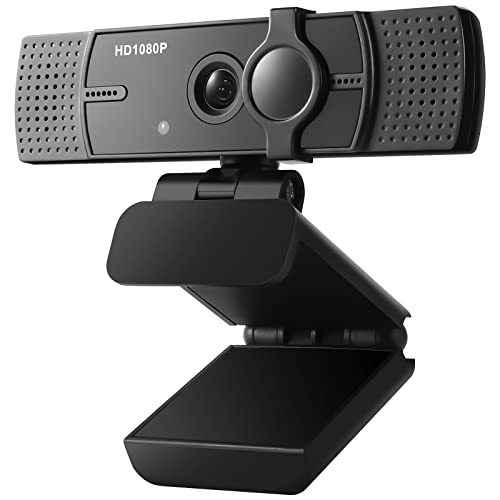
The Cuwada 1080P Webcam presents sharp and smooth video with a highly advanced undistorted lens, eliminating fish-eye effects for true-to-life visuals. It automatically adjusts brightness to ensure you look your best in every video, suitable for low-light environments.
Equipped with a dual noise-cancellation microphone, it delivers pure sound quality by minimizing background noise and clearly capturing voice from up to 10 meters. The built-in privacy cover further secures your digital life by protecting your camera when not in use.
Buying Guide: Choosing the Best External Camera for Your MacBook
When selecting an external camera for your MacBook, several factors should be considered to ensure the best match for your needs:
Video Resolution and Frame Rate
The resolution determines the clarity of your video. For high-quality streaming or professional video calls, aim for at least 1080p Full HD, with some webcams offering up to 2K Quad HD. Higher frame rates, such as 30fps or 60fps, result in smoother video performance, especially important for motion-intensive tasks.
Lens Quality and Field of View
Lenses with undistorted optics prevent fisheye effects, providing true-to-life images. A wider field of view (above 90°) is advantageous for group calls or when you want to include more of your background environment.
Microphone Performance
A built-in microphone with noise reduction capabilities enhances your audio clarity by filtering background noise, crucial for remote work, online meetings, and streaming.
Privacy Features
Privacy covers—physical sliding shutters or built-in covers—are essential to protect your camera when it’s not in use, preventing unauthorized viewing. For added security, consider ultra-thin webcam cover slides compatible with your MacBook model.
Compatibility and Connection
Ensure the webcam supports MacBook operating systems and interfaces smoothly with macOS. USB plug-and-play webcams are easiest to use. Some models include USB-C adapters for the latest MacBooks.
Lighting and Brightness Adjustment
Webcams with automatic light correction or integrated lighting (such as ring lights with adjustable brightness) help maintain the best image quality in various lighting situations.
Mounting and Adjustability
Flexible mounting options—clip-on, tripod support, or adjustable stands—allow you to position the camera for optimal framing and comfort during use.