Best External Monitor Options for Camera Use in 2026
The right external monitor can dramatically improve framing, exposure, and focus when shooting with cameras, DSLRs, or mirrorless rigs. Below are five highly capable field monitors that balance image quality, portability, and practical features for creators on the move. Each entry includes a quick snapshot and why it matters for camera work.
| Product | Key Benefit | Resolution / Brightness |
|---|---|---|
| FEELWORLD FW759 | Slim, portable field monitor for on-the-go shooting | 1280×800; 400 cd/m² |
| FEELWORLD S55 V3 | Advanced video assist with LUTs and waveform | 1920×1080; bright IPS display |
| Neewer F100 7″ | Budget-friendly, sunshade included for outdoor use | 1280×800; 450 nits |
| NEEWER F700 7″ | High-end brightness and LUT support with extended inputs/outputs | 1920×1080; 2000 nits |
| OmniMaster 4K30 | Magnetic rear-screen monitor for phones and creators | 0-4K input compatibility; 4K30 on-device |
Note: All products listed are external monitors designed to enhance camera work, not built-in displays for laptops or desktop setups.
FEELWORLD FW759: Slim 7 Inch Field Monitor
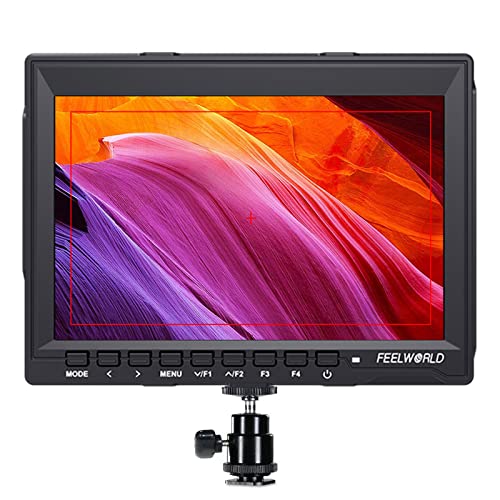
FEELWORLD FW759 offers a compact, lightweight design with a 7 inch IPS panel and 1280×800 resolution. Its 400 cd/m² brightness and wide color gamut deliver solid image fidelity for on-location shoots. The monitor supports 4K HDMI input, enabling clean pass-through from most DSLRs and camcorders. At just 17 mm thick and around 300 g, it pairs well with stabilizers and gimbals for mobile rigs. Essential workflow features include HDMI input for 4K UHD formats and standard exposure aids, making it a practical option for run-and-gun filming.
FEELWORLD S55 V3: 6 Inch Field Monitor

The FEELWORLD S55 V3 provides a larger feature set in a compact 6 inch form factor with a vivid 1920×1080 IPS panel. It supports 4K HDMI input and output, enabling real-time monitoring on and off camera. Its LUT loading capability lets shooters preview looks with on-device color grading. Built-in waveform, false color, zebra, and focus peaking provide precise exposure and focus decisions—crucial for gimbals and lighter camera systems without a built-in display. A dedicated tilt arm and included power options support flexible on-set positioning.
Neewer F100: 7″ Field Monitor With Sunshade

Neewer’s F100 offers a budget-friendly 7 inch IPS monitor with 1280×800 resolution, 450 nits brightness, and a sunshade to improve outdoor visibility. The monitor supports a comprehensive set of formats, including multiple 1080p and 720p variants, expanding compatibility with various cameras and recorders. Its wide compatibility with DSLRs, camcorders, and stabilizers makes it a practical addition to travel rigs or entry-level setups. The included sunshade helps maintain visibility under bright daylight, reducing glare for accurate framing outdoors.
OmniMaster 4K30: Magnetic Rear Monitor

OmniMaster centers on a magnetic rear monitor concept designed for smartphone integration. It supports connecting to iPhone or Android devices via USB-C or Lightning, enabling real-time mirror and control for rear-camera shots. This form factor suits creators who want a compact, travel-friendly secondary display, especially for selfie-style vlogs or live streaming. The built-in battery and magnetic mounting streamline on-the-go framing, allowing quick setup without running extra cables.
Buying considerations for external camera monitors include display size and resolution, brightness for outdoor use, color accuracy and LUT support for accurate on-set looks, and the availability of exposure tools such as waveform, zebra, and focus peaking. Portability and power options matter for handheld or gimbal work, while inputs and outputs—especially 4K HDMI compatibility and pass-through—determine how well a monitor integrates with your existing camera kit. In addition, some models offer tilt arms, sunshades, or built-in LUT libraries to streamline production workflows in varied lighting and shooting scenarios.
Buying Guide
- Display size and resolution: For precise focus and exposure, choose monitors with at least 7 inches and a clear 1080p or higher resolution. Some models provide 4K HDMI pass-through for future-proofing.
- Brightness and color accuracy: Outdoor shoots demand higher brightness (nits) and a wide color gamut. Look for 400+ cd/m² and IPS panels to minimize color shift and viewing angle issues.
- Video assist tools: Exposure aids like waveform, false color, zebra, focus peaking, and LUT support help verify settings in real-time and preview grading decisions on set.
- Connectivity: Ensure the monitor supports your camera’s HDMI port and includes loop-out or pass-through if you need to monitor on a larger display or external recorder.
- Power options: Battery compatibility, included batteries, and power efficiency affect how long you can shoot without swapping power. Some monitors come with built-in batteries or can be powered via DC.
- Durability and portability: Slim, lightweight designs benefit gimbals, cranes, or handheld rigs. A sunshade improves daylight visibility, and a robust mounting system enables quick setup on location.
- Software features: LUT loading and on-device image processing can save time by letting you preview looks directly on set, reducing post-production guesswork.
- Special use cases: Magnetic or phone-integrated monitors offer niche advantages for travel vlogging, phone-based workflows, or quick framing in tight spaces.
When selecting an external screen for camera work, align your choice with the shooting environments you most frequently encounter—indoor controlled shoots vs. field daylight conditions—and with the camera ecosystems you already use. This alignment helps ensure reliable performance, faster setup, and improved visual accuracy across your project workflow.