Best High Speed IR Camera for Fast Night Vision and Clarity
Finding a high speed IR camera means prioritizing fast frame rates, reliable night vision, and plug‑and‑play usability across operating systems. This guide highlights five strong options and explains who each is best for. The selections emphasize automatic IR‑Cut switching, wide fields of view, and high‑quality image sensors suitable for 3D printers, remote monitoring, and industrial vision tasks. Below is a quick product snapshot to help compare key features at a glance.
| Product | Brand | Best For | Key Feature |
|---|---|---|---|
| IFWATER 1080P USB Camera 60FPS High Speed IR Cut Day and Night Vision | IFWATER | Industrial vision and 3D printers | 120fps MJPEG, 170° FOV, 2MP OV2710 sensor |
| High Speed USB3.0 0.3MP Color Machine Vision Industrial Camera | HTENG VISHI | Fast data transfer and SDK users | 790fps, external trigger, USB 3.0 |
| ELP 1080P Day Night Vision USB Camera | ELP | All‑around PC/mac/android setups | 24 IR LEDs, 2MP sensor, UVC plug‑and‑play |
| GW Security 8MP Pan Tilt Zoom IP Camera | Camstar | Outdoor/indoor surveillance | 4K resolution, 5X optical zoom, two‑way audio |
| 1080P Day&Night Vision USB Camera With 166 Degree Fisheye | Magnolia | Wide‑area coverage | 166° HFOV, 1080P60/30 |
IFWATER 1080P USB Camera 60FPS High Speed IR Cut Day and Night Vision
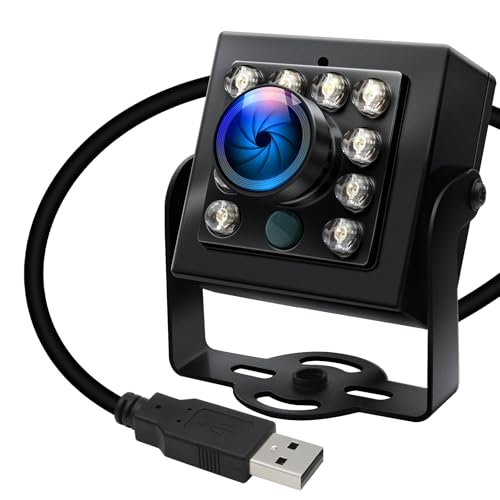
The IFWATER model offers a high‑speed option with up to 120fps at 640×480, making it suitable for professional video capture, monitoring, and industrial vision. Its 170° wide‑angle infrared night vision uses 850nm LEDs for clear night footage, with an auto IR‑Cut filter that adapts to lighting. The 1/2.7” OmniVision OV2710 sensor supports 1080P at 30fps and flexible frame rates for diverse shooting needs. This camera is best for buyers who need fast capture and broad coverage in day/night conditions. Limitations include lower full 1080P performance at very high frame rates.
Who this is best for: Researchers, hobbyists, and small production setups needing smooth motion capture and a wide night field of view. Why selected: Combines high frame rate options with reliable IR night vision in a plug‑and‑play USB design.
High Speed USB3.0 0.3MP Color Machine Vision Industrial Camera

This camera focuses on transfer speed and developer support. It claims fast transfer and provides an SDK, designed to be easy to use, with support for external trigger and flash. With USB 3.0, it aims to minimize latency in industrial monitoring or automated capture workflows. The main caveat is the lower resolution (0.3MP) which is acceptable for fast motion detection but not for detailed imagery. Best for buyers who prioritize speed, easy integration, and programmable workflows over high pixel detail.
Who this is best for: System integrators and automation engineers who need quick integration and external triggering. Why selected: Strong emphasis on data throughput and SDK support for custom pipelines. Caution: Low resolution may limit detailed analysis or identification tasks.
ELP 1080P Day Night Vision USB Camera

The ELP USB camera module emphasizes day/night versatility with automatic IR‑Cut switching. It uses 2MP OV2710 for high‑definition imagery up to 1920×1080, with 24 IR LEDs for night illumination. It supports plug‑and‑play UVC on multiple platforms, including PC, laptop, Android, and Raspberry Pi. Its strengths lie in straightforward compatibility and reliable night vision, making it a solid all‑round option for home and small office surveillance or remote monitoring. A potential limitation is the fixed LED count which may not suit extremely low‑light environments.
Who this is best for: General purpose users and educational setups needing hassle‑free cross‑platform use and dependable night vision. Why selected: Strong plug‑and‑play capability and balanced day/night performance. Caution: LED quantity may be insufficient for expansive or very dark spaces.
GW Security 8MP Pan Tilt Zoom IP Camera

This Camstar model targets advanced surveillance with 8MP resolution and a motorized 5X optical zoom lens. It supports PTZ control, built‑in microphone and speaker for two‑way audio, and IP/PoE connectivity. The combination of high resolution and remote pan/tilt makes it suitable for outdoor and indoor security installations, large rooms, or premises requiring detailed wide‑area coverage. A limitation is that it relies on network connectivity for full functionality; setup and bandwidth considerations are required for smooth operation.
Who this is best for: Businesses or homes needing top‑tier surveillance with remote viewing and two‑way audio. Why selected: Exceptional resolution and flexible PTZ capabilities in a weather‑ready enclosure. Caution: Network bandwidth and configuration can impact performance.
1080P Day&Night Vision USB Camera With Fisheye Lens

This Magnolia camera features a 166° wide fisheye lens for immersive wide‑angle coverage and night vision support. It provides 1080P at multiple frame rates (30fps/60fps/120fps) to balance detail and motion capture. The automatic day/night switching works with IR illumination to aid nighttime clarity. Best for monitoring large rooms or open spaces where a single camera can capture most of the scene. Limitation includes potential distortion near edges due to fisheye optics, which may require dewarping in post‑processing for precise measurements.
Buying Guide
What should you consider when choosing a high speed IR camera?
- Frame rate vs. resolution: For fast motion, prioritize higher fps (60–120fps) at practical resolutions like 720p or 1080p to maintain smooth footage.
- Night vision performance: Look for IR LEDs count, wavelength (850nm common), and automatic IR‑Cut switching for accurate day/night capture.
- Field of view: Wide or fisheye lenses give broader coverage but may introduce distortion; assess whether you need edge‑to‑edge coverage or high detail in a small area.
- Connectivity and compatibility: USB2.0/3.0 and UVC support enable plug‑and‑play use across Windows, Linux, macOS, and embedded boards.
- Data handling: For industrial setups, consider cameras with SDKs or external trigger support to integrate with existing control systems.
- Physical environment: Outdoor vs indoor use, weather sealing, and mounting options determine long‑term reliability.
Practical buying tips by scenario
- Home or small workshop: Choose cameras with reliable day/night switching and simple USB connectivity for quick setup.
- 3D printing or small production: Look for high frame rates and a robust SDK or API to synchronize with printers or controllers.
- Surveillance or security: Prioritize higher resolution, PTZ options, and multi‑sensor compatibility for comprehensive coverage.
Frequently Asked Questions
- What is considered a high speed camera for IR use? A camera offering 60fps or higher at practical resolutions suitable for real‑time monitoring and motion capture.
- Do all IR cameras require drivers? Most modern USB cameras use UVC and are plug‑and‑play without extra drivers on supported systems.
- Is a wider field of view always better? It depends on the scene; wide FOV covers more area but can cause distortion at the edges.
- Can IR cameras work in total darkness? Yes, with adequate IR LEDs that illuminate the scene, many cameras maintain visibility at night.
- Should I choose a camera with an SDK? If you plan to integrate with automation or custom software, an SDK simplifies development and control.
- Is outdoor use feasible for these cameras? Some models are designed for indoor use; check weather resistance and mounting capabilities before installation.
This selection focuses on high speed IR capability paired with practical compatibility. Each option serves different buyer needs—from industrial capture and machine vision to home monitoring and security. Use the buying guide questions to identify your primary use case and select the camera that best fits your workflow, environment, and integration requirements.