Best Instant Cameras With Preview Screens for 2026
In a market flooded with instant photography options, choosing an instant camera with a clear, usable preview screen helps you frame shots before printing. This guide highlights top options that combine instant printing with easy-to-view previews, suitable for families, hobbyists, and budding photographers. Each pick balances print quality, screen size, durability, and kid-friendly features where relevant.
Summary of Selected Products
| Product | Brand | Preview Screen | Notes |
|---|---|---|---|
| Fujifilm Instax Mini EVO Instant Camera – Brown | Fujifilm | Built-in digital preview with various film effects | |
| LETSHAHA Instant Print Camera for Kids | LETSHAHA | 2.4-inch IPS screen for live view | |
| Instant Print Camera for Kids – Classic Black (MYSTILUCK) | MYSTILUCK | 1080P video and 3-inch display for framing | |
| W & O Instant Print Camera for Kids | W & O | 2.6-inch LCD preview | |
| GREENKINDER Kids Camera Instant Print | GREENKINDER | 3-inch HD screen for composition |
Fujifilm Instax Mini EVO Instant Camera – Brown

The Fujifilm Instax Mini EVO blends classic instant film with modern digital controls. It offers high-quality 2” x 3” Instax Mini prints and a library of 100 expression options through 10 lens choices and 10 film effects. A built-in selfie mirror helps users frame selfies, and dual shutter buttons support portrait and landscape shooting. The camera’s hybrid nature reduces trial-and-error in composition while delivering the tactile charm of instant prints.
LETSHAHA Instant Print Camera for Kids

This kid-friendly camera centers on a 2.4-inch IPS display for real-time preview and video capture. It uses thermal printing to deliver black-and-white photos and includes a 32GB SD card plus three rolls of thermal paper, offering cost-effective printing without ink. With 1080P video, 20MP photos, and a durable, kid-safe design, it’s built to keep young creators engaged while sharing memories with family and friends.
Instant Print Camera for Kids – Classic Black (MYSTILUCK)

The Classic Black model from MYSTILUCK combines a 3-inch display with 1080P video and 372 prints’ worth of paper. It features 15 scene filters and 16 stickers to boost creativity. The device uses safe, ink-free thermal printing and includes a 32GB SD card, ensuring a complete package for children to explore photography, capture moments, and instantly print keepsakes.
W & O Instant Print Camera for Kids

W & O’s model emphasizes a 2.6″ LCD preview with 2.5K UHD video and 16X zoom, offering clear composition and flexible framing for group shots and selfies. It uses non-toxic thermal paper for printing and integrates filters and frames to spark creativity. The camera’s rugged build makes it suitable for everyday adventures and classroom use alike.
GREENKINDER Kids Camera Instant Print
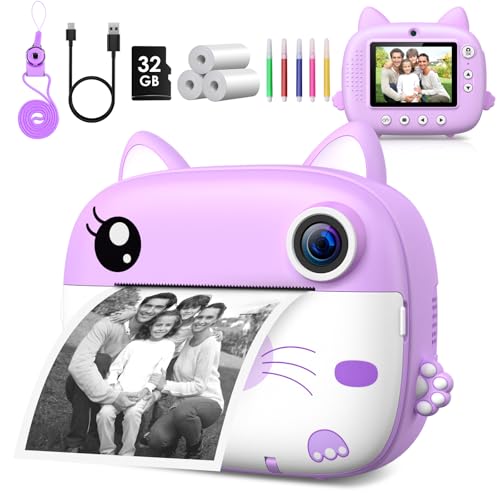
The GREENKINDER model offers a 3-inch HD screen for easy composition and a dual-lens system that captures 48MP images and up to 2.5K video. The device uses safe thermal printing with three rolls included for up to 150 prints. It also includes a 32GB memory card to store digital copies, and a USB connection to transfer files for sharing or editing on other devices.
Buying Guide: Key Purchase Considerations
- Preview screen size and quality: A larger, clearer screen helps with framing and verifies exposure before printing. Consider models with at least 2.4″ or larger displays for easier use by kids and adults alike.
- Print technology and costs: Ink-free thermal printing keeps costs low but verify the number of prints per roll and the availability of affordable refill packs. Hybrid models may offer richer color options via digital previews.
- Durability and age range: For younger users, look for shockproof shells, non-toxic materials, and simple controls. For teens or adults, more advanced settings, such as multiple lens effects, can enhance creativity.
- Image quality and resolution: Higher MP sensors and 2.5K–4K video options provide crisper captures, useful when sharing digital copies or editing later, even if prints are standard instant photos.
- Storage and connectivity: A built-in SD card, USB transfer, and optional Wi-Fi can simplify moving images to devices for printing or posting online.
- Battery life and charging: Check whether the camera uses standard batteries or built-in rechargeable options. Longer battery life supports longer shoots without frequent recharges.
- Safety and materials: For kids, ensure BPA-free paper, non-toxic inks, and a sturdy, kid-friendly design to minimize hazards during play and learning.
- Accessories and expansion: Some models include extra rolls, lanyards, or additional filters. Consider future-compatible features such as additional film packs or lenses.
- Price-to-value balance: Compare print counts, screen quality, and durability against the price to determine the best long-term value rather than upfront cost alone.