Best Live Streaming Camera Equipment for High-Quality Broadcasts
Whether you’re streaming gaming, tutorials, or live events, having reliable hardware matters. The following selection focuses on cameras and kits designed for smooth, high‑quality broadcasts, easy setup, and flexible connectivity. Each option supports modern streaming workflows, whether you’re maintaining a single-camera feed or expanding to multi‑camera setups. Read on to compare features that matter most for live video, audio clarity, and effortless control from a smartphone or PC.
| Product | Brand | Key Benefit | Connectivity |
|---|---|---|---|
| Mevo Start | Logitech for Creators | 1080p HD with smart app control | Wi‑Fi, LTE, Ethernet |
| 5K Video Camcorder | BREGOO | High-resolution cinema-grade output | Wi‑Fi, USB/HDMI options |
| 2K Deluxe Streaming Kit | Abel Gaming | All‑in‑one kit for streams and calls | USB webcam, mic, LED light |
| NBPOWER 1080P Streaming Cam | NBPOWER | Clear 1080p with fill light | USB, built‑in mic, autofocus |
| Mevo Start 3‑Pack | Logitech for Creators | Multi‑camera streaming out of the box | Wi‑Fi, wireless sync |
Logitech For Creators Mevo Start — Wireless Live Streaming
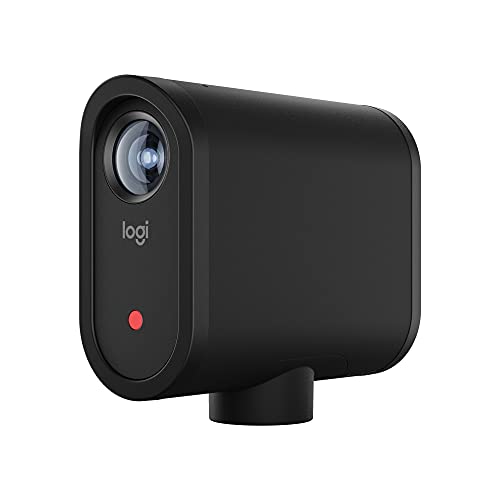
The Mevo Start from Logitech for Creators delivers polished 1080p HD broadcasting with compact design and smart app control. Its built‑in feature set focuses on mobile and remote production, allowing content creators to shoot, switch angles, and stream directly from a phone or tablet. The Auto‑Director and other smart controls simplify multi‑angle storytelling, while Wi‑Fi, Ethernet, or LTE connections ensure connectivity in diverse environments. The camera is designed for stand‑alone use or as part of a multi‑camera workflow when paired with additional devices.
Key points include crisp 1080p output with real‑time switching, flexible streaming locations, and a straightforward app experience. For creators who want to go live without a heavy setup, Mevo Start provides a balanced blend of portability and control. Its internal battery options and USB powered mode help maintain uptime for longer sessions. The system is compatible with standard streaming platforms, making it a versatile core tool for remote or on‑the‑go productions.
Live Video Streaming Kit — 1080p Webcam, USB Mic, LED Light

This all‑in‑one streaming kit from Abel Gaming targets aspiring streamers who want a simple yet capable setup. It combines a 1080p webcam with a USB microphone and an adjustable LED light to improve video and audio quality in one package. The kit’s plug‑and‑play nature aims to reduce setup friction for live webcasts, webinars, and online classes. It is especially suitable for PC or laptop users who need reliable, desk‑friendly gear without extra capture cards or complex configurations.
The included microphone and camera are designed to minimize background noise and preserve voice clarity, helping hosts stay understandable during long broadcasts. The kit’s limitation is that it requires a compatible PC and streaming software to function at its best, as there is no separate capture card included. It’s best for desktop environments where space is not a strict constraint and where a straightforward workflow is preferred over advanced multi‑camera productions.
5K Video Camcorder With 64MP, 3” Touch Screen

The BREGOO 5K camcorder targets creators who want high‑end image quality with robust still and video capabilities. It records 5K (20fps) or 4K (60fps) video, supported by a 64MP sensor and a 3.0″ touch screen that rotates for flexible framing. Built for vlogging, travel films, and events, this camera provides cinema‑level detail with motion handling that appeals to serious creators seeking filmic results. The kit typically includes a memory card, spare batteries, and accessories like an external mic and a lens hood to cover common shooting scenarios.
Strengths include the high resolution and versatile tilt screen, which helps with on‑the‑move setups and remote interviews. The camera’s wireless and app controls allow for remote monitoring and transfer, enhancing live streaming workflows. Potential drawbacks are heavier payload and the need for compatible capturing hardware if you want to stream directly from the camera, which may require additional adapters or capture devices.
Deluxe Live Video Streaming Kit — 2K Webcam and USB Mic

The Abel Gaming Deluxe kit centers on a 2K webcam with autofocus, a cardioid microphone, and a compact LED light. It’s designed for professional calls, interviews, and streams where clear facial detail and stable audio are essential. The autofocus keeps the subject sharp as you move, while the wide‑angle lens helps capture more of the scene. The built‑in mic with noise handling and the plug‑and‑play design make it a practical choice for remote work, podcasts, and streaming from varied setups.
As a budget‑minded, all‑in‑one option, this kit emphasizes ease of use and portability. It’s well suited for desktop users who want dependable performance without multiple separate devices. Limitations might include the absence of a dedicated video switcher or advanced camera controls found in higher‑end rigs, making it best for single‑camera streams or small interview panels rather than multi‑camera productions.
NBPOWER 1080P 60FPS Streaming Camera with Light and Mic

NBPOWER’s 1080p streaming camera emphasizes smooth video and accessible features. With 60fps streaming and an integrated fill light, it helps combat low light and soft details that can ruin broadcasts. The autofocus system keeps faces in sharp focus even during movement, while the built‑in microphone provides basic audio capture for webcam‑style streams. It’s a practical option for live classes, casual gaming streams, and remote meetings where a simple USB webcam setup suffices.
Considerations include the balance between image quality and the simplicity of use. The camera is ideal for users who want a straightforward plug‑and‑play experience without adding extra equipment like a separate microphone or lighting kit. For higher production value or multi‑camera workflows, you might need additional devices or a capture card to integrate with streaming software and streaming platforms.
Mevo Start Three‑Pack — Multi‑Camera Setup

This three‑pack from Logitech for Creators makes multi‑angle streaming more accessible. Sync up to three Mevo Start devices to create HD multi‑camera broadcasts straight from out of the box. The combination of 1080p outputs, wireless streaming, and built‑in mics supports dynamic storytelling without a heavy setup. It’s well suited for events, product demonstrations, or any scenario where switching perspectives adds depth to the stream. Battery life and external power options provide flexibility for longer sessions or venue setups.
Important considerations include the need for adequate bandwidth and a stable network when streaming multiple feeds simultaneously. The solution shines in environments where a compact and scalable multi‑camera approach is desired, yet it may require multiple devices and careful coordination to maintain consistent frame timing across streams.
Buying Guide: Key Purchase Considerations for Live Streaming Cameras
When choosing live streaming camera equipment, consider these factors to match your use case and budget:
- Resolution and frame rate: 1080p at 60fps is a solid baseline for smooth motion; 4K can provide future‑proofing but may require more bandwidth and processing power.
- Camera form factor and portability: Compact, USB‑powered cameras are ideal for desk setups or on‑the‑go shoots; larger camcorders offer longer recording times and better optics.
- Connectivity and streaming workflow: Wi‑Fi, Ethernet, and cellular options enable diverse locations. If multi‑camera streaming is needed, verify compatibility with your switcher, software, and network bandwidth.
- Audio quality: Built‑in mics are convenient, but external mics with cardioid patterns typically deliver clearer vocal pickup, especially in noisy environments.
- Ease of use vs. control: Apps with auto‑director or scene presets simplify operation for beginners, while more advanced rigs provide manual exposure, focus, and color controls for professional workflows.
- Power and uptime: Battery life matters for portable shoots; consider models with USB‑powered operation or external power options for longer sessions.
- Compatibility with software: Check compatibility with your preferred streaming platform (Twitch, YouTube, Zoom, etc.) and any capture card requirements for non‑USB cameras.
- Budget and future expansion: Starter kits offer value, but plans to scale with more cameras or higher resolutions should drive longer‑term investment choices.
In practice, the best approach is to align a camera’s strengths with your typical shooting scenarios. For single‑camera streams from a desk, a compact 1080p model with a reliable app might be enough. For multi‑angle productions or events, investing in a multi‑camera system with a switcher or a capable streaming software setup becomes more compelling. Always verify warranty and support options, as streaming gear may require firmware updates and field maintenance over time.