Best Reliable Photo Printers for Home Use in 2026
Looking for the most reliable photo printer for home use? This guide highlights five dependable printers that consistently produce quality photos from a smartphone or computer. Best for quick 4×6 prints, durable glossy finishes, and simple setup, these models suit families, hobbyists, and scrapbookers who want long-lasting results without fuss. The following picks balance print quality, ease of use, and value over time.
| Product | Best For | Key Benefit |
|---|---|---|
| KODAK Dock Plus 4×6” Photo Printer | Casual photo lovers | Integrated docking station for easy printing from phones |
| Liene M100 4×6” Photo Printer | On-the-go users | Portable, high-volume paper/cartridge kit |
| HP Envy Photo 7975 | Family home office | AI-enabled, versatile all-in-one for photos and documents |
| Epson Expression Premium XP-7100 | Creative projects | High-quality color prints and versatility |
| Nelko PP01 Mini Photo Printer | Pocket-sized scrapbooking | Small, sticky-back 2×3 prints for quick crafts |
KODAK Dock Plus 4×6” Photo Printer

Best for: casual photo enthusiasts who want simple, immediate 4×6 prints from a smartphone. The Dock Plus integrates a docking station for easy phone placement and charging during printing. It uses Genuine 4PASS dye sublimation, producing three color layers plus a protective lamination in roughly 55 seconds. Prints resist fingerprints, water, and fading, making it suitable for albums, frames, or gifting.
Why chosen: This model emphasizes convenience and durable outputs. The built-in dock reduces cable clutter and improves connection stability for iPhone and Android users who value quick, reliable snaps from a mobile device.
Caution: The 4×6 format is specialized; if you need larger prints regularly, consider a larger-format option.
Liene M100 4×6” Photo Printer

Best for: users who want a high-volume, portable photo printer with included paper and cartridges. The package ships with multiple cartridges and papers, plus a compact, magnetic design for storage. It uses thermal dye sublimation to deliver vibrant prints with laminated, water- and scratch-resistant surfaces.
Why chosen: The all-in-one package approach is advantageous for families or students who print frequently. The built-in hotspot helps maintain a stable connection for device-free printing from smartphones.
Caution: Portability comes with a trade-off in print size and potential higher per-print costs compared to larger desktop models.
HP Envy Photo 7975 Wireless Color Inkjet

Best for: families seeking a versatile all-in-one that handles photos, documents, and mobile printing with AI-assisted formatting. It supports wireless printing, scanning, and copying with a focus on high-quality photo output and simple setup.
Why chosen: The AI-enabled features help optimize layouts and content, reducing waste. It is well-suited for homes needing a multi-functional device that still prioritizes photo quality.
Caution: Larger, more complex tasks may require more manual setup or maintenance time than dedicated photo-only printers.
Epson Expression Premium XP-7100
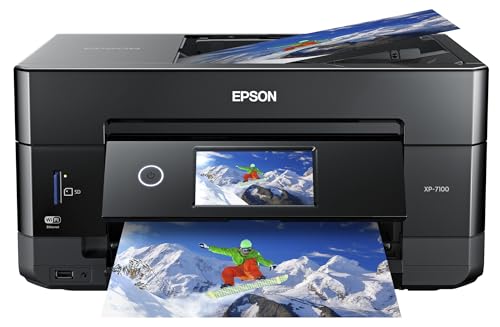
Best for: crafters and home offices needing sharp color graphics and versatile media handling. This model supports borderless photo printing up to 8×10 inches and offers duplex printing and ADF for efficiency.
Why chosen: Epson’s color accuracy and glossy finishes are well-regarded for photo projects. It’s a solid choice for users who want high-quality photos alongside document printing needs.
Caution: All-in-one inkjets require regular maintenance; avoid long idle periods to prevent clogged nozzles and preserve print quality.
Nelko PP01 Mini Photo Printer

Best for: travelers and scrapbookers who want pocket-sized photo printing with sticky-back prints for easy use in journals or planners. It prints 2×3 photos with adhesive backing, designed for quick, on-the-go craft projects.
Why chosen: The ultra-compact form factor and adhesive prints make this a pick for hobbyists who value portability over large-format photoprints. It complements larger printer setups for on-location memory capture.
Caution: Print size is limited to 2×3 inches, which may not suit everyone’s needs for standard photo albums.
Buying Guide: How to Choose the Right Reliable Photo Printer
- Print sizes and formats: Do you primarily print 4×6 photos, or do you need borderless 8×10 prints? Some models focus on small formats, others support larger borderless prints.
- Ink and media costs: Photo printers can vary in ongoing ink/print paper costs. Consider cartridge or dye-sublimation needs and the included starter papers.
- Connectivity and ease of use: USB, Wi-Fi, Bluetooth, and native apps affect how easily you print from phones and laptops. Docking stations can simplify mobile use.
- All-in-one features: If you also need scanning, copying, or document printing, an all-in-one device may be more efficient for home office integration.
- Durability and output quality: Dye sublimation generally provides durable prints with resistance to water and fading. Inkjet printers may excel in color range for photos and graphics.
Frequently Asked Questions
- What makes a photo printer reliable for home use?
– Reliability comes from consistent print quality, low maintenance needs, and predictable ink/media costs over time. - Is dye sublimation better than inkjet for photos?
– Dye-sublimation tones colors smoothly and produces durable, water-resistant prints, but inkjets can offer broader media support and larger formats. - Do all-in-one printers affect photo print quality?
– Some all-in-ones deliver excellent photo output, but dedicated photo printers may provide deeper color and faster borderless 4×6 prints. - Should I choose a portable photo printer?
– Portable printers are ideal for travel, events, or scrapbooking on the go, but they may have higher per-print costs and smaller print sizes. - What is the typical print speed for home photo printers?
– Print speed varies by model and format; many home photo printers deliver 4×6 prints in under a minute, with some faster dye-sub options. - How important is tethering or docking for mobile printing?
– Docking and direct device charging can improve convenience and stability, especially when printing from a smartphone.