Best Motion Detection Web Cameras for Home and Office
If you need a motion-detecting web camera for security, streaming, or remote monitoring, this guide highlights five strong options and explains who each is best for. These picks emphasize reliable motion detection, clear video quality, and easy integration with apps and smart assistants. The top choices vary from compact, AI-powered webcams to full-featured indoor cameras with wide angles and two-way audio. The buyer types below help you decide which model fits your space—home, small office, pet monitoring, or baby/Nanny cam use.
Summary of selected products:
| Product | Best For | Key Benefit | Notes |
|---|---|---|---|
| OBSBOT Tiny SE 1080P 100FPS Webcam | Gamers, streamers, remote meetings | Ultra-smooth 1080P@100FPS AI tracking | High frame rate, zone/bodypart tracking |
| blurams 2K Indoor Camera (1 & 2 Pack) | Home security, pet monitoring | Smart AI detection with auto tracking | No subscription required for AI features |
| LaView 4-Pack Indoor Cameras | Multi-room home monitoring | 4 wired Wi‑Fi cameras with 1080P and night vision | Supports multiple live feeds |
| Amposei 1080P Mini WiFi Camera | Discreet surveillance, portable setups | 160° wide angle, dual connectivity | Compact and flexible placement |
| Kasa EC70/EC71 1080p Pan/Tilt | Home security with local storage | Pan/tilt tracking with local storage option | Two similar models with different features |
OBSBOT Tiny SE 1080P 100FPS Webcam

Best for streamers and remote teams who want high-motion accuracy and smooth video. This AI-powered webcam offers 1080P at 100FPS and 720P at 150FPS, ensuring fluid motion capture for fast action and smooth video calls. Zone tracking and body-part tracking enhance focus on specific areas or body movements, useful for presentations or dynamic meetings. A compact desktop camera, it suits individuals who need reliable AI tracking at a reasonable price.
Best for: streamers, esports commentators, and video-native content creators who prioritize tracking accuracy and-frame fluidity.
Caution: Advanced AI features may require software integration; ensure your platform supports the OBSBOT tracking workflow you plan to use.
blurams 2K Indoor Camera Pack

Best for households seeking robust AI-powered monitoring without ongoing subscription fees. The blurams 2K camera delivers full-room coverage with 360° pan/tilt and AI detection for humans and pets, automatically tracking motion and recording short clips. Night vision and two-way audio enhance day-and-night monitoring, making it suitable for pet care, baby monitoring, and general home surveillance.
Best for: homes needing hands-free motion tracking and a straightforward alert system without monthly costs.
Caution: Requires 2.4 GHz Wi‑Fi; 5 GHz is not supported on these models.
LaView Security Cameras 4-Pack Indoor 1080P

Best for multi-room home monitoring with centralized access. The LaView 4-camera kit provides 1080P live streams and motion detection along with two-way audio. It supports multiple simultaneous feeds and web access, making it practical for larger apartments or homes where centralized viewing is desired. Night vision helps in darker areas, and alerting keeps you informed when motion is detected.
Best for: households needing several cameras for comprehensive coverage and easy remote viewing through a single app or web interface.
Caution: Must use a compatible network and app environment; wired power and 2.4 GHz Wi‑Fi compatibility should be confirmed for all locations.
Amposei 1080P Mini WiFi Camera

Best for discreet, flexible surveillance in compact spaces. The Amposei camera features a 160° wide-angle lens and dual connectivity options (WiFi or AP hotspot), giving you versatile placement without visible bulk. It supports remote monitoring via smartphone and is suitable for small offices, baby areas, or hidden-room monitoring where space is at a premium.
Best for: users who need a small, portable camera that can operate in locations without stable Wi‑Fi or where discreet placement matters.
Caution: Wide-angle view can exaggerate space; verify placement to avoid blind spots at the edges of the field of view.
Kasa EC70 1080p Indoor Pan/Tilt

Best for flexible home security with local storage option. The EC70 offers live 1080p streaming, real-time motion and sound detection, and a pan/tilt range that helps you track activity across larger spaces. It supports local MicroSD storage without monthly fees and provides a patrol mode for systematic area scanning. This model is well-suited for apartments, hallways, and rooms where you want broader situational awareness.
Best for: users seeking a budget-friendly Pan/Tilt camera with local storage and easy setup.
Caution: Requires 2.4 GHz Wi‑Fi; ensure layout supports smooth pan/tilt without physical obstructions.
Kasa EC71 1080p Pan/Tilt

Best for comprehensive room coverage with intelligent motion tracking. The EC71 features 360° horizontal and 113° vertical pan/tilt, enabling complete room scanning over time. It supports motion tracking for automated alerts and can be used as a baby or pet monitor with instant notifications. Like its EC70 sibling, it integrates with a local storage option and cloud features as needed.
Best for: households needing full-room coverage with flexible patrol and automation features to monitor multiple zones.
Caution: Features can overlap with EC70; verify which model aligns with your preferred storage and automation options before purchasing.
PEGATISAN 3MP CCTV Bullet

Best for outdoor-adjacent indoor security with higher resolution. This 3MP IP camera uses advanced encoding options and supports dual H.265/H.264 streams to optimize bandwidth and storage. Its compact pinhole lens design helps it blend into less conspicuous locations, suitable for hidden or discreet placement. It’s primarily an indoor or semi-protected environment camera with reliable motion detection via an IP connection.
Best for: users needing higher resolution for detail-rich footage and space-constrained placements where a small form factor matters.
Caution: Requires PoE power if used in professional NVR setups; confirm power and network compatibility for your specific system.
blurams Indoor Camera 2K
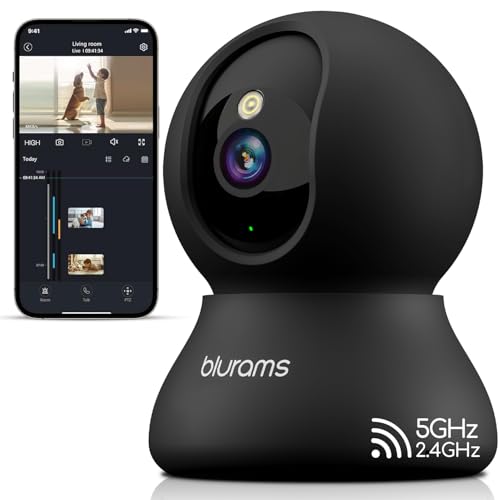
Best for smart home integration and AI-assisted security. The 2K blurams model provides 360° or near-360° coverage with motion tracking and two-way audio. AI detection supports instant alerts for humans and motion, with a short video clip saved locally or via cloud without mandatory subscriptions. It also integrates with voice assistants for easy viewing and setup with smart routines.
Best for: homes seeking strong AI detection, quick alerts, and simple voice assistant control without ongoing service fees.
Caution: You may want to verify privacy options and IFTTT capabilities if you rely on complex automations or cloud storage.
Buying Guide: Key Considerations and Comparisons
- Video quality and frame rate: For fast movement, prioritize cameras offering 1080p or higher with high frame rates (60fps+). Higher frame rates produce smoother motion tracking critical for activity-heavy rooms or gaming streams.
- Motion detection and AI features: Look for AI-based detection (humans, pets, or objects) and tracking (zone tracking, body-part tracking). This helps reduce false alarms and focuses on relevant activity.
- Field of view and pan/tilt capabilities: A wide-angle lens and effective pan/tilt range maximize coverage and minimize blind spots. Consider models with 360° or near-360° coverage if you monitor large spaces.
- Storage options: Local MicroSD storage avoids monthly fees in many models. Cloud storage may add ongoing costs but offers longer video history. Consider models with optional cloud plans and easy access via apps or web interfaces.
- Connectivity: Decide between wired vs. wireless setups. Wired cameras often provide stable feeds, while wireless models offer flexible placement. Ensure your network supports the required bandwidth for multiple streams if you have several cameras.
- Night vision: If surveillance is needed in low light, confirm color or infrared night vision capabilities and the effective range to avoid blind spots in darkness.
- Smart home compatibility: If you use Alexa, Google Assistant, or other automation systems, confirm compatibility for live viewing, voice control, or routine integration.
- Placement considerations: For best motion detection, avoid placing cameras behind glass or near heat sources, and consider elevation and line-of-sight to common activity zones.
- Privacy and security: Review privacy toggles, encryption, and data handling policies. Ensure firmware updates are available to address vulnerabilities.
Frequently Asked Questions
- What is motion detection on webcams used for?
It helps identify and alert you to activity in a video stream, enabling faster responses for security, monitoring, or live streaming purposes. - Do I need a subscription for AI features?
Some cameras offer AI detection without a subscription, while others provide additional cloud storage or advanced analytics with paid plans. Check each model’s features. - Is local storage sufficient for my needs?
Local storage is good for privacy and avoiding monthly fees, but it may limit history length. Consider combining local storage with optional cloud backup if you need longer archives. - What is the difference between 2K and 1080p in practice?
2K generally offers higher detail and clarity, especially in larger rooms or when zooming into footage. For most home setups, 1080p is sufficient, but 2K is helpful for high-detail monitoring. - Can these cameras work without constant Wi‑Fi?
Some support AP hotspot or local network modes, but most require a reliable Wi‑Fi connection for real-time alerts and remote viewing. - What is the best way to place a motion camera for pets?
Position cameras where pets commonly move, at an accessible height, and avoid obstructions that could trigger false alerts. Wide views help capture more activity.