Best Overhead DSLR Camera Mounts for Desk Setups
Answering the needs of creators who shoot top-down visuals, this guide highlights five sturdy overhead camera mounts ideal for desks. These options fit DSLRs, compact cameras, and even smartphones when used with appropriate adapters. Ideal buyers include live streamers, studio photographers, cooking vloggers, educators, and product reviewers who need stable, adjustable overhead angles. The table below compares the best picks at a glance to help you decide quickly before diving into each option.
| Product | Best For | Max Load | Height Range |
|---|---|---|---|
| SMALLRIG Camera Desk Mount | General overhead work & streaming | 2 kg | 30–73 cm |
| DImotliyor Overhead Desk Mount | Flexible multi-angle shots | ~2–2.7 kg | Adjustable, up to desk space |
| ULANZI ZJ02 | Long reach overheads | Noted in spec | 65 cm height |
| JUSMO LS15 Pro | High-load multi-device setups | ~22 lb | Modular height |
| CACENCAN Overhead Mount | Versatile, compact studios | 5 lb | 15–25 inches |
SMALLRIG Camera Desk Mount Overview

The SMALLRIG desk mount supports cameras, phones, lights, and microphones, making it suitable for indoor live streaming and desktop photography. It features a height-adjustable main pole (30 to 73 cm) and a secondary arm (30 to 50 cm) with a 360° infinite angle. The design includes a robust gear structure and widened base to bear up to 2 kg, stabilizing overhead shots. Best for desk-based creators who need reliable, easy height and angle adjustments in small to medium setups.
Who it’s best for: streamers, educators, and product reviewers seeking a straightforward, stable overhead rig with strong vertical reach. Limitations: the maximum load is 2 kg, which may exclude heavier DSLR bodies without additional counterbalance.
DImotliyor Overhead Desk Mount
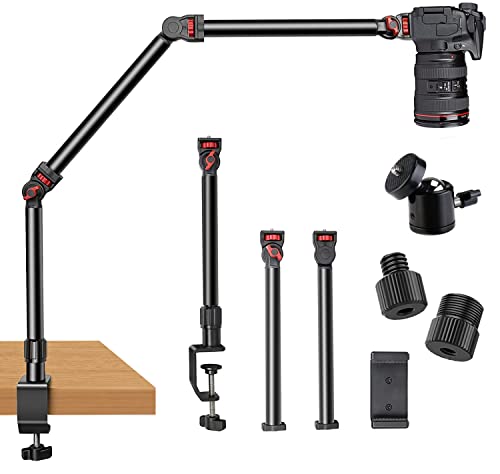
The DImotliyor mount uses a 3-section detachable arm with a 1/4″, 3/8″, and 5/8″ screw set and a 360° ball head. It offers 360° base rotation and 180° arm bends for flexible angles, enabling tight top-down lighting and camera angles. Made from aluminum alloy for durability, it supports up to about 4.5 lb (2 kg) horizontally and 6 lb (2.7 kg) suspended. Best for hobbyists and professionals who require compact, highly adaptable overhead shots with room to expand via additional poles or clamps.
Who it’s best for: budget-conscious creators needing a strong, expandable overhead rig. Caution: ensure the combined load remains within the specified horizontal and suspended limits to avoid instability.
ULANZI ZJ02 Desk Mount Arm

The ZJ02 offers a 98 cm extension and a 4-section arm with a 1/4″ ball head, enabling broad overhead coverage. Its joints provide 180° versatility, with a maximum height of about 65 cm. This option is best for larger desks and users who need a long reach for overhead lighting and camera angles. A strong choice for studio-style setups where top-down shots must span a wider working area.
Who it’s best for: creators needing extended reach for large work surfaces. Caution: longer arms can introduce more flex if not tightened correctly, so proper clamping is essential.
JUSMO LS15 Pro Overhead Mount

The LS15 Pro uses an aluminum alloy framework with a maximum load of about 22 lb (10 kg), enabling multiple devices in a single overhead rig—ideal for complex desk setups. It supports segmented adjustments, with expansion options such as extra poles or other clamps. Best for studios and professionals who need robust load capacity and modular growth. Limitation: heavier setups may require careful balance to maintain stability.
Who it’s best for: pro creators building multi-device overhead rigs. Caution: ensure all connections are secure when adding expansion poles to maintain balance.
CACENCAN Overhead Mount

This 5-pound-capacity overhead desk mount features a versatile 3-section arm with a 1/4″ screw, a universal phone holder, and a 360° ball head. It supports desktop photography, video calls, and streaming, with a telescoping height range from 15″ to 25″. Best for compact studios and beginners who want a simple yet capable overhead solution. Caution: ensure desk clamps have enough bite on your surface to prevent slippage during movement.
Buying Guide: Selecting the Right Overhead DSLR Desk Mount
What load do you plan to lift? Always match the mount’s maximum load to your camera body and any accessories. If you plan to pair lights, microphones, or multiple devices, choose a higher-capacity rig like the LS15 Pro or similar extended arms.
How much desk space is available? Long-reach arms deliver wide overhead coverage but require sufficient desk depth and secure clamping. For compact desks, consider shorter arms with strong vertical reach, like the SMALLRIG or CACENCAN models.
Is flexibility more important than stability? Multi-section arms and 360° ball heads offer flexible angles but may need frequent tightening to maintain position. Simpler mounts provide steadier, predictable performance but less angle variety.
What mounting method suits your desk? Most options use C-clamps; ensure your desk thickness and edge profile are compatible. Some mounts include versatile bases that work better on rounded edges or thinner surfaces.
Expansion potential: if you anticipate upgrading gear, prioritize modular designs that allow extra poles, clamps, or compatible accessories. This reduces future replacement costs and simplifies upgrades.
Frequently Asked Questions
- Can I mount a DSLR on these overhead rigs? Yes, provided the camera’s weight falls within the mount’s maximum load.
- Do these mounts require special tools to install? Most use standard screws and clamps; basic assembly is typically straightforward with included hardware.
- Will overhead mounts reduce camera shake? A stable clamp and a balanced setup significantly reduce shake during overhead shots.
- Are extra poles or clamps needed for expansion? Some models support expansion; check the product page for compatible accessories.
- Which mount is best for a tight budget? Look for models offering essential overhead capability with lower load limits and fewer expansion options.
- Can I use these mounts for live streaming? Yes, all listed options are suitable for overhead live streaming and top-down demonstrations.