Best Polaroid Camera for Phone: Top Smartphone Printers and Hybrid Cameras
Looking for a Polaroid-style camera experience that pairs with your phone? These smartphone printers and hybrid instant cameras let you print photos directly from your iPhone or Android device, making it easy to share tangible memories. This guide highlights five top options, explaining who each is best for, and how they compare for practical, everyday use.
Buyer snapshot: Ideal for quick, on-the-go photo printing, social media snapshots, scrapbooking, and family memories. Best for travelers, students, and casual photography enthusiasts who want real prints without complex setup.
Summary table of selected products:
- Fujifilm Instax Mini Link 3 Smartphone Printer – Clay White
- KODAK Step Instant Smartphone Photo Printer – White
- Fujifilm Instax Mini Link 2 Smartphone Printer – Soft Pink
- Polaroid Hi-Print + Paper Bundle – White
- KODAK Mini 2 Retro Portable Photo Printer – White
Fujifilm Instax Mini Link 3 Printer

The Instax Mini Link 3 is a compact, Bluetooth-connected printer that works with INSTAX Mini film. Best for users who want a simple, portable way to print quick 2×3-inch photos from their phones. It supports frames and filters prior to printing for a polished result. A solid choice for casual shooters who value speed and ease of use.
Who it’s best for: students, travelers, and casual shooters who want social-friendly prints from their phones without a large camera setup. Why selected: strong balance of portability, ease of use, and compatible film ecosystem.
Limitations: Prints require INSTAX Mini film (sold separately); the device relies on the dedicated app for editing before printing.
KODAK Step Instant Smartphone Printer

The KODAK Step uses ZINK technology to print 2×3” photos directly from a smartphone. Best for people who want no ink costs and durable, glue-stickable prints. The app includes editing tools, filters, and borders to customize each image before printing.
Who it’s best for: busy users who need quick, inexpensive, and versatile mobile prints. Why selected: zero-ink approach keeps maintenance low and prints are easy to handle.
Caution: Requires ZINK paper; ensure the correct paper packs are on hand for continued printing.
Fujifilm Instax Mini Link 2 Printer
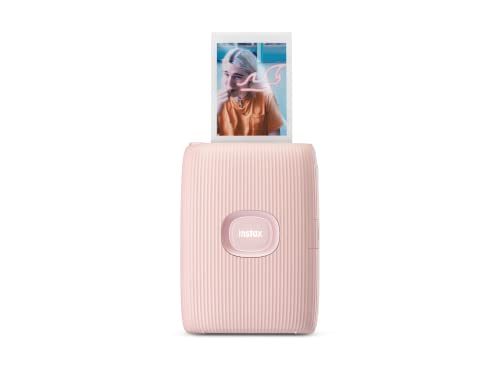
The Mini Link 2 is a compact Bluetooth printer designed for INSTAX MINI film. Best for users who want enhanced printing features, including pre-print frames, filters, and drawing options. It supports printing from videos as well, broadening creative possibilities.
Who it’s best for: social media lovers and creative hobbyists who want enhanced pre-print options. Why selected: reliable, pocket-sized, and easy to pair with mobile devices.
Limitation: prints require Instax Mini film and the editing features are app-based, requiring a smartphone connection.
Polaroid Hi-Print + Paper Bundle

The Polaroid Hi-Print uses dye-sublimation to deliver high-quality 2×3” photos from a smartphone. Best for users who want a complete starter kit with 40 sheets of paper for immediate prints and easy sticking options.
Who it’s best for: impulse printers and crafters who value vibrant color and quick output. Why selected: includes a ready-to-use bundle that minimizes setup friction.
Limitation: dye-sub technology can require careful handling to avoid smudges during transfer.
KODAK Mini 2 Retro Printer

The KODAK Mini 2 Retro uses 4PASS dye sublimation to print 2×3” photos with a clear protective lamination. Best for those who want durable, fingerprint-resistant prints with a simple setup. It includes a wireless connection and quick-start printing.
Who it’s best for: travelers and families seeking sturdy, long-lasting prints. Why selected: simple operation and durable outputs. Limitations: print speed is modest, and color fidelity depends on the editing features in the app.
Buying Guide
What to consider when choosing a phone-to-print device
- Print size and format: Most options print 2×3” photos; check if you prefer 2×3” or different sizes for albums and scrapbooks.
- Ink and paper: Some use dye-sublimation or zero-ink technologies. Consider durability, moisture resistance, and cost per print.
- Connectivity: Bluetooth, NFC, or wireless networking influence pairing ease with your phone or tablet.
- Editing features: Apps offer frames, filters, text, and borders. Decide if you need advanced editing before printing.
- Portability: If you plan to print on the go, look for compact, battery-powered options and lightweight designs.
- Film availability and cost: Ensure readily available film or paper, and compare the per-print cost across brands.
- Hybrid capabilities: Some models double as cameras or include QR codes or sound features. Consider if you want mixed-media prints.
Frequently Asked Questions
- What is the best option for quick, casual prints from a smartphone? The Fujifilm Instax Mini Link 3 or Mini Link 2 offers straightforward smartphone printing with easy-to-use apps.
- Do these printers require special film? Yes, most do. Instax Mini prints require Instax Mini film, while KODAK options use ZINK or dye-sublimation paper.
- Can I print from videos? Some models, like the Mini Link 2, support printing frames from videos after editing in the app.
- Are these devices suitable for scrapbooking? Yes, especially models that use 2×3” papers and come with editing features for borders and stickers.
- What is the durability of the prints? Dye-sublimation prints are typically resistant to fingerprints and moisture; some papers include protective lamination.
- Do these require internet access? Most printing occurs via Bluetooth or a direct wireless connection, not necessarily an internet connection.