Best Portable Printers for Cameras: Compact Photo Printers for On‑The‑Go Printing
In today’s mobile photography landscape, a portable photo printer lets you turn digital shots into tangible memories in minutes. Whether you’re a hobbyist, student, wedding planner, or traveler, choosing the right mini printer matters. This guide highlights five top options that pair well with smartphones and cameras, focusing on print quality, ease of use, and durability. Each pick fits naturally into a bag, a desk, or a studio cart, so you can print on the spot without sacrificing image fidelity.
| Product | Brand | Key Benefit | Format |
|---|---|---|---|
| KODAK Step Instant Printer (White) | KODAK | Zero-ink printing with durable, sticky-back photos | 2×3″ ZINK |
| KODAK Step Instant Printer (Black) | KODAK | Fast mobile editing and same-day prints | 2×3″ ZINK |
| Kodak Mini 2 Retro | KODAK | Laminated, fingerprint-resistant prints | 2.1×3.4″ |
| Canon Selphy CP1500 (Black) | Canon | Wi-Fi connectivity and durable finished prints | _postcard sized_ (various) |
| Canon Ivy 2 Mini | Canon | Sticky-back, pocket-sized convenience | 2×3″ |
Below are five hand-picked models that excel in portability, speed, and print quality. Each product section provides a concise overview, direct purchase link, and highlights from the official features. This snapshot helps you compare at a glance and pick the right device for your needs.
KODAK Step: White Portable Photo Printer

The KODAK Step Printer delivers instant 2×3″ photos using ZINK zero-ink technology. It pairs with iOS and Android devices via Bluetooth or NFC for quick, on‑the‑spot printing from your camera roll or social posts. The package includes the printer, charging cable, starter ZINK paper, and a quick-start guide. The standout feature is the zero-ink process, which eliminates ink cartridges while producing durable, water- and smudge-resistant prints. The free Kodak App provides a full editing suite—collages, filters, borders, stickers, and text—to customize photos before printing in under a minute.
KODAK Step: Black Portable Photo Printer
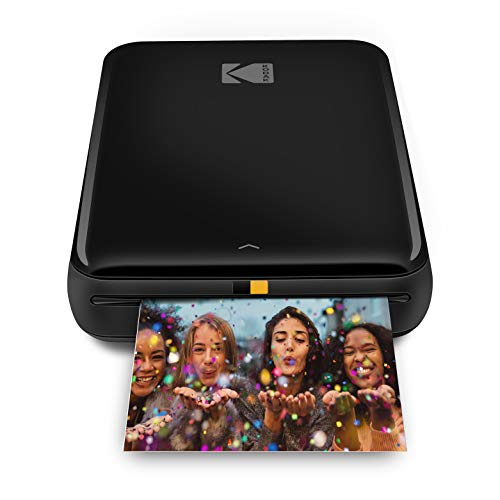
This model mirrors the White variant with identical printing technology and app support, offering rapid, edge-to-edge 2×3″ sticky-back prints. The integrated editing suite enables users to craft unique looks—posters, collages, and text-based designs—before sending images to print. The device’s compact form factor makes it ideal for classrooms, travel days, and on-location shoots, where immediate physical copies can be shared or cataloged for memory keepsakes.
Kodak Mini 2 Retro: 4PASS Portable Printer

The Kodak Mini 2 Retro uses 4PASS technology to produce durable, laminated 2×3″ prints. This process layers color for vibrant results and adds a laminate that resists fingerprints and moisture. Weighing only about 0.4 pounds, it’s highly portable for students, travelers, and event teams. The device works with the Kodak Photo Printer app for Bluetooth-enabled printing from iOS or Android, enabling quick edits, then printing on the go. Its pocketable design makes it a versatile companion for school clubs, field trips, and daily photo printing needs.
Canon Selphy CP1500 Wireless Compact Printer (Black)

The Canon Selphy CP1500 emphasizes wireless connectivity and a compact footprint suitable for travel-friendly setups. It supports mobile and camera connections, enabling easy printing from a smartphone or compatible camera. Optional battery back enables on-location printing, and prints are designed to dry quickly, with durability suitable for long-term display. Canon emphasizes resilience and longevity, noting that prints can resist moisture and maintain color quality for extended periods, making it a strong choice for event photography, scrapbooking, and in-store product visuals.
Canon Ivy 2 Mini: Sticky-Back Photo Printer (Blush Pink)
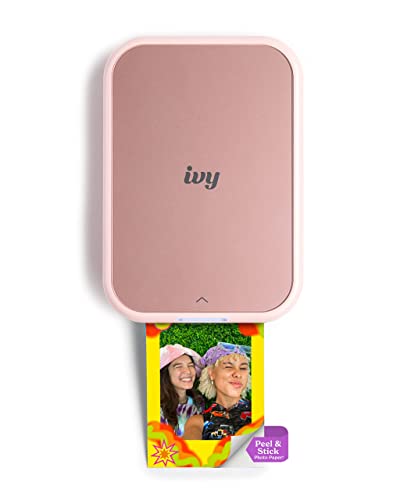
Canon’s Ivy 2 Mini focuses on simplicity and portability for everyday use. It prints via the Canon Mini Print App and uses ZINK technology to deliver dye-based color prints with a sticky backing. The compact design and accessible app workflow allow quick, on-demand print projects—ideal for planning events, decorating spaces, or sharing instant memories with friends and family. Its ease of use and Pocket-sized form factor make it a practical option for students and casual photographers who value convenience over advanced editing tools.
Fujifilm Instax Mini Link 3 (Sage Green)

The Fujifilm Instax Mini Link 3 modernizes the mini printer category with a stylish Sage Green design and strong compatibility with smartphones. It supports fast mobile printing of mini instant photos that echo classic Instax aesthetics. While it’s oriented toward Polaroid-style prints, its app ecosystem provides fun editing options and creative templates. This model appeals to social media enthusiasts who want tangible, retro-looking snapshots that can be shared or pasted into journals and scrapbooks.
Canon SELPHY CP1500 (White)

The white variant of the SELPHY CP1500 balances portability with robust features. It’s designed to handle Wi-Fi and direct smartphone connectivity, offering quick, reliable photo printing from multiple devices. The printer emphasizes a compact footprint for home offices or travel kits, while providing durable, water-resistant prints that hold up well over time. Users seeking a clean, low-profile device that still delivers high-quality images will find the CP1500 White a solid fit for everyday photo tasks.
Buying Guide: Key Considerations For Portable Photo Printers
- Print technology and materials: Zero-ink (ZINK) and 4PASS laminating formats are popular for durability. Consider whether you need laminated or standard prints, and the resulting finish quality.
- Print size and media: Most portable printers output 2×3″ or similar formats. If you want larger prints, verify supported sizes before purchase.
- Connectivity: Bluetooth, NFC, Wi-Fi, and app-based workflows determine how easily you can print from smartphones and cameras. Check compatibility with iOS and Android.
- Portability and weight: For field work or travel, lighter units with a compact footprint are ideal. Battery options may extend on-the-go use, so assess battery life and charging needs.
- Ease of use: User-friendly companion apps, ready-made templates, and editing features can save time. Some printers offer collage, border, sticker, and text options directly in the app.
- Print durability: Water, smudge, and scratch resistance are important for keepsakes. Laminating processes or protective coatings influence longevity.
- Cost of consumables: Consider the price and availability of photo paper. ZINK paper often includes sticky backing, while laminated formats may require occasional replacement supplies.
- Use-case alignment: If you need quick social-media prints, speed matters. For scrapbooking or portraits, color fidelity and border options may be more important.