Best Remote Control Camera Sliders for Smooth Motion and Professional Footage
When choosing a remote control camera slider, aim for smooth, trackable motion, reliable power, and flexible shooting modes. This guide highlights top picks that appeal to creators, vloggers, and hobbyists seeking consistent motion without manual cranking. The best options balance quiet operation, long battery life, and intuitive control for time-lapse and video shoots. Ideal buyers include independent content creators needing portable rigs, small production teams, and enthusiasts pursuing cinematic motion with smartphone to DSLR setups.
| Product | Best For | Key Benefit |
|---|---|---|
| NEEWER 3 Wheels Wireless Dolly | Beginners & mobile shooters | Wireless remote with multiple speeds |
| GVM 48″/120cm Carbon Fiber Slider (1) | Advanced motion control | Multiple modes including 120° panorama |
| NEEWER 31.5″/80cm ER1-80 | Time-lapse lovers | App and remote control options |
| NEEWER 47.2″/120cm ER1 | Studio setups & long rails | Longer travel with two-way control |
| GVM 48″/120cm (3) With App | Versatile pro setups | Six shooting modes and wide compatibility |
Below are five selected remote control camera sliders that align with common buyer intents: portability for on-location shoots, extended travel for cinematic sequences, time-lapse reliability, and app-based control for hands-free operation. Each listing includes who it’s best for, why it stands out, and a practical note on any limitations supported by the product data.
NEEWER 3 Wheels Wireless Dolly
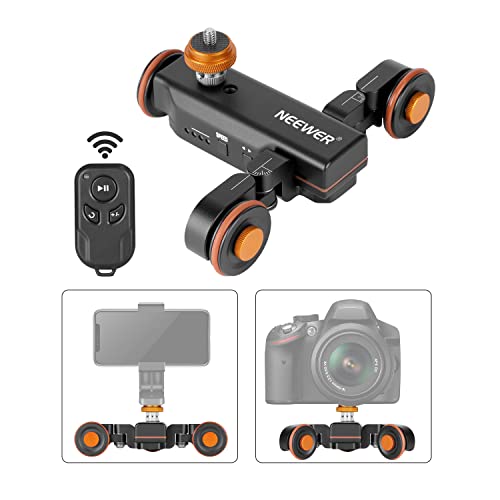
This three-wheel, remote-controlled dolly offers three speed settings and a wireless range of about 6 meters. The adjustable wheel angle supports creative circle routes as well as straight-line moves, making it suitable for small studios or on-the-go shoots. This is best for beginners or creators who want simple, reliable motion control with minimal setup. Best used with compact DSLRs, mirrorless cameras, or smartphones via a convertible 1/4″ to 3/8″ screw system. A minor caveat is that heavy macro work can challenge stability on uneven surfaces.
GVM 48″/120cm Carbon Fiber Slider (Three‑Mode)
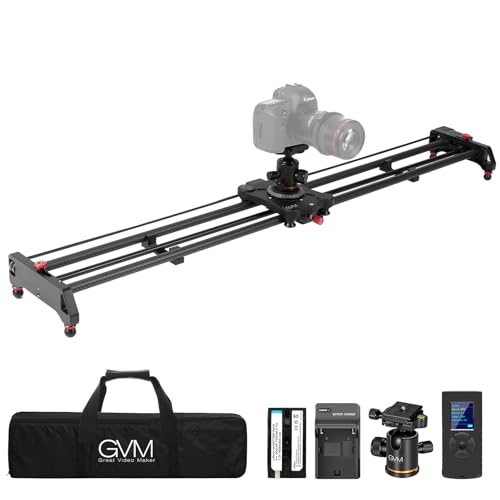
This carbon fiber slider provides three shooting modes, including tracking, time-lapse, and panoramic options, with a 120° panorama capability. Remote control enables fine-tuning of time-lapse parameters, slide speed, dwell time, distance, and shot count. It’s better for experienced shooters who want precise, repeatable motion and a broader range of framing options. Limitation: the setup assumes a flat, stable surface, so outdoor wind or vibration may affect stability.
NEEWER 31.5″/80cm ER1-80

This 31.5″ remote slider emphasizes versatile control, with app and 2.4G remote operation. It supports manual, video, and time-lapse modes, and uses a 4400mAh NP-F750 battery for long shooting sessions. Best for time-lapse enthusiasts and content creators who need flexible control via app. Note that the charger is not included, so power planning is essential for extended shoots.
NEEWER ER1-80 (Alternative)

This model mirrors the ER1 line, delivering smooth, quiet motion with a 4,400mAh battery option and app remote control. The adapter also supports time-lapse and video shooting, with attention to stable horizontal loads up to 11 lb. It’s best for creators seeking a proven ER1 structure with reliable battery-powered operation. Limitation: battery longevity may require careful charging, and battery availability should be planned for longer shoots.
GVM Camera Slider, 27” Aluminum Alloy

This aluminum alloy slider focuses on smooth operation with time-lapse, video shooting, and auto round-trip modes. It includes multiple 1/4″ and 3/8″ screw holes for versatile mounting and can be used on the ground or with a tripod. It’s well suited for studio setups or interviews where a compact, stable platform is needed. A limitation is that it’s shorter than large-frame rails, which reduces travel distance for long shots.
GVM Carbon Fiber 31″/80cm Slider

This carbon fiber slider offers complete control with time-lapse, video, and tracking modes. Remote control lets you set start and end points, sweep speed, dwell time, and shot count with auto-loop functionality. It’s best for creators needing a lightweight, portable option with robust feature access. Limitation: some setups may require additional mounting hardware for optimal stability on uneven terrain.
Buying Guide: Key Considerations And Comparisons
- Motion modes: Look for at least time-lapse, video, and tracking modes to support different shooting styles.
- Remote and app control: Apps add convenience for time-lapse and precise movement, but ensure compatibility with your device ecosystem.
- Load capacity and tilt: Verify horizontal load limits and whether the rail supports tilting to capture dynamic angles safely.
- Power options: Battery-powered systems extend field use; check battery type, life, and whether chargers are included.
- Material and weight: Carbon fiber rails offer stiffness and lightness, while aluminum is generally more affordable and rugged.
- Compatibility: Ensure screw ports (1/4″ and 3/8″) align with your camera rig, tripod, and accessories.
- Length and travel: Longer rails enable broader tracking shots but add weight and footprint; choose based on typical shoot size.
- Stability features: Look for quiet motors and anti-shake design, especially for macro and low-light work.
- Portability: Consider whether the system disassembles for travel and if it fits in your camera bag or case.
Frequently Asked Questions
- What defines a good remote camera slider for beginners?
A model that offers straightforward setup, reliable remote control, and clear compatibility with common cameras and smartphones is ideal for beginners. - Can I use a remote slider for time-lapse photography?
Yes. Time-lapse modes and configurable intervals are common features that help produce smooth, long-exposure sequences. - What should I consider about load capacity?
Choose a slider that can support the weight of your camera plus accessories; exceeding limits can cause instability. - Is carbon fiber necessary?
Carbon fiber provides stiffness and lightness, which reduces vibration, but aluminum options are often more affordable. - Do these sliders require additional chargers?
Some models include batteries, while others require external power; check the product details for charging requirements. - Are there compatibility limitations with smartphones?
Most remote systems include 1/4″ or 3/8″ screw adaptors, but verify mounting options for your specific phone or small camera rig.