Best Screen Attachments for Camera: Elevate Your Vlogging and Live Streaming
Finding the right screen attachment for your camera or phone can dramatically improve framing, focus, and overall production quality. The following five picks offer magnetic attachments, real-time mirroring, wireless control, and robust brightness for outdoor shooting. Each product is designed to turn smartphones into capable vlogging tools, supporting rear-camera use, 4K or high-framerate output, and hands-free operation for solo creators.
| Brand | Product | Key Benefit | Link |
|---|---|---|---|
| Meonxy | Vlog Selfie Monitor Screen | Rear-camera use with 4K capture and magnetic attachment | Meonxy |
| TTQ | Vlog Selfie Monitor Screen 4K 60fps | Plug-and-play 4K@60fps, 400-lumen display | TTQ |
| LUCKSKY | Vlog Selfie Monitor Screen iPhone | Real-time rear-camera mirroring up to 4K60, 180° rotation | LUCKSKY |
| WIESKEN | Selfie Monitor Screen (White) | Magnetic attachment, wireless remote, 33ft control | WIESKEN |
| SMALLRIG | Phone Monitor Screen with Wireless Control | MagSafe compatibility, 4K/30fps, real-time sharing | SMALLRIG |
Meonxy Vlog Selfie Monitor Screen

Meonxy’s Vlog Selfie Monitor Screen combines magnetic attachment with rear-camera capability, enabling high-quality selfies, vlogs, and live streams. The device supports 4K at 30fps from a phone’s camera and offers wireless connectivity for low-latency viewing. For optimal results, the BlackMagic Camera app is recommended to minimize lag, and a note suggests disabling Wi-Fi on iPhones to improve performance. The magnetic interface ensures stable, hands-free shooting angles for consistent framing.
TTQ Vlog Selfie Monitor Screen 4K 60fps

TTQ’s model emphasizes 4K@60fps recording with a plug-and-play workflow and dual USB-C connections for real-time audio synchronization. It attaches magnetically to compatible iPhones and other devices, offering a self-powered screen through the phone connection. A 400-lumen outdoor display ensures visibility in bright conditions, while a one-click rotation feature simplifies transitions, keeping footage properly oriented during live streams and on-the-go shoots.
LUCKSKY Vlog Selfie Monitor Screen iPhone

LUCKSKY offers real-time rear-camera mirroring with up to 4K60 via screen mirroring and a Bluetooth remote for hands-free control. The 180° rotation feature helps creators avoid upside-down footage, while three brightness levels adapt to varying lighting. This setup is ideal for creators who want a compact, responsive monitor that keeps their main camera as the source of truth for framing and quality.
WIESKEN Selfie Monitor Screen (White)

WIESKEN’s white model emphasizes a magnetic, MagSafe-compatible attachment for quick setup, with a Bluetooth remote enabling control from up to 33 feet away. It supports wireless mirroring and is designed for compatibility with most iOS and Android devices that output video, with a caveat noting in-app workarounds for 4K recording. This option is well-suited for creators who value a simple, cordless workflow and hands-free operation.
SMALLRIG Phone Monitor Screen

SMALLRIG’s monitor focuses on MagSafe compatibility and 1080p wireless recording, with support for 4K at 30fps via the connected phone. The device enables real-time screen sharing and remote control, with a cold shoe mount to attach accessories like lights or microphones. Range extends up to about 32-33 feet, making it practical for solo shoots, interviews, or studio setups where mobility matters.
VITANO 5” Vlog Selfie Monitor
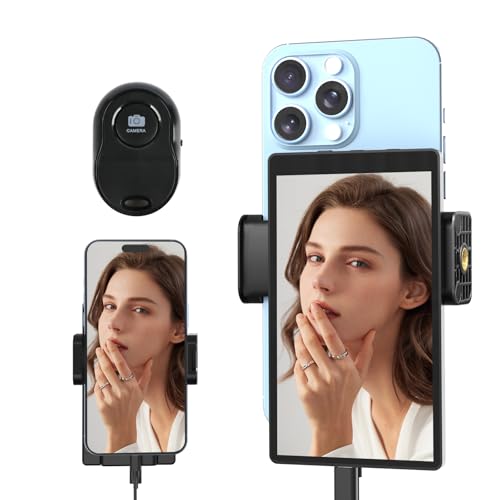
VITANO’s 5-inch monitor offers real-time HD viewing with long-range remote capture up to 33 feet. It emphasizes compatibility with iPhone and most Android devices with a magnetic mount, plus a 1/4-inch screw hole for accessories. The device is designed for creators who want a compact, affordable option that still delivers solid performance for TikTok, YouTube, and live streaming content.
Buying Guide
Key purchase considerations help distinguish the right screen attachment for your workflow:
- Compatibility: Check whether the monitor supports your phone model, rear-camera mirroring, and any required apps (for 4K or 60fps output).
- Display brightness and color accuracy: Outdoor shoots demand high brightness (around 400 lumens or more) and reliable color fidelity for consistent skin tones and true-to-life visuals.
- Attachment method: Magnetic MagSafe-style mounts are quick and clean, but verify stability for your device and accessories. Consider alternatives for heavier phones or cases.
- Latency and real-time monitoring: Low-latency performance is crucial for framing, timing, and synchronization with audio. Some units require app optimization or power settings adjustments.
- Power and charging: Some monitors draw power from the phone, while others offer passthrough charging. Decide if you need continuous power for longer shoots.
- Remote control range: If you plan solo shoots, a Bluetooth remote with a 30-foot range is often enough for comfortable operation.
- Rotation and framing: A 180° rotation or flexible tilt helps avoid upside-down footage and awkward angles during transitions.
- Budget and portability: Smaller, lighter monitors suit travel and on-the-go filming; larger screens improve visibility on a desk or studio setup.
All five options prioritize rear-camera use, wireless or screen-mirroring workflows, and hands-free operation. When choosing, align features with your primary platforms (TikTok, YouTube, Instagram), shooting environment (indoor studio vs. outdoors), and preferred control methods (remote vs. manual). For creators who rely on mobile setups, these screen attachments offer practical improvements in framing, lighting adaptability, and ease of use during solo shoots.