Best 128MB Smart Media Cards for Legacy Devices
Discover reliable 128MB SmartMedia cards that work with older digital cameras, MP3 players, and other devices with SmartMedia slots. This guide highlights five practical options, explaining who they’re best for, their strengths, and any limitations. Ideal buyers include vintage camera enthusiasts, collectors of retro electronics, and those restoring older devices that still rely on SM cards.
| Product | Brand | Capacity | Best For |
|---|---|---|---|
| SmartMedia Card 128MB SM Memory Card | Pefishop | 128 MB | General legacy devices; wide compatibility |
| JJOYQKAI SmartMedia Card 128MB SM Memory Card | JJOYQKAI | 128 MB | Digital cameras and audio devices supporting SM |
| JJOYQKAI SmartMedia Card 128MB SM Memory Card W/Lighting to Memory Card Reader | JJOYQKAI | 128 MB | SM compatibility with reading via included reader |
| Delkin 128 MB SmartMedia Card | Delkin Devices | 128 MB | Digital cameras and handheld devices |
| Onefavor 3.3V SmartMedia Cards SM 128MB | onefavor | 128 MB | Older cameras and PDAs; wide OS compatibility |
SmartMedia Card 128MB SM Memory Card — Pefishop

Features: Widely compatible with original 128MB SmartMedia slots in Olympus, Fujifilm, MP3 players, and other devices. Interface is 22-pin, 3.3V power, and data integrity is preserved during use. Compatible across Windows, Mac OS, Linux, and Chrome OS.
Best for: Users with older cameras or music players that require a standard 128MB SM card. This option provides broad device compatibility and straightforward Plug-n-Play use.
Caution: Verify device support for 3.3V SmartMedia before purchasing; some very old devices may have partial compatibility.
JJOYQKAI 128MB SmartMedia Card

Features: 128MB capacity, 3.3V ±5% power, low power consumption with data integrity, compatible with various cameras and devices supporting SM cards.
Best for: Buyers seeking a compact 128MB SM card with reliable energy use for older cameras and audio recorders that require SM format.
Caution: Some devices may require formatting to the SM card before first use; check device manual for formatting steps.
JJOYQKAI 128MB SmartMedia Card with Reader

Features: 128MB SM card, 3.3V ±5% power, low power usage, compatible with devices supporting SM cards; includes reader for convenient data transfer.
Best for: Users who want to read SM cards without a built-in reader, facilitating quick data transfer to a computer.
Caution: The included reader may be bulky for portable setups; ensure your workspace accommodates the reader size.
Delkin 128 MB SmartMedia Card

Features: Delkin eFilm 128MB SmartMedia memory stores up to 128MB; high-capacity Plug-n-Play simplicity; suitable for digital cameras, MP3 players, and handheld PCs.
Best for: Users who prioritize a straightforward, widely-supported SM card from a trusted brand with easy setup.
Caution: Some older devices may require a specific formatting sequence; confirm device compatibility before use.
Onefavor 3.3V SmartMedia Card 128MB
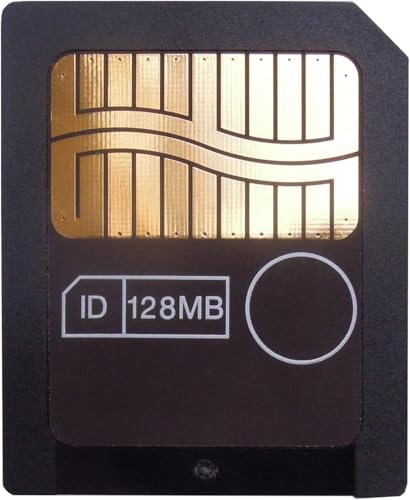
Features: 128MB capacity, 3.3V ±5% power, low power consumption, compatible with Windows, Mac OS, Linux, and Chrome OS; suited for a broad set of devices requiring SM cards.
Best for: Buyers looking for broad OS compatibility and a compact 128MB option for legacy devices like older cameras and PDAs.
Caution: Availability may vary; check that your device’s SM interface supports 3.3V operation before use.
Buying Guide: Key Considerations for 128MB SmartMedia Cards
- Device compatibility: Confirm your camera or player explicitly supports SM format and 3.3V power; some devices require 5V or have nonstandard SM implementations.
- Card capacity: 128MB is suitable for simple storage needs on legacy devices; assess whether you need higher capacity for your application or multiple devices.
- Power and interface: Look for 3.3V ±5% power and standard 22-pin SM interfaces to maximize compatibility and data integrity.
- Operating system support: Ensure the card is reported as compatible with Windows, Mac OS, Linux, or Chrome OS if you plan to transfer data on a PC.
- Reliability and brand: Consider brands with a history of SM cards (Delkin, Delkin eFilm, JJOYQKAI, Onefavor) to reduce data loss risk.
- Reader options: If a reader is included, verify its compatibility with your computer’s ports and its ability to support the SM format transfer smoothly.
- Physical durability: Some SM cards are more robust than others; handle with care to avoid pin or connector damage.
Frequently Asked Questions
- What is a SmartMedia card?
It’s an older flash memory format with a 22-pin interface used in some vintage cameras and devices. - Do all old devices support 128MB SmartMedia cards?
Most do, but some devices require a specific firmware or formatting sequence; check the user manual. - Can I use a 128MB SM card in modern devices?
Modern devices may not support SM cards; they typically use SD or microSD formats. - Is formatting required before first use?
Often yes; format to the SM file system according to device instructions to ensure data is readable. - Are there risks transferring data from SM cards?
Data integrity depends on the card’s condition; use a reliable reader and back up important files when possible. - Which brand is most reliable for 128MB SM cards?
Renowned brands like Delkin and established manufacturers offer dependable SM solutions; verify device compatibility first.