Best Solid-State VHS Movie Camera Alternatives for Preserving Footage
Planning to digitize or preserve old VHS footage with modern gear? This article highlights solid-state and hybrid options that help capture, convert, or play back vintage video while staying aligned with current tech standards. Below you’ll find five relevant Amazon products, plus a buying guide that outlines key considerations to help you choose wisely.
| Product | Brand | Amazon Link |
|---|---|---|
| Video Camera, 1080P 30MP Camcorder IR Night Vision Vlogging Camera | VETEK | Link |
| Sony VHS/DVD Combo Player (Renewed) | Sony | Link |
| Panasonic VHS to DVD Recorder VCR Combo w/Remote, HDMI | Panasonic | Link |
| Toshiba New SD V296 DVD/VCR Combination | TOSHIBA | Link |
| 2 FujiFilm Video TC-30 VHS-C Premium Quality Videocassette | Fujifilm | Link |
Introduction to options: This selection covers a range of devices and media that bridge the gap between analog VHS and modern playback, capture, and transfer workflows. Each product serves a distinct role—from capturing live video with a contemporary camcorder to playing or transferring VHS into digital formats. Consider your preferred workflow, storage needs, and whether you want a standalone player, a transfer-capable combo, or compact media for on-the-go digitization.
VETEK Video Camera With IR Night Vision
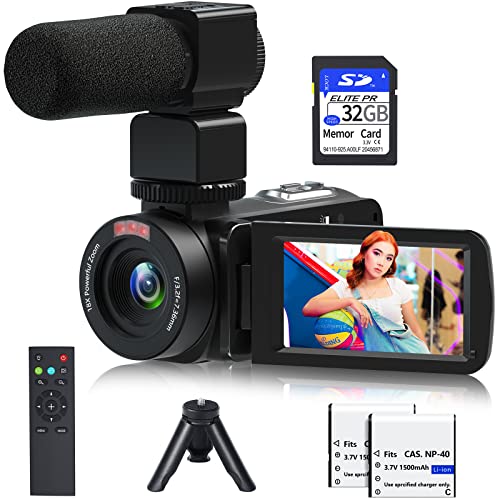
The VETEK camcorder is a compact, solid-state style option for beginners looking to capture new footage in 1080p. Key features include 1080P recording at 30 frames per second, infrared night vision for low-light shots, and a 3.0″ LCD screen. The kit includes remote control, microphone, a mini tripod, two batteries, and a 32GB SD card, supporting simple on-the-go vlogging and event documentation. This model emphasizes accessibility and portability, making it suitable for immediate storytelling and casual projects.
Sony VHS/DVD Combo Player (Renewed)
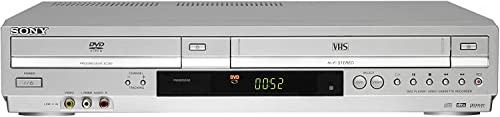
This renewed Sony unit blends VHS playback with DVD playback in a single chassis. It provides a practical solution for families or archivists who still rely on VHS tapes while expanding functionality with DVD playback. It supports standard RCA and HDMI connections. Note that it does not record VHS to DVD, which is a consideration if your goal is direct digital transfer from VHS to a digital format on the fly. The device format aligns with retro media preservation needs where playback accuracy is a priority.
Panasonic VHS to DVD Recorder VCR Combo

Panasonic’s VCR/DVD combo focuses on transferring home VHS tapes to DVD with a dedicated transfer workflow. The unit is designed to simplify the conversion process and includes a remote for convenient operation. The key value is a straightforward “press to transfer” approach, reducing the need for external capture hardware. The device is positioned for users who want to create durable digital copies from existing VHS tapes at home, with a promise of reliable performance and easy post-transfer playback on DVD players.
Toshiba SD V296 DVD/VCR Combination

The Toshiba V296 combines a DVD player with a VCR in a compact form. It includes features like a JPEG viewer and One Touch Recording for VCR, with component video options. This unit supports simple playback and basic recording, making it a practical choice for households looking to re-live old memories without needing complex setups. The combo design remains useful for archiving and viewing old tapes in a familiar format.
FujiFilm VHS-C Premium Quality Tapes (Two Pack)

These FujiFilm VHS-C tapes are designed for vintage camcorders and portable VCR setups. They offer reliable media for recording and playback in analog formats. Having quality tapes on hand is important for preserving footage when working with aging equipment, and FujiFilm’s reputation for dependable media makes these a sensible addition to a VHS preservation workflow. Use these tapes with compatible camcorders or adapters to capture moments from family events, school projects, and travel.
Buying Guide
- Workflow goals: Decide whether you primarily want to play back old tapes, transfer them to digital, or capture new footage with modern gear.
- Device type: Choose between dedicated media players, VCR/DVD combos, or transfer-focused recorders based on how you plan to preserve content.
- Media compatibility: Ensure you have the correct tapes (VHS, VHS-C) and media formats that your hardware supports; stock up on reliable tapes if using older media.
- Connectivity: Look for HDMI and USB outputs for easy transfer to modern displays or computers. RCA connections can still be useful for legacy setups.
- Ease of use: For non-professional users, consider devices with straightforward transfer buttons, remotes, and built-in editing or playback features to minimize setup complexity.
- Quality considerations: If you intend to digitize, prioritize gear that preserves original color and audio fidelity, and consider using post-processing software for enhancement.
- Longevity and reliability: Renewed or refurbished units can be cost-effective but verify return policies and warranty terms to mitigate risk.
- Storage and organization: Plan for digital storage (external drives, cloud backups) and categorize tapes by date or event to simplify future retrieval.
- Future-proof options: If frequent transfers are anticipated, a dedicated VHS-to-DVD or VHS-to-digital transfer setup with upgradeable software may be advantageous.
In assessing these options, balance nostalgia and practical needs. For quick playback and occasional digitization, a combo device may suffice. For consistent preservation projects, investing in a reliable transfer workflow with suitable storage and software will support higher-quality results over time.