Best Streaming Cameras With Zoom for Clear, Flexible Video
In today’s digital landscape, a streaming camera with zoom can elevate meetings, live streams, and remote collaborations. This guide highlights five standout options that balance image clarity, zoom capabilities, and user-friendly features for American audiences. Each choice offers distinct strengths, from built-in mics to remote-controlled zoom, ensuring you can tailor your setup to different environments—from home offices to classrooms and small studios.
Summary of chosen products
- Logitech Brio 101 Full HD 1080p Webcam
- NexiGo N60 1080P Webcam
- Logitech C920x HD Pro PC Webcam
- Angetube 4K Webcam with AI Tracking
- EMEET C960 4K Webcam
Logitech Brio 101 Full HD Webcam With Built‑In Mic

This webcam is designed for versatile streaming and meetings, including compatibility with Nintendo Switch 2’s GameChat mode. It features RightLight auto-light balance that enhances brightness and reduces shadows up to 50%, helping users look their best in varying lighting. An integrated microphone ensures clear audio during conversations, making it suitable for laptop or desktop setups. The device prioritizes reliable, high-quality video for everyday use, with a focus on ease of setup and consistent performance in standard office or home environments.
Angetube Streaming Webcam With Ring Light And Remote
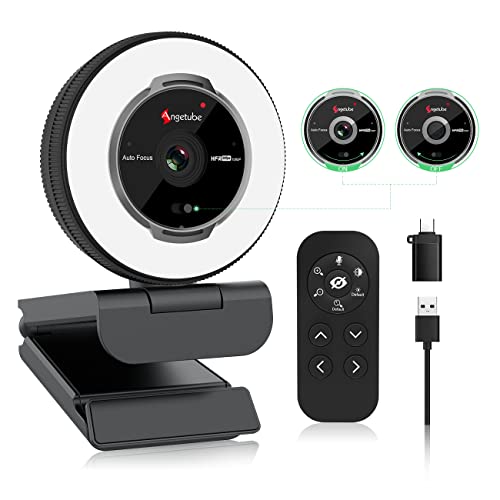
This 1080p webcam includes a ring light and a remote control for quick lighting adjustments, enabling improved portrait quality in streaming scenarios. It offers 5x digital zoom and real-time auto focus to help you maintain sharpness during dynamic movements or close-ups. The camera is designed to work with popular livestream software like OBS and is compatible with multiple platforms, including Xbox and Mac, making it a flexible option for creators who want convenient lighting and zoom control in one device.
NexiGo N60 1080P Webcam With Zoom And Privacy

The NexiGo N60 delivers full HD 1080p video with user-controlled zoom and an adjustable field of view. It includes a privacy cover and a built-in noise-canceling microphone, which helps reduce ambient sounds for clearer calls. The camera is plug-and-play, with software options to tweak exposure and FOV, making it a good fit for Zoom, Teams, and other conferencing tools. Its broad compatibility makes it suitable for both work-from-home setups and school environments.
Logitech C920x HD Pro PC Webcam

The C920x Pro offers full HD 1080p at 30fps with dual mics and automatic lighting correction. It is a reliable choice for streaming and video calls, delivering better-than-average color accuracy and audio pickup. While not featuring extensive optical zoom, it excels in consistent performance and broad compatibility with major conferencing platforms. It remains a popular choice for users seeking a robust, plug-and-play camera for daily communications and content creation.
EMEET C960 4K Webcam With AI Noise Reduction

The EMEET C960 4K webcam delivers true 4K resolution and features automatic light correction, PDAF autofocus, and dual AI noise-canceling mics. It is designed for high-detail video calls and presentations, with plug-and-play simplicity for Windows and Mac. Although primarily a 4K device, its software options allow adjustments to optimize exposure and color in various lighting conditions, making it suitable for professional remote work and content creation that demands crisp imagery.
Angetube 4K AI Tracking Web Camera

This 4K webcam includes AI tracking and auto framing to keep meeting participants in frame as they move. It supports 4K at 30fps and 1080p at 60fps, with USB 3.0 for fast data transfer. HDR helps balance highlights and shadows, producing flattering images in challenging lighting. The AI tracking makes it well-suited for presentations, large meetings, and streaming scenarios where dynamic movement occurs.
Buying Guide: Key Considerations For Choosing A Streaming Camera With Zoom
Video resolution and frame rate: Higher resolutions (4K) offer more detail, but require more processing power and bandwidth. For most everyday streaming, 1080p at 30fps or 60fps provides a balance of quality and efficiency.
Zoom capability and FOV: Consider whether you need digital or optical zoom, and how adjustable the field of view is. Fixed focal-length lenses with software zoom can be sufficient, while some models offer multipoint zoom and remote operation for distant framing.
Auto lighting and exposure: RightLight or similar auto light correction helps maintain consistent lighting across different rooms and times of day. Look for sensors, HDR, and color accuracy features that minimize shadows and overexposure.
Audio quality: Built-in mics are convenient, but dedicated mics or dual-mic arrays can significantly improve sound. Noise suppression and echo cancellation are important for clear conversations.
Privacy and security: A privacy shutter or cover is essential for controlling camera access when not in use. Ensure the camera supports reliable driver updates and reputable software integration.
Compatibility and ease of use: Check compatibility with major platforms (Zoom, Teams, Google Meet) and whether plug-and-play setup is supported. Software controls for exposure, white balance, and zoom can enhance customization.
Remote control and accessories: Some models offer remote controls or smartphone apps for adjusting zoom, framing, and lighting from a distance. Accessories such as privacy covers and tripods add versatility.
Budget and value: Compare feature sets against price to determine the best value. For many users, a solid 1080p webcam with good low-light performance may meet needs without paying for 4K capabilities.