Best Studio Teleprompter Solutions for Clear on-Camera Delivery
The studio teleprompter you choose should match your setup, from compact streaming to full DSLR/mirrorless productions. This guide highlights five strong options, explaining who each is best for and why it stands out. It’s ideal for content creators, educators, and professionals seeking reliable script prompting without complicated setup.
| Product | Best For | Key Benefit |
|---|---|---|
| Elgato Prompter XL | DSLR/Mirrorless Studio Shoots | Full HD display with removable monitor and single-cable setup |
| Proaim Professional Speech Teleprompter | Broadcasts and Presentations | Supports devices up to 17″ and includes 60/40 beam splitter glass |
| NEEWER Basics X12B | Budget-Friendly Streaming | Easy, assembly-free design for iPad/tablets |
| Glide Gear TMP 100 | Compact, Mobile Shoots | Wide device compatibility with protective hood |
| NEEWER X11 | Live Streams On the Go | Built-in LCD monitor for quick setup |
Elgato Prompter XL – Full-Sized Teleprompter
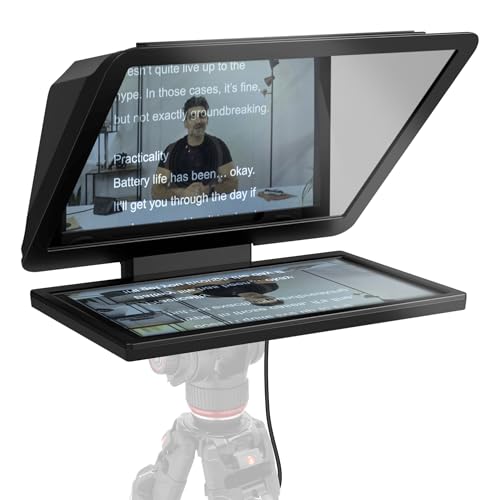
The Elgato Prompter XL is a full-size teleprompter designed for DSLR, mirrorless, and studio cameras. Its 15.6-inch display detaches for flexible placement, and the setup supports a single USB-C connection for PC or Mac. This option is best for creators who need a larger, easy-to-read prompt in a controlled studio environment and also want a spare monitor for conferencing or multitasking. A notable limitation is the need for compatible mounts and cables to maintain the single-cable workflow.
- Best for: Studio shooters needing a large, readable prompt and a convenient extra monitor.
- Why selected: Combines a detachable 15.6″ display with a simple USB-C setup, reducing cable clutter.
Caution: Ensure your camera rig supports the XL’s mounting and that you have an appropriate HDMI/USB-C routing if you plan to use the spare monitor for conferencing.
Proaim Professional Speech Teleprompter

The Proaim Professional Speech Teleprompter is designed for versatility with devices up to 17 inches, including tablets, laptops, and monitors. It uses a 60/40 beam splitter glass to balance script visibility with natural eye contact. A telescopic conference stand is included, enabling quick height adjustments for comfortable viewing angles. This option is ideal for presentations, broadcasts, and multi-camera productions. A limitation is the need to match the device size to the prompt if precise eye-line consistency is essential.
- Best for: Presentations and broadcasts requiring large device compatibility.
- Why selected: Combines flexible mounting with a professional beam splitter for clear script visibility.
Caution: The large device support may require additional counterbalance or heavier support equipment on certain tripods.
NEEWER Basics X12B Aluminum Teleprompter

The NEEWER Basics X12B emphasizes economy without sacrificing core teleprompter functionality. It features an upgrade with an assembly-free design, lightweight durable aluminum construction, and a liftable platform to center lenses. It’s well-suited for online courses, tutorials, and streaming where cost containment and straightforward use matter most. Note that it does not function as a separate monitor for self-viewing while recording.
- Best for: Budget-conscious creators who want ease of use and reliable basic prompting.
- Why selected: Assembly-free design and solid build make it a practical starter teleprompter.
Caution: It does not provide built-in monitor functionality for on-camera self-view or script mirroring beyond the reflected text.
Glide Gear TMP 100 Teleprompter

The Glide Gear TMP 100 offers wide device compatibility for smartphones and tablets up to 10.5″ x 8″. Its protective hood improves visibility by reducing glare, and the included carry bag supports travel-ready setups. It uses a professional-grade beam splitter glass (70/30) to balance readability with camera clarity. This model is best for mobile or on-location shoots where portability matters. A potential limitation is device size constraints for larger screens or cameras.
- Best for: Mobile shoots and compact studio setups needing portability.
- Why selected: Protective hood and carrying bag enhance on-the-go usability.
Caution: Not suitable for devices larger than the specified tablet size, which can limit use with bigger monitors.
NEEWER 2 in 1 Teleprompter X11
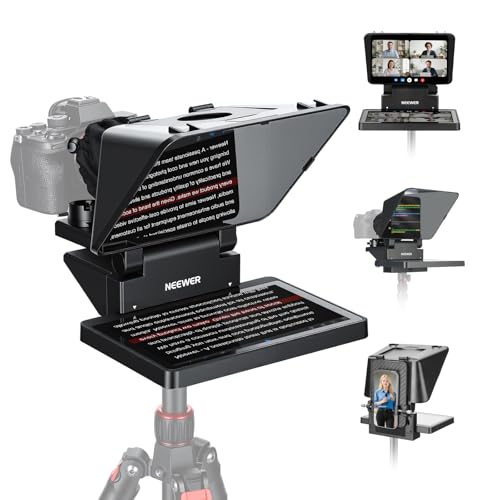
The NEEWER X11 integrates a built-in 9″ HD LCD monitor for direct screen mirroring, designed for live streaming and video conferencing. It includes a 9″ display, a 75% light transmission beam splitter, and a screen-mirroring cable for simple setup. It is best for creators who want an all-in-one solution that reduces the number of external devices. The setup is quick, but it requires compatible devices and proper app or driver support for full functionality.
- Best for: Quick, all-in-one prompt setup for live streams and conferencing.
- Why selected: Built-in monitor simplifies the prompt workflow and reduces extra gear.
Caution: Some users may need to install drivers or apps for full screen-mirroring features depending on their devices.
Buying Guide
What to consider when choosing a studio teleprompter:
- Device compatibility: Choose a model that supports your camera size and preferred devices (phones, tablets, laptops). Look for beam splitter glass quality and light transmission ratings to ensure crisp script visibility without sacrificing image quality.
- Monitor and display needs: Decide if you want a built-in monitor or an external display. Built-in monitors simplify setup, while external displays can offer larger prompts for longer scripts.
- Portability vs. studio stability: If you travel or shoot on location, prioritize lightweight, foldable designs with protective carrying cases. For a fixed studio, a sturdier setup with larger prompts may be preferable.
- Setup complexity: Assembly-free and plug-and-play options save time but may limit customization. Consider your comfort with mounting, cable routing, and software control if remote operation is important.
- Eye contact and ergonomics: A teleprompter that keeps the script at or near eye level improves natural delivery. Proper distance and tilt influence readability and eye contact.
- Cost vs. features: Economical models cover essential prompting, while premium options offer larger screens, better beam splitters, and added integration features. Balance budget with your production needs.
FAQ
- What is a teleprompter beam splitter glass and why does it matter?
- Can I use a teleprompter with a smartphone?
- Do built-in monitors require special software?
- Is a larger teleprompter better for reading scripts?
- What is the best teleprompter for on-the-go shoots?
- Do teleprompters affect camera image quality?
Beam splitter glass reflects the script toward the camera while allowing light from the scene to pass through. A good split ratio (for example 70/30 or 60/40) preserves image quality while ensuring the script is readable.
Yes, many models are designed to hold smartphones or small tablets. Check device size limits and mounting compatibility before purchasing.
Some models use plug-and-play mirroring or rely on included apps. Always verify compatibility with your operating system and devices.
A larger screen can improve readability from farther distances, but it may require a larger studio footprint and more robust mountings.
Models with lightweight construction, protective hoods, and carry bags are ideal for travel and quick setup. Built-in monitors can also speed up assembly on location.
Quality beam splitters and proper alignment minimize any impact on image quality. Poor alignment or reflections can reduce readability and eye contact.