Best USB Cables for Cameras: Reliable Photo Transfer and Charging Essentials
Finding the right USB cable for your camera can simplify shooting days, speed up file transfers, and keep your gear ready for the next shoot. This guide highlights top USB data transfer cables designed for a variety of Canon, Nikon, and general camera models. We cover compatibility, durability, and practical use cases so you can choose cables that fit your setup and workflow.
Summary table of selected products
| Product | Brand | Key Use | Length |
|---|---|---|---|
| SCOVEE Camera USB Cable Cord for Canon & Elph Series | SCOVEE | Canon cameras and Elph series data transfer | 6 ft |
| USB C Data Transfer Interface Cable for Canon/Nikon | ienza | USB-C data transfer for select Canon/Nikon models | Varies (USB-C) |
| Camera IFC-400PCU USB Data Transfer Cable | ienza | Canon Rebel, PowerShot, Vixia models | Standard length varies |
| 3ft Mini USB Cable, USB 2.0 to Mini B | ULIFTUS | General devices including cameras and accessories | 3 ft |
| SCOVEE 10FT Camera USB Cable Cord | SCOVEE | Canon Elph, Rebel, and Vixia family data transfer | 10 ft |
SCOVEE USB Cable For Canon And Elph Series
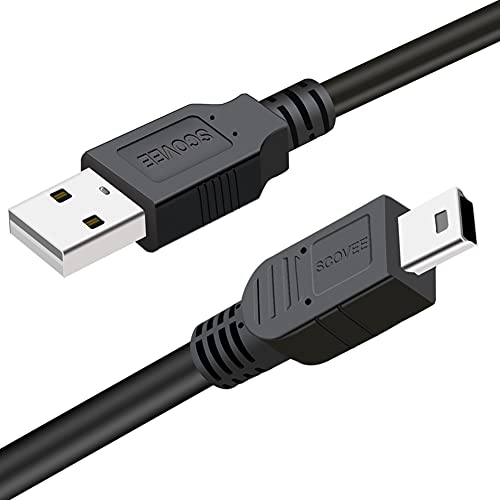
This mini USB cable is compatible with all Mini-B 5-Pin devices and is designed for transferring pictures, images, and other files from compatible cameras to a PC or Mac. It works with Canon PowerShot ELPH models and other cameras that require an IFC-400PCU, IFC-200U, or IFC-500U cable. The 6-foot length offers flexibility for desktop and on-location transfers, while a durable build helps endure daily use. Users can connect directly to a computer to simplify backup workflows or import media for editing in post-production.
The SCOVEE 6-foot model targets common Canon compact and DSLR workflows, including transfer from Elph series cameras. Its compatibility list includes a broad range of PowerShot and ELPH cameras, which makes it a practical choice for families with multiple Canon models or for photographers who switch between travel cameras and more advanced bodies. As with any USB data cable, ensure the camera’s USB mode is set to allow data transfer rather than charging only.
USB C Data Transfer Interface Cable For Canon And Nikon

This USB-C data transfer interface cable is designed for cameras that require USB-C connectivity to download photos or videos to a PC, laptop, or smartphone. It lists compatibility with Canon EOS Rebel T5i, T6i, T7i, and select PowerShot and Vixia models, as well as Nikon DSLR D610, D90, and related bodies needing a UC-E4/UC-E15 type connection. The USB-C interface supports modern devices such as MacBooks and newer smartphones, streamlining cross-device workflows. It is particularly useful for creators who rely on USB-C hardware for efficient file transfer and backup during shoots.
Important considerations include confirming your camera’s support for USB-C data transfer cables, ensuring your computer or mobile device has a compatible USB-C port, and verifying the exact model compatibility list in the product description before purchasing. This type of cable can also support rapid transfer when paired with USB-C capable hosts and devices.
Camera IFC-400PCU USB Data Transfer Cable

The IFC-400PCU cable family is designed for Canon Rebel, EOS T1i, T2i, T3, T3i, T4i, T5, T5i, T6, T6i, T6s, T7i, and various PowerShot and Vixia camcorders. This data transfer cord helps move images and other files from your camera to your PC or Mac. The listing highlights compatibility with multiple IFC variants (such as IFC-400PCU, IFC-200U, and IFC-500U), ensuring broad coverage for users with older to mid-range Canon cameras. It serves as a reliable option for photographers who maintain a mix of Canon models and require consistent data transfer cables across devices.
When selecting this cable, verify the exact model you own matches the listed canon model family. Cable quality, connector integrity, and connector length are practical factors to consider for maintaining steady data transfers and reducing wear on the camera’s USB port during frequent use.
3ft Mini USB Cable, USB 2.0 To Mini B

This 3-foot USB-A to Mini-B cable provides USB 2.0 data transfer with a maximum 480 Mbps speed. It’s compatible with devices that use a Mini USB 5-pin connector, which includes many cameras, MP3 players, and some gaming peripherals. The cord offers fast charging up to 3A and emphasizes durability with a bend-tested PVC jacket. The reinforced connectors are designed to resist wear from frequent plugging and unplugging, making it a practical, budget-friendly option for primary camera transfers and on-the-go charging needs.
The ULIFTUS 3-foot option is a concise alternative for travelers or hobbyists who need a shorter, tangle-free cable. It’s suitable for linking a camera with a computer, a USB charger, or a power bank for charging while transferring data. This cable’s performance hinges on the quality of the USB-A and Mini-B connectors and the overall build to prevent data loss during synchronization.
SCOVEE 10FT Camera USB Cable For Canon Elph And Rebel
The 10-foot SCOVEE USB cable provides extended reach for transferring data from Canon Elph and Rebel series cameras to a PC or Mac. The long length is advantageous when a computer is not immediately adjacent to a shooting setup, such as studio spaces or large workstations where flexibility matters. Features indicate compatibility with a broad range of Elph and SD-series cameras through the common Mini USB 5-Pin interface. The durability and length pairing make this model a versatile choice for photographers who need more slack between gear and the computer during the transfer process.
Buying Guide: Key Purchase Considerations And Comparisons
- Compatibility: Start with your camera model and confirm the exact USB type (Mini-B, USB-C, or standard USB-A) and the cable’s supported models. Canon, Nikon, and other brands may require specific cable variants (IFC, UC-E, UC-E16, etc.).
- Connector Type and Length: Choose a length that matches your workflow. Short cables minimize clutter; longer cables provide flexibility for studio setups or distant computers. Ensure the connector is robust to withstand repeated plugging and unplugging.
- Transfer Speed: USB 2.0 cables are common and cost-effective, but USB-C and USB 3.0/3.1 variants can offer faster transfers when paired with compatible devices. Consider your computer’s port availability and the file sizes you typically transfer.
- Durability and Build Quality: Look for reinforced connectors, quality jackets, and bend-tested designs to extend cable life in field conditions. A sturdy cable reduces data loss and port wear over time.
- Charging vs Data Transfer: Some cables focus on data transfer, while others support charging. If you need simultaneous power and data, verify the product supports both functions and the camera’s power requirements.
- Brand Reliability and Documentation: Opt for well-known brands or cables with clear compatibility statements and return policies. User reviews can highlight real-world performance and longevity.
- Future-Proofing: If you anticipate upgrading camera bodies to models with USB-C ports, consider a USB-C data transfer option or a versatile cable that supports multiple connector types compatible with your devices.
- Price-to-Performance: Compare build quality, length, and compatibility against price. A slightly higher upfront cost often yields longer service life and fewer replacement cables.
In summary, the best USB cables for cameras balance compatibility with build quality and practical length. For many photographers, having a couple of cable options—a standard 6-foot or 10-foot model for home or studio use and a USB-C capable option for newer devices—provides a flexible workflow. Always verify model-specific compatibility and consider how often you’ll travel with your camera gear to determine the most suitable length and connector type for your needs.