Best Video Camera for Live Broadcast: Top Picks for Clear, Reliable Streaming
Looking for a video camera capable of delivering steady, professional live broadcasts? This guide highlights five top options ideal for different buyers—streamers needing mobility, houses of worship, event producers, and educators. Each pick includes why it’s best for certain use cases, plus practical trade-offs to consider before you buy.
Summary table of chosen products:
- Logitech for Creators Mevo Start — Best for mobile, on-the-go live streaming
- Tenveo 4K NDI PTZ Camera AI Humanoid & Face Auto-Tracking — Best for church services and large events
- Osee GoStream Duet USB/SDI Multi-Camera Mixer — Best for multi-source, on-site productions
- Osee GoStream Deck HDMI Pro — Best for multi-output streaming with extensive control
- Tenveo 4K PTZ Camera with AI Auto-Tracking — Best for professional presentations and classrooms
Logitech for Creators Mevo Start — Wireless Live Streaming Camera

Best for: Creators who need compact mobility and easy smartphone control. This camera streams in 1080p HD and can switch between Wi-Fi, Ethernet, or LTE networks, making it suitable for on-the-go reporting or events without fixed infrastructure. The intelligent app control enables Auto-Director-style content creation from a phone, helping solo operators.
Why selected: It delivers native 1080p streaming with straightforward setup and wireless control, which suits solo shooters and small productions that require quick setup and flexible locations.
Limitations to note: No built-in hard drive—local recording requires an external option or streaming; higher-end productions may prefer 4K or more advanced control.
Tenveo 4K NDI PTZ Camera AI Humanoid & Face Auto-Tracking

Best for: Houses of worship, conference rooms, and large events needing hands-free subject tracking and professional PTZ control. The bundle includes a PTZ controller with 7″ LCD for real-time previews, ideal for operators who need precise framing during live broadcasts.
Why selected: 4K resolution with up to 20X optical zoom and AI auto-tracking keeps the subject centered, while NDI/RTSP/ONVIF support expands compatibility with professional switchers and streaming workflows.
Limitations to note: No built-in microphone, so separate audio capture is required for complete broadcasts.
Osee GoStream Duet Multi-Camera SDI/HDMI Live Stream Switcher

Best for: Live events requiring multi-source management with easy GUI control and Mac/Win software integration. This mixer-switcher supports SDI, HDMI, USB-C, NDI HX, and practical transitions for polished broadcasts.
Why selected: It consolidates multiple inputs and provides robust key effects and transitions, plus flexible control methods. It’s well-suited to productions that need on-site switching and PC-based control.
Limitations to note: More complex setup may demand a learning curve for first-time users, and feature depth may exceed simple solo-use scenarios.
Osee GoStream Deck HDMI Pro Live Streaming Switcher

Best for: Production setups needing multiple HDMI inputs and a dedicated streaming output with NDI HX and on-device audio controls. This model is ideal for studios or venues with several camera feeds and a need for reliable multi-stream capabilities.
Why selected: The hardware layout supports four HDMI sources plus two outputs, plus audio controls and SD card/SSD recording options for supplemental ingest. It’s designed for multi-platform streaming via Ethernet and other outputs.
Limitations to note: Higher price point and increased complexity may be overkill for basic single-camera livestreams.
Tenveo 4K PTZ Camera with AI Auto-Tracking
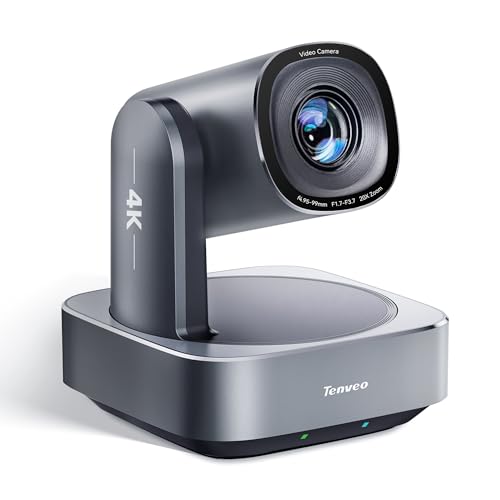
Best for: Professional classroom settings, worship services, or corporate events where auto-tracking and a wide perspective are essential. It offers 4K at 30fps with a 20X optical zoom and 8X digital zoom for flexible framing.
Why selected: Combines 4K capture, AI humanoid/face tracking, and versatile outputs (HDMI/USB3.0/LAN PoE). It supports multi-connection workflows and is compatible with professional switchers and streaming setups.
Limitations to note: Note the absence of a built-in microphone; external audio is required for complete broadcasts.
Buying Guide
What should I consider before buying a live-broadcast camera?
Assess video quality needs (1080p vs 4K), portability, and the desired level of automation such as AI auto-tracking. Consider required outputs (HDMI, SDI, USB, NDI) and whether PoE power is important to reduce cabling. Also, evaluate whether you need built-in streaming capabilities or integration with external switchers and software.
How important is autofocus and auto-tracking?
Auto-tracking helps maintain focus on presenters during movement, reducing manual control. For large rooms or ongoing events, AI-based tracking provides smoother framing, though it may require fine-tuning in dynamic lighting or crowded scenes.
Which setup is best for multi-camera productions?
Choose a device that offers multiple inputs (HDMI, SDI) and reliable network options (NDI, RTMP, RTSP). A dedicated switcher or control surface with a preview monitor can improve live decision-making and cut quality.
What about audio?
Most PTZ cameras omit built-in mics. Plan for external mics or mixer solutions and verify audio routing options via the camera or switcher to ensure clean synchronization with video.
What is the best fit for different buyers?
Single-camera mobile users: compact 1080p options with easy app control. Churches and large venues: 4K PTZ with AI tracking and NDI compatibility. Live events with many angles: multi-input switchers with robust audio and monitoring. Classrooms and education: reliable PTZ cameras with auto-framing and flexible outputs.
Quick comparison at a glance
- Best for mobility: Logitech Mevo Start
- Best for large venues: Tenveo 4K NDI PTZ with AI tracking
- Best for multi-source control: Osee GoStream Duet
- Best for multi-output control: Osee GoStream Deck HDMI Pro
- Best for classrooms and productions: Tenveo 4K PTZ with AI Auto-Tracking
FAQ
- What is the main difference between 1080p and 4K PTZ cameras?
4K provides greater detail and cropping flexibility, while 1080p may be sufficient for smaller streams or budget setups.
- Do I need a separate audio solution with these cameras?
Yes, except when the camera includes a built-in mic or is paired with an audio mixer that matches your workflow.
- Can these cameras stream directly to platforms like YouTube, Facebook, or RTMP servers?
Many support direct streaming or RTMP, RTSP, or NDI workflows; verify compatibility with your chosen platform.
- Is PoE power important for a live setup?
PoE simplifies wiring by delivering power and data over a single Ethernet cable, beneficial in fixed installations.
- Which camera is best for a small studio with one operator?
A compact 1080p model with app-based control and auto-direct features generally fits a solo operator best.
- Are NDI-enabled cameras necessary for every setup?
NDI is advantageous for professional switchers and multi-camera workflows, but not required for simple online streaming.