Best Video Conference Web Cameras for Clear, Reliable Calls
Choosing the right web camera can elevate every meeting, from quick team huddles to virtual client demos. The following selections represent top-rated models that balance image quality, audio pickup, and ease of use for American users. Each option supports common platforms like Zoom, Microsoft Teams, and Google Meet, with some models offering enhancements for low-light environments or wide-angle room capture. Use the quick summary below to narrow your choice, then read detailed product sections for specifics and comparisons.
| Product | Main Benefit | Best For | |
|---|---|---|---|
| Logitech C920x HD Pro | Great all-around 1080p | Home office, small teams | HD lighting adjustment, dual mics |
| j5create 360 Degree All Around | Full room coverage | Meetings with multiple participants | 360° viewing, six display modes |
| TONGVEO All-in-One Conference Room | All-in-one system | Small-to-medium conference rooms | HD camera + Bluetooth speakerphone |
| NexiGo N990 Gen 2 | 4K clarity with PTZ | Large meetings, presets | 5X digital zoom, Sony sensor |
| Logitech Brio 101 | High-quality 1080p with GameChat | Game/edu calls, versatile setup | RightLight, built-in mic |
Logitech C920x HD Pro PC Webcam

The Logitech C920x HD Pro webcam delivers Full HD 1080p video at 30fps with strong autofocus and automatic lighting adjustments. It features dual built-in microphones for stereo sound and a compact, plug-and-play design that works with most desktop setups and laptop configurations. It’s a versatile choice for everyday video calls, streaming, and classroom or remote work scenarios where reliable performance matters. Compatibility spans common platforms, including Teams, Google Meet, and Zoom, making it a dependable pick for mixed meeting environments.
j5create 360 Degree All Around Meeting Webcam
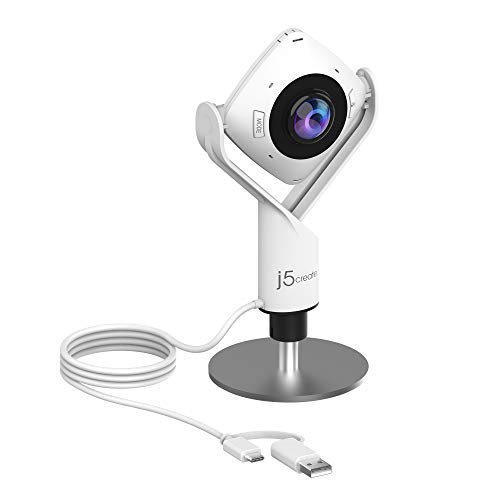
The j5create model offers a 360° field of view with a built-in omnidirectional microphone, designed to capture participants across a full room. With six display modes and full HD 1080p video at 30 Hz, this camera is well-suited for collaborative sessions, online classes, or large virtual roundtables. The wide-angle design helps ensure everyone stays visible during meetings, while USB-C connectivity provides straightforward setup for modern devices.
TONGVEO All-in-One Conference Room System

This all-in-one conferencing setup combines a 1080p HDMI PTZ camera with a Bluetooth conference speaker. The system supports simultaneous video and audio, enabling clearer meetings in small-to-medium conference rooms. Features include a wide 350° horizontal and 180° vertical range, a built-in microphone array with echo cancellation, and a portable, cable-friendly design. It’s ideal for teams that want a single, cohesive solution for video and audio without managing separate devices.
NexiGo N990 (Gen 2) 4K PTZ Webcam

The NexiGo N990 Gen 2 brings 4K ultra-high-definition imagery with a Sony Starvis sensor for crisp video at up to 3840×2160 at 30fps. It includes a PTZ mechanism with presets, a remote for zoom control, and dual stereo mics. This camera is designed for larger conference settings or presentations where precise framing and flexible camera control are valuable assets during calls.
Logitech Brio 101 Full HD 1080p Web Camera

Logitech Brio 101 emphasizes ease of use withGameChat compatibility on Nintendo Switch 2, RightLight automatic lighting adjustments, and a built-in microphone. It aims to deliver balanced, clear imagery with brightening features that reduce shadows. This model suits casual video calls, streaming, and educational use where straightforward setup and reliable performance are prioritized.
NexiGo N60 1080P Web Camera

The NexiGo N60 offers 1080p video with a 110° wide fixed focal length and software-adjustable FOV and exposure. It includes a built-in noise-cancelling microphone and plug-and-play USB setup, making it a solid choice for everyday video calls, online classes, and small group meetings where simplicity and dependable performance matter.
Buying Guide: Key Purchase Considerations
– Resolution and frame rate: For most professional use, 1080p at 30fps is a baseline. Models offering 4K provide crisper detail for large rooms or presentations, but require a stronger PC and bandwidth.
– Field of view: A narrower FOV is ideal for individual desks; a wide or 360° view helps capture groups. Consider room size and how many participants you typically include.
– Microphones and audio: Built-in mics vary in sensitivity and noise suppression. For meetings in noisy environments, dual mics or an external microphone system can significantly improve clarity.
– Auto exposure and lighting: RightLight or similar features help maintain visibility in mixed lighting. Inconsistent lighting can wash out or darken facial details without good adjustment.
– PTZ and presets: PTZ cameras with presets are beneficial for larger rooms or presentations that require quick framing changes without manual repositioning.
– Connectivity and compatibility: USB-C or USB-A options matter for newer devices. Ensure compatibility with your preferred videoconferencing platforms and any enterprise IT policies.
– Ease of setup: Plug-and-play is ideal, but some cameras offer bundled software for advanced controls, such as color correction, zoom, or exposure adjustments.
– Privacy and security: Look for physical shutters or software-based privacy features if you frequently leave meetings unattended or share your screen.
– Budget and future-proofing: Balance features against price. A camera with a higher resolution and broader feature set can provide long-term value as meeting requirements evolve.