Best WiFi Panoramic Camera Light Bulbs for Home Security
Answer: A WiFi panoramic camera light bulb typically combines illumination with a built-in security camera, offering 360° or near-360° coverage, motion detection, two-way audio, and remote alerts. This type is ideal for renters, small-space homes, and first-time smart security setups—providing both light and surveillance in one device. The following top five options balance field of view, AI features, and ease of installation for different needs and budgets. A quick buying table is included below to compare core specs at a glance.
| Product | Best For | Key Benefit | Limitations |
|---|---|---|---|
| WESECUU Light Bulb Security Camera | Large rooms, Alexa users | 5G & 2.4G dual-band for stable WiFi, 360° view | Requires E27 bulb base |
| ratolo Security Camera Indoor/Outdoor | Budget multi-pack needs | 360° panoramic view via E27 setup | Two-pack may require more setup |
| WYZE Bulb Cam | Wyze ecosystem fans | 2K HD, color night vision, easy Bluetooth setup | Limited to supported sockets |
| Hawkray Light Bulb Camera | AI-feature seekers | OpenAI-enabled AI detection, 911 alarm option | OpenAI features may vary by region |
| Hawkray Light Bulb Camera (Indoor/Outdoor) | Indoor/outdoor flexibility | 360° pan-tilt, dual-band WiFi | Bulb form may limit certain fixtures |
WESECUU 2K Panoramic Bulb Camera (5G/2.4G)
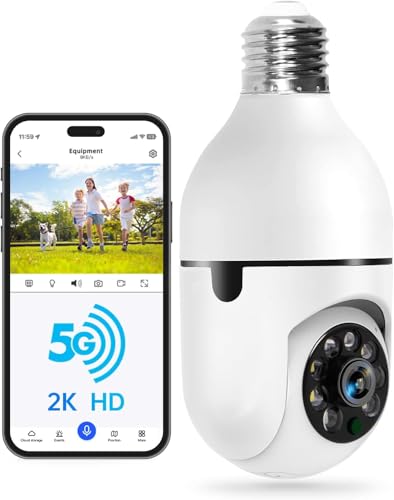
Best for homes already using Alexa and needing a robust dual-band connection. This model supports both 5G and 2.4G networks, which can improve stability in crowded WiFi spaces. It installs as a standard E27 bulb, offering 360° horizontal and 355° vertical coverage for fewer blind spots. Two-way audio enables real-time communication with visitors or family members, and it can trigger audible alarms and lights to deter intruders.
Who it’s best for: households wanting strong wireless performance with hands-free voice integration. Why selected: the dual-band WiFi reduces lag and helps maintain smooth live video. Limitation: requires compatible E27 socket and app setup in the EseeCloud environment.
ratolo 2-Pack Panoramic E27 Camera

Best for budget-conscious buyers who want multi-location coverage with easy installation. This model uses an E27 base and claims a 360° viewing angle via app-controlled PTZ features, enabling full-room surveillance without separate mounting hardware. It supports motion detection and real-time alerts to keep you informed even when away from home.
Who it’s best for: renters or those adding coverage in multiple rooms. Why selected: value-packed option for comprehensive monitoring. Limitation: two-pack setup may require additional network planning to avoid signal interference.
WYZE Bulb Cam 2K

Best for Wyze ecosystem enthusiasts seeking easy setup and strong local integration. It delivers 2K HD video with color night vision and a 160° wide view. The bulb camera is designed to fit standard E26 sockets and supports Bluetooth setup, reducing scanning steps for quick activation.
Who it’s best for: users already using Wyze products or those who prefer Bluetooth pairing. Why selected: simple install and broad smart-home compatibility. Limitation: depends on Wyze app and may require compatible hub for extended automation.
Hawkray Light Bulb Security Camera (5G/2.4G)

Best for AI-driven security features and proactive alerts. This bulb camera combines dual-band WiFi with OpenAI-enabled detection and 911 alarm monitoring. It offers 360° horizontal and 90° vertical movement to maximize coverage and minimize blind spots, with two-way audio for immediate communication.
Who it’s best for: homeowners seeking smarter AI-based detection and rapid emergency response. Why selected: advanced AI and integration with local emergency services. Limitation: feature availability may vary by region and app support.
Hawkray Indoor/Outdoor 360° Bulb Cam
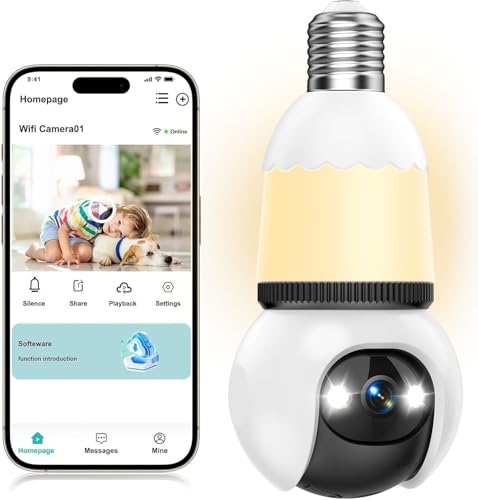
Best for flexible installation across different spaces. This dual-band model supports 360° pan-tilt for full-room surveillance. It includes color night vision and motion detection, with the option to enable siren-like alerts to deter intruders. The form factor suits homes needing interior and exterior coverage from a single device.
Who it’s best for: users needing a single solution that can go indoors or outdoors. Why selected: versatile placement and reliable coverage. Limitation: bulb-shaped design may not fit all fixtures or ceiling types.
Buying Guide: Key Purchase Considerations
What should you check before buying a WiFi panoramic camera bulb?
- Field of view and pan-tilt range: Look for 360° horizontal and 90–355° vertical movement to minimize blind spots.
- Network compatibility: Dual-band 5G/2.4G is preferable in busy homes to reduce lag and ensure stable video.
- Video quality and night vision: Choose 2K or higher with color night vision for clearer detail after dark.
- Audio features: Two-way audio is essential for real-time communication and deterrence; ensure microphone and speaker quality meet your needs.
- Smart features: AI-based detection, human detection, and emergency alerts (e.g., 911 integration) add proactive security but verify regional availability.
- Power and installation: Check socket type (E27 or E26) and ensure existing fixtures can support a bulb camera without interfering with lighting.
- App ecosystem and voice assistants: Confirm compatibility with Alexa, Google Assistant, or IFTTT if you rely on smart-home routines.
- Storage and privacy: Understand whether the device uses cloud storage, local SD options, or both, and review privacy controls.
Practical Setup Tips
- Place the bulb camera at a vantage point that covers entryways or common areas to maximize deterring view.
- Test motion sensitivity settings and alert frequency to avoid fatigue from false alarms.
- Regularly update firmware through the app to maintain security and feature availability.
FAQ
- Q: Do these bulbs require a special hub or subscription? A: Most work directly with your WiFi and mobile app without a separate hub; some features may require a cloud plan.
- Q: Can I use multiple bulbs in the same room without interference? A: Yes, but ensure your router handles multiple streams and configure each device with unique alerts.
- Q: Are color night vision cameras truly color in low light? A: Color night vision uses enhanced sensors and lighting to preserve color in low-light conditions.
- Q: Is it possible to upgrade or replace cameras later? A: Yes, you can replace bulbs or add additional cameras that support the same app ecosystem and WiFi standards.
- Q: Do these bulbs work outdoors in all weather? A: Some models are designed for outdoor use; verify IP rating and weather suitability for your climate.