Best Cameras With Printer Docking Stations for Quick On‑Site Photo Printing
Answering your search for convenient camera docking printers, this guide highlights five docking-enabled photo printers and docks that pair with cameras or smartphones for fast, on‑the‑spot prints. Best for scrapbookers, event hosts, and casual photo lovers who want instant 4×6 prints without a computer. The top picks combine easy setup, reliable dye-sublimation or lab-quality prints, and built‑in docking stations for charging and direct connection. Below is a quick summary table of the selected products to compare at a glance.
| Product | Type | Best For | Notes |
|---|---|---|---|
| KODAK Dock Plus 4×6″ Photo Printer (50 Sheets) | Docking Photo Printer | Families and hobbyists needing many quick prints | Fast 55‑second prints; 4PASS dye sublimation |
| KODAK Dock Plus 4×6″ Photo Printer (10 Sheets) | Docking Photo Printer | Casual home printing | Compact option with same tech |
| KODAK Dock Era 4×6″ Desktop Photo Printer (50 Sheets) | Docking Photo Printer | Desktop setup with charging dock | Same 4PASS dye sublimation tech |
| Kodak 8951956 EasyShare HDTV Dock | Dock/Media Dock | Legacy EasyShare users and media playback | HD still/video display and printing via dock |
| Sony Cybershot DSCT33 5.1MP Camera (Includes Docking Station) | Camera with Dock | Compact camera users needing easy docking | Includes docking station for charging and connectivity |
KODAK Dock Plus 4×6″ Photo Printer, 50 Sheets

The Dock Plus 50‑sheet model is a docking photo printer designed to produce high‑quality 4×6″ prints directly from a compatible smartphone. It uses integrated device docking to improve connection while charging the phone during printing. The printer employs Genuine 4PASS dye sublimation printing, delivering prints in roughly 55 seconds with a protective lamination for fingerprint and water resistance. It is straightforward to operate: power on, pair via Bluetooth, and print. Best for households and event setups where a steady stream of prints is desired.
- Best for: families and casual photographers who want a reliable, all‑in‑one docking printer with fast results.
- Limitation: printing requires compatible smartphones and straightforward Bluetooth pairing.
KODAK Dock Plus 4×6″ Photo Printer, 10 Sheets
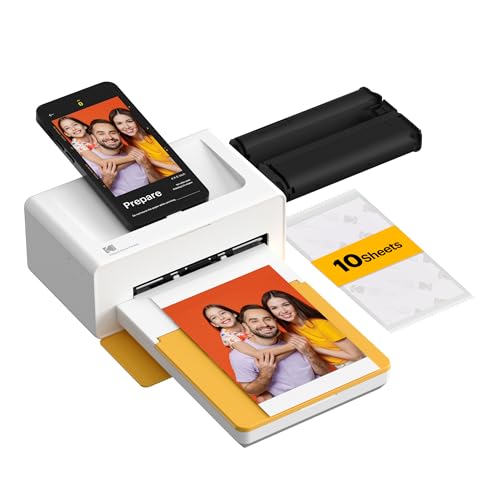
This compact 10‑sheet Dock Plus model shares the same core features as the 50‑sheet version: a built‑in docking station for seamless phone connection and charging, and fast 4PASS dye sublimation printing. It prints high‑quality 4×6″ photos in about 55 seconds with a durable protective lamination. It is best for individuals who want a smaller footprint and fewer prints per session, while still enjoying quick, wand-to-wall results.
- Best for: solo photographers or small households with limited space.
- Limitation: lower sheet count means fewer prints before reloading.
KODAK Dock Era 4×6″ Desktop Photo Printer, 50 Sheets

The Dock Era is a desktop alternative designed for users who want the same 4×6″ print quality in a slightly different footprint. It features an integrated docking station to connect with smartphones while charging. The 4PASS dye sublimation process yields three color layers with a clear protective lamination, delivering prints in about 55 seconds. It suits home offices or craft spaces where quick, on‑demand prints are often needed.
- Best for: desk‑based workflows and hobbyists who prefer a dedicated home printer with charging dock.
- Limitation: desktop size may still take up space on busy desks.
Kodak 8951956 EasyShare HDTV Dock

The EasyShare HDTV Dock provides a docking station experience focused on still images and video playback on HDTV displays. It is compatible with Kodak EasyShare printers and docks for printing on demand when connected. This option is useful for displaying and selecting photos on a larger screen, with printing access as a secondary benefit for immediate photo output.
- Best for: users who want a dual role as a media dock and print accessory.
- Limitation: not a dedicated mobile print solution; requires compatible upstream gear.
Sony Cybershot DSCT33 5.1MP Camera (Includes Docking Station)

The Sony Cybershot DSCT33 is a compact 5.1 MP camera that includes a docking station for charging and easy connections to other devices. It features a 3x optical zoom, Carl Zeiss optics, and a 2.5‑inch LCD. The built‑in dock simplifies charging and data transfer, making it a practical choice for travelers and hobbyists who want a simple, all‑in‑one package for shooting and printing later via compatible docking printers.
- Best for: travelers and casual shooters who want a bundled docking solution for charging and printing readiness.
- Limitation: older camera model; may lack newer sensor tech but remains compatible with simple dock workflow.
Buying Guide: Choosing the Right Camera Docking Printer
- Print technology: Dye sublimation vs. direct thermal. Dye sublimation (4PASS) generally yields more durable, water‑ and fade‑resistant photos with lamination. Choose this if long‑lasting prints matter most.
- Sheet capacity and footprint: Larger sheet counts reduce reloads but take more space. Pick capacity that fits your usual print volume and available desk or shelf space.
- Docking capabilities: Ensure your smartphone or camera model is fully supported by the dock. Consider Bluetooth vs. wired connections and whether charging while printing is essential.
- Ease of use: Look for straightforward setup, quick print times, and simple operation so that first‑time users can print with minimal steps.
- Portability vs. desk setup: For frequent travelers, smaller or portable docks are preferable. For craft rooms, a desktop dock with a larger sheet capacity can be advantageous.
- Compatibility: Confirm that the printer dock supports your device ecosystem (iPhone, Android, or specific camera brands) to maximize compatibility and avoid adapter issues.
Frequently Asked Questions
- What is a docking photo printer? A docking photo printer integrates a docking station to connect and charge a smartphone or camera while printing photos directly from the device.
- Do dye sublimation prints last long? Yes, 4PASS dye sublimation prints typically include a protective lamination that resists fingerprints, water, and fading for longer lasting photos.
- Is a dedicated desk printer better than a portable option? It depends on your space and print volume. Desk printers offer larger sheet capacities and steadier performance, while portable options suit travel and small spaces.
- Can I print from Android devices with these docks? Most docks support Bluetooth or direct connections from both iPhone and Android devices, but always verify compatibility before purchase.
- Are these printers suitable for events? Yes, docking printers with fast print speeds can be practical for events, weddings, and gatherings where guests want instant prints.
- What should I consider besides printing speed? Consider print durability, ease of use, connection stability, and whether you need additional features like wireless printing or app support.