Best HDMI Camera for Live Streaming and Online Teaching
This guide matches buyers with five top HDMI-enabled cameras ideal for live streaming, online teaching, and virtual events. It highlights who each product is best for, explains why it stands out, and notes any limitations to consider. The selections focus on ease of use, reliable connections, and flexible outputs (HDMI, USB, NDI, SDI) for different streaming setups. Suitable buyers include church livestreams, education streams, small studios, and corporate meeting rooms seeking high-quality visuals without complex setups.
The following quick reference table summarizes key buyers’ takeaways for each product:
- IFWATER HDMI 4K USB Camera: Best for dual-output streaming to TV and PC; good for teaching and small conferences.
- KATOVJJTS PTZ Camera 4K UHD: Best for multi-angle events; ideal for churches and large meeting rooms needing wide coverage.
- TONGVEO 4K NDI PTZ AI Auto-Tracking: Best for AI tracking and IP streaming; great for dynamic presenters and larger venues.
- AVKANS AI Auto Tracking NDI 6 Camera: Best value with NDI HX2/HX3 options and SDI output; suitable for budget-conscious studios.
- AVKANS 4K NDI PTZ Camera 20X: Best for broad streaming ecosystems with app-based control and long cable runs.
IFWATER HDMI 4K USB Camera for Live Streaming

Best for instructors and small teams needing simultaneous HDMI and USB outputs. This model provides 1080p HDMI and 2160p USB output, with a 5-50mm manual focus and 10x zoom (2x digital, 10x optical). It supports MJPEG/H.264/YUY2 and 3840×2160 at 30fps via USB or HDMI, allowing flexible display to both a TV and a PC. It’s selected for classrooms and small studios where dual-screen presentation is valuable, and where a simple USB-C powered setup is preferred. Limitation: HDMI is 1080p, so it’s not a full 4K HDMI feed for displays that require higher HDMI bandwidth.
KATOVJJTS PTZ Camera 4K UHD

Best for venues needing flexible framing with strong optical zoom and broad coverage. This camera offers 20x optical zoom and a wide 58.7° field of view, along with 4K UHD at 30fps. Its PTZ movement supports 340° pan and 120° tilt with long-distance transmission up to 100 meters. It’s well suited for churches, large meetings, and education spaces that require dynamic framing and remote control. Caution: A higher-end streaming setup may benefit from integrating with compatible video switchers to maximize 4K output alongside IP/NDI options.
TONGVEO 4K NDI PTZ AI Auto-Tracking

Best for advanced live streams with AI auto-tracking and dual HDMI/USB3.0 outputs. This camera delivers 4K at 30fps via HDMI and USB 3.0, with IP/NDI streaming support up to 1080p. AI auto-tracking features include presenter tracking and auto-framing with a one-person-at-a-time constraint. It’s ideal for worship services, large events, and conferences requiring hands-free operation and seamless switching between presenters. Limitation: AI tracking notes indicate it tracks one person at a time and is not designed for high-speed motion.
AVKANS AI Auto Tracking NDI 6 Camera

Best for value-focused studios needing multiple output options. The AVKANS PTZ supports NDI HX2 and HX3, plus HDMI, USB3.0, and SDI outputs. It includes NDI licensing and offers long cable runs without extra hardware. Suitable for churches, worship teams, and event venues that use OBS, vMix, or similar software. Limitation: While it supports multiple streams, practical bandwidth should be checked to ensure consistent performance with NDI and SDI simultaneously.
AVKANS 4K NDI PTZ Camera 20X
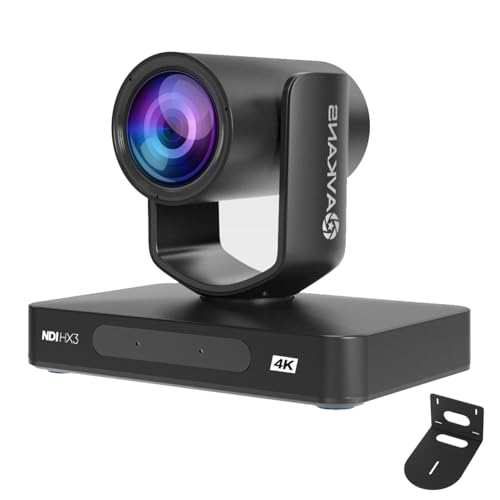
Best for large studios and multi-camera productions needing robust NDI integration and long-range servicing. The 20x optical zoom and 4K resolution at 30fps deliver crisp detail, while app-based control and NDI support enable smooth multi-camera workflows. It’s ideal for houses of worship, sports venues, and broadcast-ready classrooms. Caution: Extensive setups may require compatible video switchers and network infrastructure to realize full 4K/NDI capabilities consistently.
Buying Guide
- What outputs do you need? Look for HDMI for high-quality displays, USB for direct PC capture, and IP/NDI/SDI for professional multi-camera setups.
- Do you need AI auto-tracking? If yes, consider cameras with presenter tracking or auto-framing, and note any limits (one subject at a time, not for fast motion).
- What is the room size and subject distance? PTZ with long optical zoom (20x) benefits larger rooms; fixed-focus or compact cameras suit small classrooms or deskside use.
- Is sync with streaming software important? Cameras that integrate with OBS, vMix, Wirecast, Zoom, and Teams provide smoother workflows.
- Power and cabling considerations: PoE support can simplify wiring, while SDI provides locking connectors for longer runs.
- Budget and scalability: NDI licenses and compatibility with multiple protocols add value for expanding studios or church campuses.
Tips for Setup and Use
- Test HDMI and USB outputs separately to match display and PC capture settings.
- Configure AI tracking modes in advance and preset camera positions for quick switching during live events.
- Use high-quality cables and, where possible, locked connectors for stability in long-distance runs.
- Maintain consistent lighting to maximize AI tracking performance and image clarity.
FAQ
- What is the difference between HDMI and USB outputs on these cameras?
– HDMI typically carries broadcast-friendly video at high resolutions to displays or switchers, while USB is convenient for direct PC capture or conferencing software. - Can these cameras be used with Zoom or OBS?
– Yes, many models are designed to work with common streaming and video conferencing software, including OBS, vMix, Zoom, and Teams. - Do AI auto-tracking cameras track more than one person?
– Most models track a single person at a time; check specifications for multi-person support or auto-framing capabilities. - What does NDI mean for live streaming?
– NDI enables network-based video transmission between cameras and software, allowing low-latency, multi-camera workflows over a local network. - Are SDI outputs necessary for home studios?
– SDI is more common in professional studios and large venues; for home setups, HDMI and USB/NDI are typically sufficient.